



How Disney, Chick-fil-A, and more attract applicants on social media
Workstream Blog

How Disney, Chick-fil-A, and more attract applicants on social media

By Workstream

Get the latest with Workstream

Always stay current with hiring news by subscribing to our email updates

Social media has become a popular channel for sourcing hourly workers. But it takes more than standing up an account and publishing a “now hiring” post to attract applicants. Businesses across a variety of industries have seen success creating content that engages fans while also enticing prospective employees.

If being creative on social media sounds like something you don’t have time for, know that you don’t have to recreate the wheel. Here are some proven post formats for engaging applicants and customers alike: 

A day in the life 

One of the most popular ways businesses are showing up on social media today is through a day in the life videos. This genre of social post gives viewers a unique behind-the-scenes look at your business and what it would be like to work there. Whether it’s a brand viewers love or a job they’ve never seen done before, these videos are so shareable that some have even gone viral. 

The Walt Disney Company

Take inspiration from brands that do this well. One such example is The Walt Disney Company (@disneyparks on TikTok). In a more obvious push to source applicants, they posted a day in the life from the perspective of one of their lifeguards with a clear call for viewers to apply.

Their get ready with me videos give viewers a behind-the-scenes look at performers preparing for work while talking about what they like about their job and how they get their start in the art. 

They also post videos showing employees making popular food items at the park, which is a fun way to show off the work a role is responsible for while also getting customers excited to come try your products.


McDonald’s 

McDonald's takes a unique approach to food preparation videos. On Linkedin, they show some of their chefs trying out new recipes suggested by the fans. Not only does this encourage fans to continue engaging with their brand, but it also shows prospective applicants the fun side of working there.

McDonald's behind the scenes social media example

Now your turn

Create your own a day in the life posts by capturing videos of: 

  • Hour-by-hour timelapse from open to close 
  • Employees interacting with customers 
  • Employees giving a tour of the facility 
  • Employees sharing their favorite “hacks” 
  • What it’s like during the night shift vs. the day shift 
  • The lunch or dinner rush 
  • Employees demoing a unique tool used on the job
  • Employees sharing their favorite parts of their job
  • Employees debunking rumors about the job 

Employee shoutouts

Give shoutouts on social media to people who join your team or employees doing an amazing job. Your team members will feel compelled to reshare these posts to their own followers, effectively widening the reach. It’s also great to show prospective employees and customers that you appreciate your staff.

Chick-fil-A  

Chick-fil-A does this well by consistently posting close-up, high-resolution photos of their employees on their Instagram page. The accompanying captions also often carry a friendly tone, with interactive elements which encourage followers to respond (effectively bumping up engagement scores too!). One such example is 'What's your go-to order?', which prompted fans to reply with their favorites. 


Now your turn

Highlighting your employees is a great way to humanize your brand and celebrate your team—while also showing applicants what kind of team they could be joining. Consider sharing: 

  • Quick employee bios
  • Employee anniversaries
  • Employee of the month
  • Employees going above and beyond
  • Great customer feedback about an employee 

Employee perks and benefits 

The competition over hourly workers has pushed businesses to overhaul everything from pay to perks in hopes of attracting more applicants. And while you’re probably showcasing these benefits on your job postings, don’t forget to share them on social media too. Not only does this entice prospective employees, but it also shows your customers that you’re a good employer and boosts your brand’s reputation.

Chick-fil-A

Chick-fil-A annually awards select team members with its Remarkable Futures scholarship and shares photos of the winners. This feel-good post gets employees sharing why they love working for the brand, earning it even more good publicity. 

Wendy's

Special company events can also entice prospective applicants by giving them a look at your company culture. Wendy's recently posted a photo from their in-person onboarding event, which was a great opportunity to show the emphasis the company puts on building their community, while also giving fans a look at what it’s like to join the Wendy’s team. 
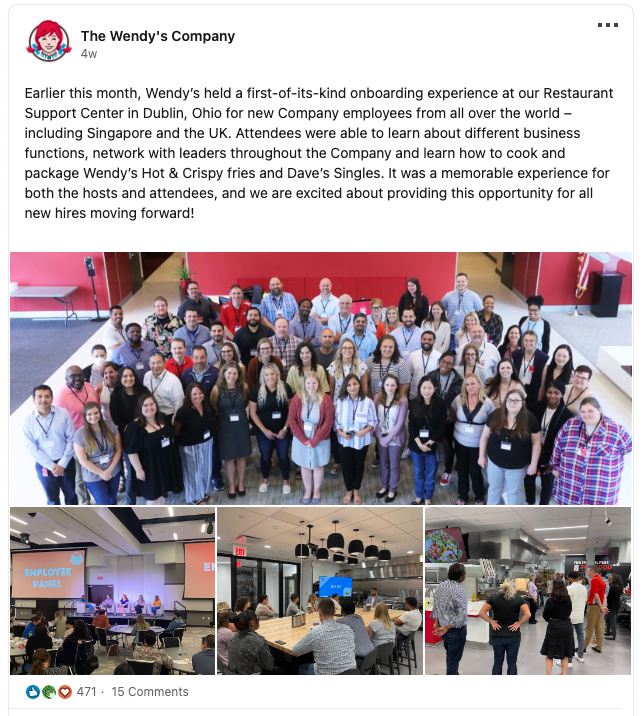
Wendy's community social media example

Now your turn 

The best way to highlight your business’ unique perks and benefits is to share them from the perspective of your employees. It allows you to promote your perks with real-life examples. Consider the following perks and some ways you can authentically post about them: 

  • Paid time off: Share a vacation photo and a quote from an employee about why this vacation was special to them 
  • Education reimbursement: Share a photo or video of an employee learning or demonstrating a skill they learned using their reimbursement 
  • Childcare services: Everyone loves cute kids! If your employees are comfortable with it, have them share a photo of their kids in your brand’s gear and allow the employee to caption it. 
  • Charitable donations: If your team participates in charity activities together, capture those moments and share how you’re giving back to your community together. 

Ready to get started? 

There are many ways to attract hourly ways through social media, and these are just a few examples to get you started. Look into what makes your brand and business stand out from your competitors and showcase it. And don’t forget to let your employees be the stars and even create the content for you!


By Workstream
Workstream is the leading HR, Payroll, and Hiring platform for the hourly workforce. Its smart technology streamlines HR tasks so franchise and business owners can move fast, reduce labor costs, and simplify operations—all in one place. 46 of the top 50 quick-service restaurant brands—including Burger King, Jimmy John’s, Taco Bell—rely on Workstream to hire, retain, and pay their teams. Learn how you can better manage your hourly workforce with Workstream.

Personal Information and Sensitive Personal Information

Before we discuss the right to limit and the right to opt-out, we must first define personal information and how it relates to sensitive personal information.

Personal information is any data that identifies, relates to, or could reasonably be linked to you or your household. A few examples of personal information include:

  • Name or nickname
  • Email address
  • Purchase history
  • Browsing history
  • Location data
  • Employment data
  • IP address
  • Profiles businesses create about you, including pseudonymous profiles (“user1234”)
  • Sensitive personal information

Sensitive personal information or “SPI” is a subset of personal information, defined as:

  • Identifying information (e.g. social security number, driver’s license)
  • Financial data (e.g. debit or credit card numbers)
  • Precise geolocation (within a radius of 1,850 feet)
  • Demographic or protected-class information (e.g. race/ethnicity, religion, union membership)
  • Biometric and genetic data (e.g. fingerprints, palm scans, facial recognition)
  • Communications and content (e.g. mail, email, text messages)
  • Health and sexual orientation (e.g. vaccine records, health history)

Right to Opt-Out

Californians have the right to opt-out of the sale and sharing of their personal information. That means you have the right to opt-out of the sale of your personal information to third parties (e.g. data brokers, advertisers). You also have the right to opt-out of the sharing of your personal information to prevent the targeting of ads across different businesses, websites, apps, or services.

CCPA-covered businesses must provide a link to allow you to exercise this right. It is usually found at the bottom of a webpage and will say “do not sell or share my personal information” or “your privacy choices.” Sometimes businesses offer privacy choices through a pop-up window or form

To opt-out of the sale and sharing of your personal information, click on the link or use the toggle provided by the business and follow the directions. Doing this on every website you visit can feel burdensome, but to ease the burden you can automatically select your privacy preferences for every website by using an opt-out preference signal, or OOPS for short.

An OOPS is a user-friendly and straightforward way for consumers to automatically exercise their right to opt-out of the sale and sharing of their personal information with the businesses they interact with online. An OOPS, such as the Global Privacy Control. It can either be a setting on your internet browser or a browser extension. With an OOPS, consumers do not have to submit individual requests to opt-out of sale or sharing with each business.

Right to Limit

Californians also have the right to direct businesses to limit the use and disclosure of their sensitive personal information.

Businesses covered under the CCPA must provide a link on their website that allows you to request the limiting of your SPI, if they plan on using it in certain ways. That link will also typically be at the bottom of a webpage and will say: “limit the use of my sensitive personal information” or “your privacy choices.” Once you send this request, the business must stop using your SPI for anything other than to:

  • Provide requested goods or services
  • Ensure security and integrity
  • Prevent fraud
  • Maintain system functionality
  • Comply with legal obligations

Bringing it Together

In summary, the CCPA gives you the right to opt-out of the sale and sharing of your personal information and gives you additional rights to further limit the use and disclosure of your sensitive personal information.

When you exercise these rights together, you exert greater control in protecting your personal data which is important for your identity, safety, and financial health.

If you are on a business’s website and you can’t find the links to exercise your rights, remember to check their privacy policy. The privacy policy should tell you how you can exercise your rights under the law.

If you find your rights being violated, you can submit a complaint to CalPrivacy.

Next in the LOCKED series, we will explore the right to correct and right to know. Follow us on social media to get live updates or check back in one week for the next post.

Essential

Required to enable basic website functionality. You may not disable essential cookies.

Targeted Advertising

Used to deliver advertising that is more relevant to you and your interests. May also be used to limit the number of times you see an advertisement and measure the effectiveness of advertising campaigns. Advertising networks usually place them with the website operator’s permission.

Personalization

Allow the website to remember choices you make (such as your username, language, or the region you are in) and provide enhanced, more personal features. For example, a website may provide you with local weather reports or traffic news by storing data about your general location.

Analytics

Help the website operator understand how its website performs, how visitors interact with the site, and whether there may be technical issues.

Right to Limit Use of Sensitive Personal Information

You also have the right to limit how we use sensitive personal information (such as precise geolocation, financial data, etc.).

Your preference has been saved. We will not sell or share your personal information.