<img height="1" width="1" style="display:none" src="https://www.facebook.com/tr?id=395330474421690&amp;ev=PageView&amp;noscript=1">
Built for the hourly workforce

A payroll migration so easy it feels like magic

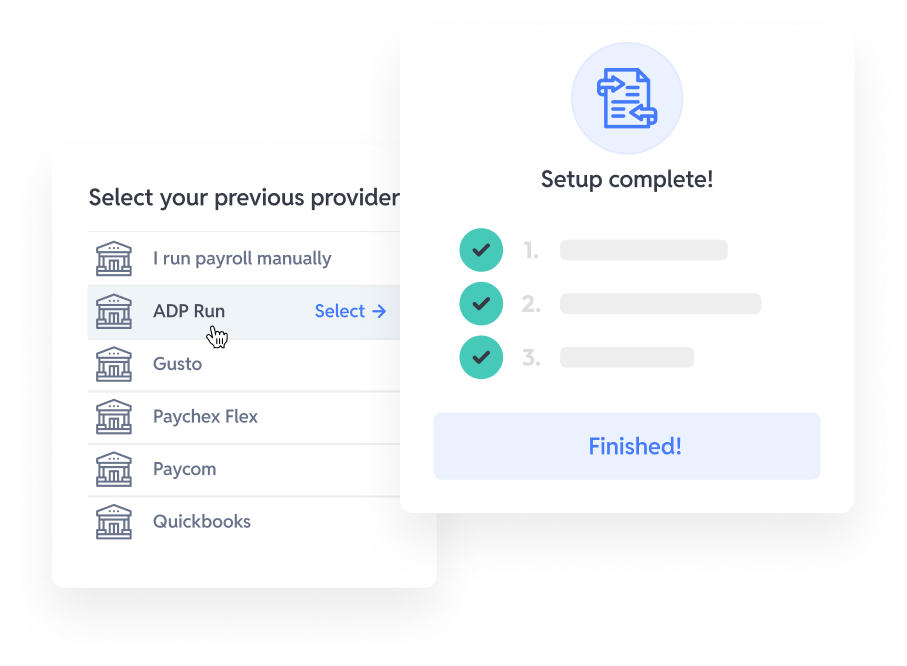
Switching payroll providers has historically taken months, and that won't work for you or your workers. With Workstream's Magic Migration, all you have to do is give us access to your current payroll provider, and we handle the rest.

Frame-Apr-13-2026-07-46-13-1255-AM

Automatic data transfer

Our automated workflows transfer your data without manual downloads, spreadsheets, or work from you.

Frame-Apr-13-2026-07-46-52-7198-AM

Payroll experts

Our team of experienced payroll experts verifies data accuracy and resolves potential issues on your behalf.

Frame-Apr-13-2026-07-47-30-8894-AM

Lightning fast support

Our award-winning, always-on support team is available in seconds to answer your questions.

magic migration for payroll

Magic Migration 
for Payroll

We get it, just the words “payroll migration” inspires nightmares consisting of CSV stacks, hours spent mapping fields, and mysterious error codes.

Our Magic Migration is totally different. We do all the work for you, including auditing your information and previous filings to reduce compliance risk.


Typical migrations occur in under 30 days, with a basic migration averaging just 10 days.

1

Kickoff

We do a kickoff call with your team to walk you through the process.

2

Access

You provide us access to your prior provider via a basic user login.

3

Migrate

We migrate employees, year-to-date history, pay rates, and more.

4

Validate

If information is missing, we reach out proactively to validate it.

5

Run payroll

With your data in Workstream, you’re ready to run payroll.

Start your payroll setup today

FAQs

Got questions? We've got answers.

Still have questions?

What's involved in setting up payroll software?

At Workstream, setting up payroll software involves tax-agency registrations, prior-year payroll history migration, deduction and benefits setup, general ledger mapping, and parallel payroll test runs before go-live. Workstream’s implementation team manages the implementation process, while your team provides the required payroll data and final approval before launch.

How long does payroll implementation take?

Payroll implementation with Workstream typically takes 4–8 weeks for multi-location operators. Larger franchise systems with many EINs, complex payroll structures, or messy historical data may require additional time. Workstream’s hiring and HR modules can often go live within 2–4 weeks and run in parallel with payroll implementation. Clean and complete payroll data from the previous provider can significantly speed up the implementation timeline.

Can you switch payroll providers mid-year?

Yes, you can switch payroll providers mid-year with Workstream by importing year-to-date wages, tax withholdings, and deduction history from the previous payroll provider. Workstream’s implementation team handles the migration and reconciles the imported records against the final payroll run from the prior system. Mid-year payroll migrations are common for operators moving away from providers such as ADP, Paychex, and Gusto.

Does payroll implementation include prior-year wage history?

Payroll implementation with Workstream includes importing prior-year wage history so W-2s accurately reflect the employee’s full annual earnings after migration. Workstream also coordinates tax filing handoffs between payroll providers based on the cutover date to avoid gaps or overlaps in wage records. This helps prevent W-2 errors and IRS reconciliation issues at year-end.

What information do I need to provide during setup?

Payroll setup with Workstream requires your EINs, state tax IDs, prior payroll registers, employee records, deduction and benefits configurations, general ledger mappings, and any custom pay rules such as tip pooling, shift differentials, or blended overtime policies. Workstream also provides a structured implementation checklist to help operators prepare everything needed before the first live payroll run.

How much of the implementation does Workstream handle versus my team?

Payroll implementation is primarily handled by Workstream’s implementation team, including tax registrations, data migration, payroll testing, and go-live coordination. Your team mainly provides payroll exports, validates the imported data, and approves the final cutover before launch. Most operators spend around 5–10 hours per week internally during the implementation process.

Personal Information and Sensitive Personal Information

Before we discuss the right to limit and the right to opt-out, we must first define personal information and how it relates to sensitive personal information.

Personal information is any data that identifies, relates to, or could reasonably be linked to you or your household. A few examples of personal information include:

  • Name or nickname
  • Email address
  • Purchase history
  • Browsing history
  • Location data
  • Employment data
  • IP address
  • Profiles businesses create about you, including pseudonymous profiles (“user1234”)
  • Sensitive personal information

Sensitive personal information or “SPI” is a subset of personal information, defined as:

  • Identifying information (e.g. social security number, driver’s license)
  • Financial data (e.g. debit or credit card numbers)
  • Precise geolocation (within a radius of 1,850 feet)
  • Demographic or protected-class information (e.g. race/ethnicity, religion, union membership)
  • Biometric and genetic data (e.g. fingerprints, palm scans, facial recognition)
  • Communications and content (e.g. mail, email, text messages)
  • Health and sexual orientation (e.g. vaccine records, health history)

Right to Opt-Out

Californians have the right to opt-out of the sale and sharing of their personal information. That means you have the right to opt-out of the sale of your personal information to third parties (e.g. data brokers, advertisers). You also have the right to opt-out of the sharing of your personal information to prevent the targeting of ads across different businesses, websites, apps, or services.

CCPA-covered businesses must provide a link to allow you to exercise this right. It is usually found at the bottom of a webpage and will say “do not sell or share my personal information” or “your privacy choices.” Sometimes businesses offer privacy choices through a pop-up window or form

To opt-out of the sale and sharing of your personal information, click on the link or use the toggle provided by the business and follow the directions. Doing this on every website you visit can feel burdensome, but to ease the burden you can automatically select your privacy preferences for every website by using an opt-out preference signal, or OOPS for short.

An OOPS is a user-friendly and straightforward way for consumers to automatically exercise their right to opt-out of the sale and sharing of their personal information with the businesses they interact with online. An OOPS, such as the Global Privacy Control. It can either be a setting on your internet browser or a browser extension. With an OOPS, consumers do not have to submit individual requests to opt-out of sale or sharing with each business.

Right to Limit

Californians also have the right to direct businesses to limit the use and disclosure of their sensitive personal information.

Businesses covered under the CCPA must provide a link on their website that allows you to request the limiting of your SPI, if they plan on using it in certain ways. That link will also typically be at the bottom of a webpage and will say: “limit the use of my sensitive personal information” or “your privacy choices.” Once you send this request, the business must stop using your SPI for anything other than to:

  • Provide requested goods or services
  • Ensure security and integrity
  • Prevent fraud
  • Maintain system functionality
  • Comply with legal obligations

Bringing it Together

In summary, the CCPA gives you the right to opt-out of the sale and sharing of your personal information and gives you additional rights to further limit the use and disclosure of your sensitive personal information.

When you exercise these rights together, you exert greater control in protecting your personal data which is important for your identity, safety, and financial health.

If you are on a business’s website and you can’t find the links to exercise your rights, remember to check their privacy policy. The privacy policy should tell you how you can exercise your rights under the law.

If you find your rights being violated, you can submit a complaint to CalPrivacy.

Next in the LOCKED series, we will explore the right to correct and right to know. Follow us on social media to get live updates or check back in one week for the next post.


Essential

Required to enable basic website functionality. You may not disable essential cookies.

Targeted Advertising

Used to deliver advertising that is more relevant to you and your interests. May also be used to limit the number of times you see an advertisement and measure the effectiveness of advertising campaigns. Advertising networks usually place them with the website operator’s permission.

Personalization

Allow the website to remember choices you make (such as your username, language, or the region you are in) and provide enhanced, more personal features. For example, a website may provide you with local weather reports or traffic news by storing data about your general location.

Analytics

Help the website operator understand how its website performs, how visitors interact with the site, and whether there may be technical issues.

Right to Limit Use of Sensitive Personal Information

You also have the right to limit how we use sensitive personal information (such as precise geolocation, financial data, etc.).

Your preference has been saved. We will not sell or share your personal information.