






“There are only two ways in which a manager can impact an employee’s output: motivation and training. If you are not training, then you are neglecting half the job.” - the late Thomas J. Watson, former Chairman and CEO of IBM.
Like Watson, many leaders have repeatedly emphasized the importance of a new hire training program and training new employees, along with the value it brings to a company. In fact, not training new employees could bring more harm to the organization than good, even when it comes to hourly workers.
Research has shown that the primary reason for employees leaving a company is the lack of growth, development opportunities, and advancements in their job positions. Needless to say, the high turnover rate that comes after is bound to incur additional costs for the company, and they are not as insignificant as they seem.
To put things into perspective, the cost of hiring someone can be as high as 30% of the job’s salary. That is around $12,000 for an employee who makes $40,000 a year!
With that in mind, we know how important it is to include a new hire training program in the process of onboarding hourly workers in order to retain them. Thus, we have gathered some tips for training new employees in this article. Read on to find out how to build an effective new employee training program!
What Is a New Hire Trainer?
New hire training is an integral part of the onboarding process, designed to get newcomers up to speed and accustomed to their new role and job duties. The ultimate goal? To improve retention rates, create a harmonious team atmosphere, and facilitate productivity. Typically, a new hire training program is meticulously crafted by human resources, in collaboration with relevant department heads, to meet specific training needs.
During this time, new hires can expect to experience a mix of training sessions. We're talking one-on-one conversations, online courses—like those you might find on LinkedIn—and even quizzes to evaluate the trainees' understanding and check in on their progress. This training plan can come in various formats and training methods—online training, shadowing more experienced team members, or even role-specific training like using particular software.
It's vital for team leaders and HR to check in with new hires regularly, especially during their first week, to ensure that they understand the company culture and are aligning with it. Training materials should be updated and could include a variety of resources from FAQs to video tutorials.
Bear in mind that the new hire training program should be tailored to the learners, especially when there's a diverse range of job descriptions in your big, mid, or small business. At the end of the day, the effectiveness of your new employee training program can make or break the transition into the new job. So, make it count.
The Importance of Training New Employees
Did you know that rehiring costs can make up approximately 12% of a company’s expenses, with it going up to 40% for those with a high turnover rate? It’s true. But simply providing training for your new and current employees can mitigate these costs. Furthermore, it takes up far less time as compared to recruiting new hires for the job.
However, these exorbitant costs that come from rehiring are not the only reason that makes the training of new employees important. Investing in employee training also leads to better returns for the company as employees can work smarter and more efficiently. In turn, they can complete more tasks at a given time. And considering that you are paying them by the hour, it will undoubtedly give you the most bang for your buck! Companies that invest $1,500 on training per employee saw an average of 24% more profit than companies that did not.
As Richard Branson said, “Take care of your employees, and they will take care of your business”. By constantly working on employee engagement through the provision of training, your employees will naturally become loyal to your brand. As the needs of your employees are satisfied, they will increasingly find value in working in your company and striving towards your organization’s goals. In turn, you will notice higher customer satisfaction and production standards as a result of your training efforts.
Remote New Hire Training
The coronavirus pandemic brought about a new normal in 2020, from social distancing measures to the digitization of, well, everything. Inevitably, the usual onboarding process was altered to meet the new societal standards. Employee training, in particular, was no longer allowed to be organized in huge batches, and companies are encouraged to move them online as much as possible. This is where remote employee training played a crucial role when training new hires.
While remote training was essential in the 2020 pandemic climate, there’s no denying the challenges that come with its usage. For one, it is probably not the most conducive way to communicate due to technical challenges or even distractions from remote environments.
Moreover, the lack of personal interaction may pose a problem as new hires might find it difficult to clarify their questions online. Thus, finding the most optimal way to conduct your training is imperative to make sure that it meets the objectives of your company.
To ensure a smooth onboarding experience for your new employees, consider harnessing digital tools that can relay information in the least troublesome way. As hourly workers mostly only require general knowledge about the company as well as details about their job scope, a platform that facilitates virtual learning dynamically will be best to engage the attention of the new hires. Additionally, check that communication platforms are well established between the managers and the new employees so that they can clarify their doubts easily.
At Workstream, we kickstart your mobile training by automating text messages to your new employees once they are hired. This message contains essential items such as your onboarding handbook, checklists, and employee training videos and it allows them to be equipped with the basic knowledge of their position before their first day of work.
Not only will it help them smoothly transition into their role, but they will also be able to access these resources anytime and anywhere. The popular fast-food franchise, McDonald’s, has adopted this approach and it’s proven to make their hiring process so much more efficient.
We help you manage the dissemination of information vital to your onboarding so that you can focus on the other aspects of your hiring process. To see how we can best meet your needs, schedule a time with our hiring experts today!
Tips for Training New Employees
Establishing a new hire training program may sound like an arduous task. But doing it right can bring your company a long way. To ensure that your training is effective, consider following the tips below when developing your training program.
Communicate with your newly hired employees before their first day of work
Just like how Workstream makes onboarding easier for our clients’ new employees, communicating with your new hires before their first day of work is essential to ensure that they are prepared to fulfill their job tasks and responsibilities. And this applies to both remote and physical training.
Some of the information that could be imparted may include a brief description of their job responsibilities, employee handbook, and training videos, as well as the expectations they have to meet as an employee of their company.
By doing this, you can manage the expectations of the employee before they start their work properly. Moreover, it helps in making them feel more prepared, while at the same time keeping the staff involved in their training more organized and efficient.
Peer training
Most often than not, current employees can give a more comprehensive overview of the tasks at hand since they have firsthand experience in the position. As such, consider incorporating peer training into your onboarding process - it might just help your new hire work more efficiently after learning the tips and tricks from your current employee. If you are in the quick-service restaurant (QSR) industry, for example, you may want to let your new employee shadow your best servers to observe how they go about their responsibilities.
Hands-on training
As hourly positions usually involve a lot of physical duties, providing training that is engaging and on-the-job, such as hands-on training, will be an effective way to train your new hires. By observing how a certain task is done and emulating them after, they are better able to get used to their job at hand. This especially applies to positions that require the usage of new technology.
Apply the 10-min rule
When going through vital information with your new employees, it is important to keep them engaged to ensure that you have their attention, especially when it is in a remote setting. Grosskopf, the author of the book “Awake Leadership”, advises hiring managers to break up these informative sessions and ask questions after every 10 minutes or so. Additionally, you may want to gather input from your trainees on the pace of your training to make sure that they can keep up with your content.
Onboarding your new employees right is just as important as training them. For a thorough guide on employee onboarding, check out our article Ultimate Guide to Sourcing, Interviewing and Onboarding Hourly Employees!
New Hire Training Checklist by Industry
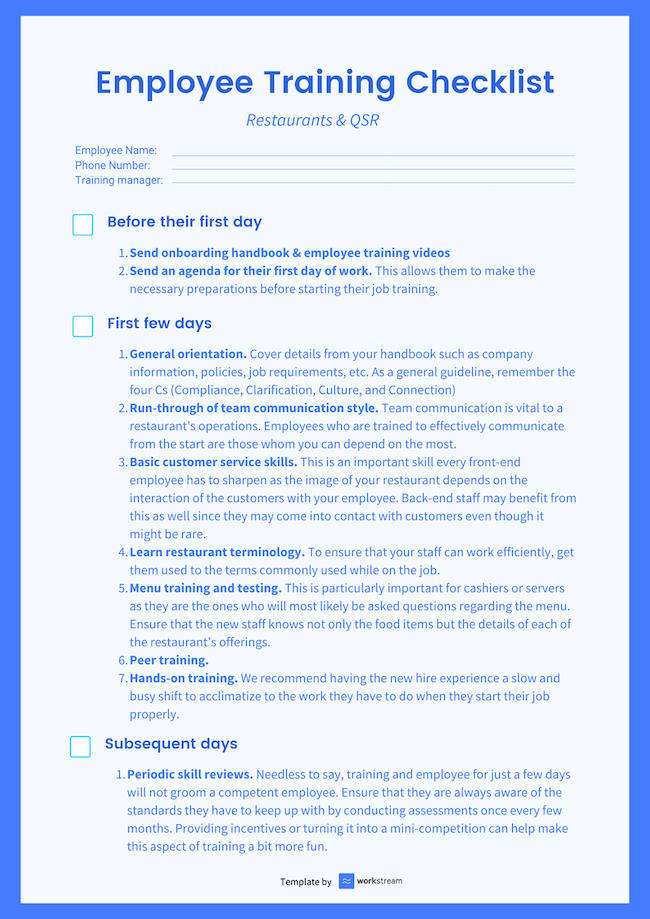
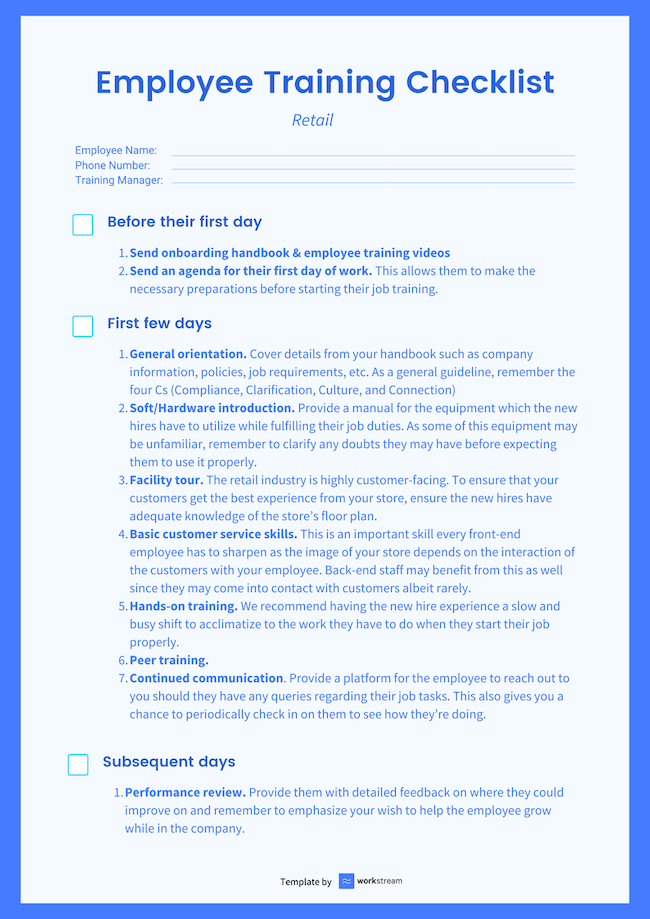
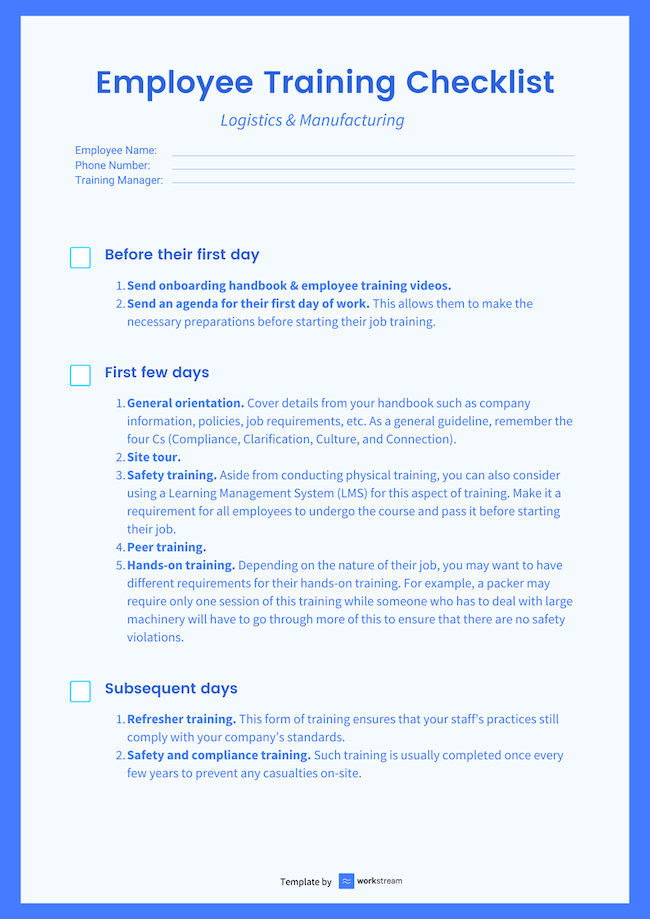
We know training new employees can get tedious and messy sometimes. And we understand your frustrations! That’s why we have consolidated a checklist (sorted by industry!) to help you ensure you do not miss out on any of the important elements when it comes to training new employees.
Restaurants and QSRs
Hospitality

Assisted Living

Retail
Logistics and Manufacturing
Delivery
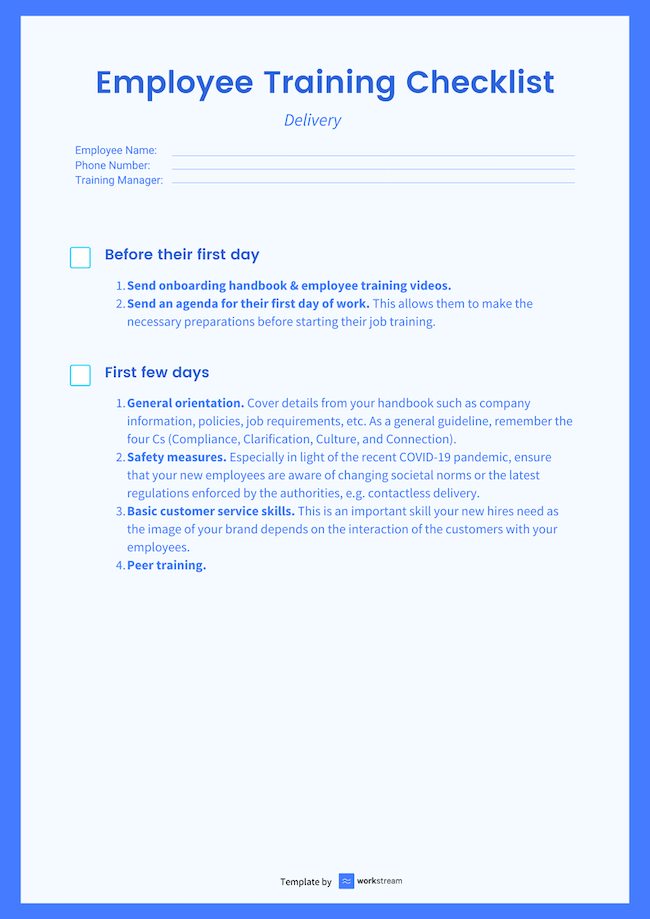

To reiterate, training is vital to your company’s operations as it prevents you from incurring unwanted costs caused by high turnover rates. Consider utilizing our checklist when training your employees to ensure you’ve got everything covered! Do note that the checklist is not exhaustive and ultimately depends on what you’re looking for in your employees.
Require help for your hiring needs? At Workstream, we manage your backend hiring process so you can focus on what matters. Book a demo with our hiring specialists today!