<img height="1" width="1" style="display:none" src="https://www.facebook.com/tr?id=395330474421690&amp;ev=PageView&amp;noscript=1">

One integrated compliance system

Automatic payroll deductions-1

Automatic payroll deductions

Integrated scheduling & payroll

Integrated scheduling & payroll

Built-in benefits administration-1

Built-in benefits administration

Proactive compliance alerts

ACA Eligibility Tracking

ACA Eligibility Tracking
& Enrollment

Flagged time clock

Flagged time clock and meal break violations

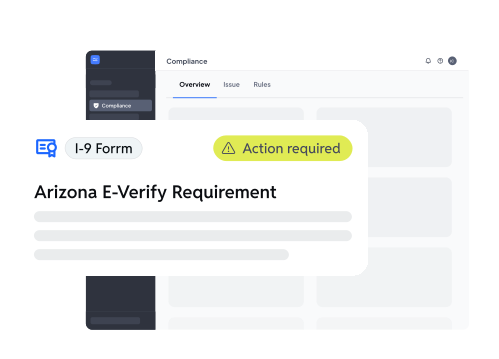
Automated I-9

Automated I-9 
and e-verify collection

Alerts for missing

Alerts for missing onboarding and certs

Audit ready documentation

Required acknowledgments

Required acknowledgments

Accurate audit trails

Accurate audit trails

Frame 2117249770 (9)

Compliance reporting

chat history

Searchable chat history

Christian Bankhead
Crumbl Franchise
Owner

“I can tell you exactly how much compliance is worth: $57,854. That was the size of a potential Department of Labor fine that one of my peers faced.

The organization and clarity of Workstream has helped me avoid similar fines, even throughout my own audit.”

Compliance touches every part of your business

When your tech works together, it’s easier to stay on top of it

Read more from Workstream

Best AP Automation Tools for Multi-Location Businesses

Best Mobile Time Clock Apps for Restaurants

Best Text-to-Apply Software for Hourly Hiring

Best Job Posting Platform for Hourly Hiring

Best Onboarding Software for Multi-Unit Operators

Best Applicant Tracking Systems for Franchises

FAQs

Got questions? We've got answers.

Still have questions?

What labor compliance risks do restaurant operators face?

Restaurant operators face labor compliance risks such as federal FLSA wage-and-hour violations, state meal and rest break penalties, predictive scheduling fines, ACA reporting penalties, I-9 and E-Verify violations, tip credit miscalculations, minor labor law violations, and state-specific final paycheck timing failures. In California, missed meal breaks can trigger one-hour premium pay penalties that can cost a single location thousands of dollars per month. Predictive scheduling laws also apply in cities such as New York City, Seattle, Chicago, Portland, Philadelphia, San Francisco, and Emeryville. The average FLSA collective action settlement for restaurants exceeds $200,000, and many of these violations are preventable with the right restaurant software like Workstream.

How does compliance software prevent meal break violations?

Compliance software like Workstream prevents meal break violations by monitoring employee time clocks in real time and alerting managers before employees cross legal meal break thresholds. In California, employees must take a meal break before the end of the fifth hour of continuous work under Labor Code §512. Other states have different thresholds. If a break is missed or shortened, Workstream logs the violation and surfaces it in payroll so the required one-hour premium pay is applied automatically before payroll closes. This helps operators resolve issues early instead of discovering them years later during litigation.

What is predictive scheduling, and which cities require it?

Predictive scheduling is a labor law that requires employers to post employee work schedules a set number of days in advance and pay additional compensation when schedules are changed at the last minute. Most laws require schedules to be posted 7–14 days ahead of time. Predictive scheduling laws currently exist in New York City, Seattle, San Francisco, Emeryville, Oregon, Chicago, and Philadelphia. Workstream automatically enforces scheduling notice windows for each jurisdiction and calculates predictability pay when last-minute schedule changes happen.

What compliance software helps with ACA reporting?

Workstream is a trusted compliance software that helps with ACA reporting by tracking employee eligibility, measurement periods, stability periods, and look-back hours throughout the year. Applicable large employers, defined under IRC §4980H as businesses with 50 or more full-time equivalent employees, must track this information to determine healthcare eligibility correctly. Workstream automatically manages this tracking and generates 1095-C forms and 1094-C transmittals for IRS filing. ACA non-compliance penalties in 2024 start at $2,970 per full-time employee who is not offered minimum essential coverage. Workstream’s Automated tracking helps reduce the spreadsheet errors that commonly trigger these penalties.

What restaurant software handles minor labor laws for teenage workers?

Workstream is a trusted restaurant software that handles minor labor laws by enforcing federal and state scheduling restrictions for workers under 18. Federal FLSA child labor rules and state labor laws limit daily and weekly work hours, restrict work during school nights, and prohibit minors from operating equipment such as slicers, balers, forklifts, and certain fryers. Workstream maintains federal and state-specific rule sets for teenage workers and blocks managers from creating schedules that would violate those rules before shifts are assigned.

What is Compliance Shield?

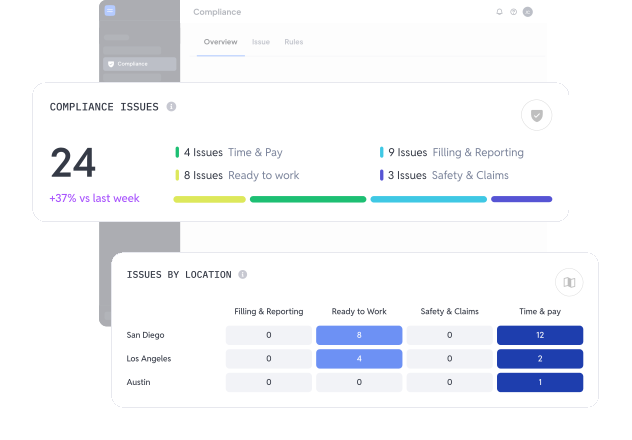
Compliance Shield is Workstream’s AI-powered compliance tool that helps restaurant operators identify labor and payroll risks before they become costly violations. It continuously monitors onboarding, time tracking, payroll, safety, claims, and filing activity to flag issues early, maintain audit visibility, and help businesses stay compliant with federal, state, and local labor laws.

Compliance Shield includes built-in labor law monitoring, proactive risk detection, and location-level risk visibility across multiple stores. Compliance Shield can flag issues such as missed meal breaks, approaching overtime thresholds, ACA eligibility changes, incomplete I-9 forms, and payroll compliance risks before payroll closes. It also gives multi-unit operators a centralized view of compliance risks across locations, helping them fix small issues early before they turn into expensive penalties, audits, or lawsuits later.

What restaurant software’s compliance rules stay current when laws change?

Workstream is a restaurant software whose compliance rules stay current by continuously updating the platform’s compliance rules engine as federal, state, and local labor laws change. These updates can include predictive scheduling laws, minimum wage increases, revised meal and rest break requirements, ACA updates, and expanded family leave regulations.

Workstream automatically applies new compliance rules from the effective date forward without requiring operators to manually update settings or reconfigure workflows. This helps restaurants avoid outdated compliance tracking and reduces the risk of errors that commonly happen with spreadsheets or manual processes. This also gives restaurant operators peace of mind because they do not need to manually track or remember changing labor laws themselves.

Personal Information and Sensitive Personal Information

Before we discuss the right to limit and the right to opt-out, we must first define personal information and how it relates to sensitive personal information.

Personal information is any data that identifies, relates to, or could reasonably be linked to you or your household. A few examples of personal information include:

  • Name or nickname
  • Email address
  • Purchase history
  • Browsing history
  • Location data
  • Employment data
  • IP address
  • Profiles businesses create about you, including pseudonymous profiles (“user1234”)
  • Sensitive personal information

Sensitive personal information or “SPI” is a subset of personal information, defined as:

  • Identifying information (e.g. social security number, driver’s license)
  • Financial data (e.g. debit or credit card numbers)
  • Precise geolocation (within a radius of 1,850 feet)
  • Demographic or protected-class information (e.g. race/ethnicity, religion, union membership)
  • Biometric and genetic data (e.g. fingerprints, palm scans, facial recognition)
  • Communications and content (e.g. mail, email, text messages)
  • Health and sexual orientation (e.g. vaccine records, health history)

Right to Opt-Out

Californians have the right to opt-out of the sale and sharing of their personal information. That means you have the right to opt-out of the sale of your personal information to third parties (e.g. data brokers, advertisers). You also have the right to opt-out of the sharing of your personal information to prevent the targeting of ads across different businesses, websites, apps, or services.

CCPA-covered businesses must provide a link to allow you to exercise this right. It is usually found at the bottom of a webpage and will say “do not sell or share my personal information” or “your privacy choices.” Sometimes businesses offer privacy choices through a pop-up window or form

To opt-out of the sale and sharing of your personal information, click on the link or use the toggle provided by the business and follow the directions. Doing this on every website you visit can feel burdensome, but to ease the burden you can automatically select your privacy preferences for every website by using an opt-out preference signal, or OOPS for short.

An OOPS is a user-friendly and straightforward way for consumers to automatically exercise their right to opt-out of the sale and sharing of their personal information with the businesses they interact with online. An OOPS, such as the Global Privacy Control. It can either be a setting on your internet browser or a browser extension. With an OOPS, consumers do not have to submit individual requests to opt-out of sale or sharing with each business.

Right to Limit

Californians also have the right to direct businesses to limit the use and disclosure of their sensitive personal information.

Businesses covered under the CCPA must provide a link on their website that allows you to request the limiting of your SPI, if they plan on using it in certain ways. That link will also typically be at the bottom of a webpage and will say: “limit the use of my sensitive personal information” or “your privacy choices.” Once you send this request, the business must stop using your SPI for anything other than to:

  • Provide requested goods or services
  • Ensure security and integrity
  • Prevent fraud
  • Maintain system functionality
  • Comply with legal obligations

Bringing it Together

In summary, the CCPA gives you the right to opt-out of the sale and sharing of your personal information and gives you additional rights to further limit the use and disclosure of your sensitive personal information.

When you exercise these rights together, you exert greater control in protecting your personal data which is important for your identity, safety, and financial health.

If you are on a business’s website and you can’t find the links to exercise your rights, remember to check their privacy policy. The privacy policy should tell you how you can exercise your rights under the law.

If you find your rights being violated, you can submit a complaint to CalPrivacy.

Next in the LOCKED series, we will explore the right to correct and right to know. Follow us on social media to get live updates or check back in one week for the next post.


Essential

Required to enable basic website functionality. You may not disable essential cookies.

Targeted Advertising

Used to deliver advertising that is more relevant to you and your interests. May also be used to limit the number of times you see an advertisement and measure the effectiveness of advertising campaigns. Advertising networks usually place them with the website operator’s permission.

Personalization

Allow the website to remember choices you make (such as your username, language, or the region you are in) and provide enhanced, more personal features. For example, a website may provide you with local weather reports or traffic news by storing data about your general location.

Analytics

Help the website operator understand how its website performs, how visitors interact with the site, and whether there may be technical issues.

Right to Limit Use of Sensitive Personal Information

You also have the right to limit how we use sensitive personal information (such as precise geolocation, financial data, etc.).

Your preference has been saved. We will not sell or share your personal information.