






In the ever-changing landscape of the job market, employers and employees alike have become familiar with terms like furlough and layoff. However, when it comes to managing an hourly workforce, it's crucial for employers to understand the significant distinctions between these two employment statuses. Furlough vs layoff has implications not only for the employees but also for the employers themselves.
By gaining clarity on these concepts, employers can make more informed decisions, maintain compliance with labor laws, and foster stronger relationships with their workforce during times of uncertainty.
Furlough vs layoff
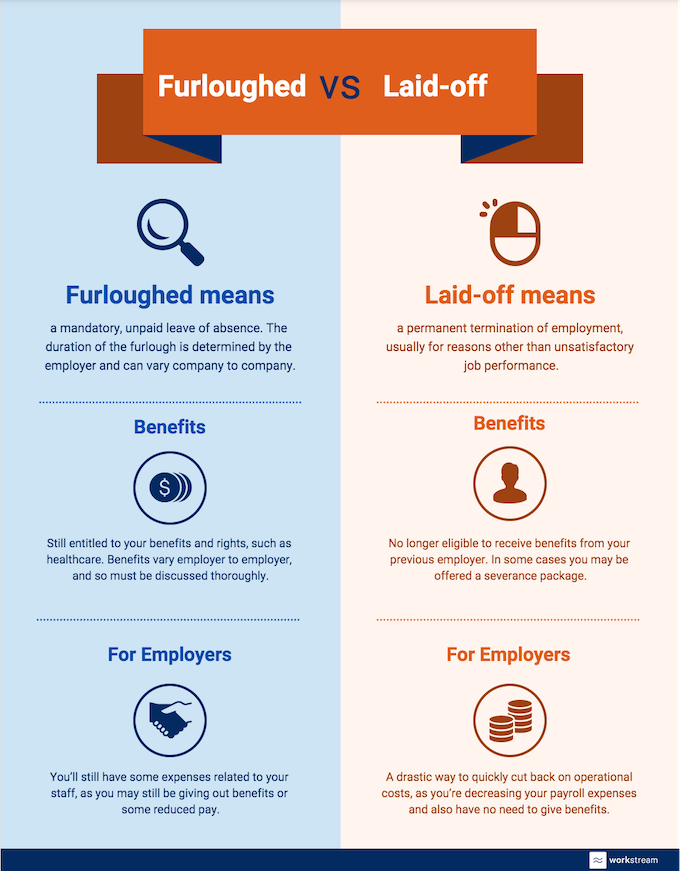
First, let's establish a clear definition of each term. Employee or company furlough refers to a temporary unpaid leave of absence granted to employees due to economic challenges or business disruptions, typically with the expectation that they will return to work when conditions improve. On the other hand, a layoff involves permanently separating employees from their positions due to factors such as restructuring, financial difficulties, or a decrease in demand for products or services. And company will have to rehire new employees after the mass layoff.
While both furloughs and layoffs involve a reduction or cessation of work, they have distinct implications for employees and employers, particularly in terms of job security, benefits, and legal obligations. For full-time, hourly, or part-time workers, these differences can greatly impact their financial stability and well-being.
Understanding the nuances of furloughs vs layoffs is especially crucial for employers of the hourly workforce due to several reasons. Firstly, hourly or short-term workers often rely on consistent income to cover their living expenses, making any disruption in employment a significant concern. Secondly, employers must be aware of the legal requirements and responsibilities associated with each status to avoid potential violations of labor laws. Lastly, clear communication and transparency regarding these employment statuses are vital to maintaining employee morale, trust, and loyalty.
Throughout this blog post, we will explore the specific implications of furloughs vs layoffs on hourly workers, highlighting the key differences and offering guidance for employers in navigating these circumstances effectively. By gaining a comprehensive understanding of these employment statuses, employers can make informed decisions that prioritize both the welfare of their hourly workforce and the long-term success of their business.
So, let's delve deeper into the world of furlough vs layoff, and discover why it is crucial for employers of hourly workers to know the difference and act with empathy, clarity, and foresight during uncertain times.
What is furlough?
Hourly workers can experience two types of furloughs: reduction of hours or zero hours. In reduction of hours, employers drastically cut the number of hours employees are required to report to work, impacting the payout. The zero-hour furlough typically happens when a business closes temporarily with no certain reopening date or longer period of time. Many restaurants and hotels have implemented this, where employees are still listed as employed on the company workweek roster but are no longer reporting to work.
As a salaried employee, you can experience a pay cut when you are furloughed, as long as the pay is consistent from week to week. You can also be given a furlough similar to the zero-hour scheme, where you are technically employed by the company but cannot do any work. Under this type of furloughed employee status, you can find your access to company assets and portals cut off for the duration, such as email or files on the company server but will be eligible for health plan.
Now that we’ve gone in-depth into the definition and types of furloughs, what are the other differences between being furloughed and laid-off employees?
Benefits
-
Getting laid off means termination of employment and you are no longer eligible to receive employee benefits from your previous employer. So you will have to look for a new job. However, in some cases, downturn laid-off employees including hourly employees offered a severance package to help blunt the impact of losing their source of income. Be warned though, that accepting a severance package may affect your unemployment benefits as it might affect your eligibility.
-
Going on furlough workers means that you are technically still an employee of the company but are on temporary leave of absence due to the lack of work. And in general are thus still entitled to your benefits and rights, such as healthcare and other health benefits according to the Department of Labor. The extent of the benefits you will receive will vary from employer to employer according to the furlough period, and so must be discussed thoroughly.
- Employees furloughed due to the coronavirus crisis are also eligible to claim unemployment insurance along with health insurance, thanks to the coronavirus stimulus package recently passed by Congress and the Fair Labor Standards Act. This means an additional $600 a week in financial aid, lasting until the end of July according to the state law.
Getting Rehired and Other Means of Employment
-
While you are of course encouraged to go for the job search once laid off, surprisingly, it’s a similar scenario when you get furloughed. You can look for another, more stable job - provided that it’s a permanent position, otherwise you can be found in violation of your employment contract.
- When furloughed, there is more of a guarantee that once the business finds itself on firm footing again, you’ll be back to normal working conditions due to worker adjustment strategy. This is because you are still technically employed by the company. Once you are laid off, in general you can only go back to work for your previous employer if you go through the hiring process all over again.
What’s in It for Employers?
Laying off is a drastic way to quickly cut back on operational costs, as you’re decreasing your payroll expenses and also have no need to give benefits. However, this shutdown or reduction in force may end up costing you in the long run, as you scramble to hire competent employees once the company gets back on its feet.
Furloughing means you’ll still have some expenses related to your staff, as you may still be doling out benefits or some reduced pay. Still, many companies choose to furlough rather than temporary layoff during the coronavirus pandemic as this means they will still have access to experienced, skilled human resources who won’t need to be trained, once the crisis has passed.
In the end, furloughing and laying off still both mean that you’re taking a huge hit to your source of income, while the coronavirus and its repercussions run their course. And for small businesses, both are viable options to help lessen the burden of operational expenses - it’s just a matter of thinking both options through and seeing which is the better fit for your business model and your employees.
For more relevant articles, webinars, and coronavirus resources, visit the Workstream blog.