<img height="1" width="1" style="display:none" src="https://www.facebook.com/tr?id=395330474421690&amp;ev=PageView&amp;noscript=1">
otc-bg

Our best offer of the year is back!

Up to 8 months free on Payroll & All-in-One plan
trusted across hourly industries

Thousands of multi-location businesses run on Workstream, including 47 of the top 50 restaurant brands.

  • restaurants
  • retail
  • healthcare
  • hospitality
crumle
taco-bell
Culuers
Bojangles
Arbys
Ihop
jj
haidilao
Firehouse
baskin-robbins
Burger-king
five-guys
Smoothie-king
long john silvers-1
curry up now
mooyah
Jamba
Zaxbys
Sonic
software, experts, or both

Two ways to run your people operations with Workstream AI

AI-Expert-card
ai experts

We run it for you.

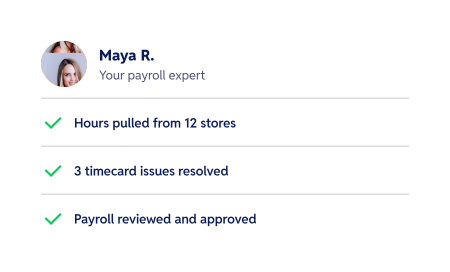
Our experts use AI to handle payroll and HR.
  • Payroll handled from timecards to payday.
  • Day-to-day HR support, without a new hire.
  • A named expert on every pay decision.
mini-dashboard
the platform

Your team runs it

AI takes the busywork off their plate.
  • Hiring, onboarding, scheduling and payroll in one place.
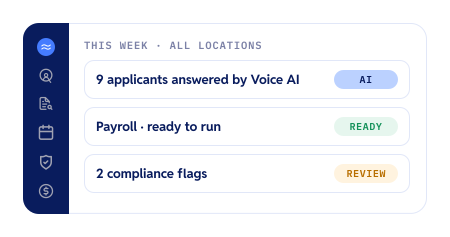
  • Voice AI answers every applicant, any hour.
  • Issues flagged at every location before they cost you.
meet your ai team

AI that works around the clock, right inside your platform

Five agents, each with one job. Tap one to see it at work.

Voice AI
Answers every applicant, day or night

First-round calls plus reminder calls that cut interview no-shows by 55%.

Video AI
Interviews on the applicant's schedule

Applicants record answers from their phone. You watch a short highlight reel.

Payroll AI
Catches timecard issues before payday

Missed clock-outs and break issues flagged in time for managers to fix.

Compliance
Flags potential issues early

Missed breaks, pay below minimum wage, and expiring 1-9’s, at every location.

AskAI
Answers in plain English

Ask a question, get the report, and have it sent to you every week.

icon-container
Voice AI Line cook, Harbor Taqueria
Tonight · 9:42 PM
Thanks for calling about the line cook role. Are you available for evening shifts?
Yeah, nights are best for me.
Great. Could you start the week of the 13th?
Call summary ready

Available evenings · 2 yrs grill experience · Can start the 13th

icon-container
Video AI Sales associate, 12 stores
Today
New video interview

Jordan answered 4 questions from your store

Jordan M.

Frame 2117250339

Highlight Reel · 1 min

Ready for your review

icon-container
Payroll Workstream app · Friday run, 12 stores
Thursday · 7:02 AM
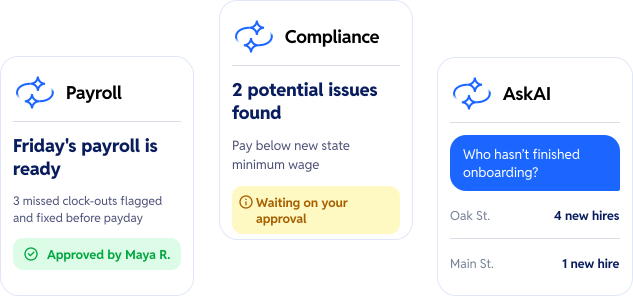
Friday's payroll is ready

Prepared from timecards across 12 stores

3 missed clock-outs flagged

Fixed by store managers on Wednesday

Check Approved by Maya R., payroll expert
icon-container
Compliance 6 offices
Monday
New state minimum wage took effect

Workstream checked pay at all 6 offices

2 employees below the new rate

Details ready for your review

Dot Waiting on your approval
icon-container
AskAI
Today
Who hasn't finished onboarding?
5 new hires: 4 at Oak St. and 1 at Main St. Want me to send this every Monday?
Yes please.
Check Scheduled: every Monday at 8 AM

Agents do the legwork. People make the calls. Here’s what one week looks like.

icon-container
Hiring
Answered 6 applicant calls
Frame (2)-4 9 applicants ready for your review
No applicant waits until morning.

Voice AI answers calls after close, books interviews, and sends reminders. You review the shortlist and decide who gets hired.

icon-container
Payroll
Friday’s run prepared
check_mark Approved by Maya R., payroll expert
Timecards fixed before Friday, not after.

Payroll AI flags missed clock-outs early so managers can fix them. With AI Experts, a named expert approves every run.

icon-container
Compliance
New state minimum wage took effect
info_icon 2 flags waiting on your approval
New law on Monday. Flagged by Monday.

When a rule changes, Compliance finds who’s affected at every location and preps the details. Nothing changes until you say yes.

icon-container
Your week
4 min
Your total time managing 
this week.
Your part takes minutes, not weekends.

Check what’s ready, approve what’s waiting, and get back to your floor. Every decision is still yours.

built for hourly work

One platform for every business that runs on hourly teams

  • Restaurants
  • Retail
  • Healthcare
  • Hospitality
Restaurants

Staff every shift and close payroll across every location

From QSR franchises to multi-brand groups, Workstream AI handles high-volume hiring and complex restaurant payroll.

  • Voice AI answers applicants during the rush
  • Payroll for tips, roles, pay rates, end EINs
  • Break and overtime flags by location
Group 2117249840 (1)

Hire seasonal teams fast and keep every store in sync

Ramp up for the holidays, then keep time, scheduling, and payroll consistent across stores.

  • Every applicant answered, 24/7
  • Schedules and hours that flow into payroll
  • One view of every store's team
Healthcare

Hire and onboard care teams without the paperwork pile-up

Fill caregiver and front-desk roles quickly, with documents and deadlines tracked in one place.

  • Applicants interview by phone or video, any hour
  • Digital onboarding and I-9s from any phone
  • Expiring documents flagged before they lapse

Hospitality

Fill shifts across properties and pay every role correctly

Hotels and venues run on teams that move between roles. Workstream AI keeps hiring and pay straight.

  • High-volume hiring for peak seasons
  • Multiple roles and rates for one employee
  • Payroll and compliance across properties
results

Time back for every manager, at every location

55%
fewer interview no-shows with Voice AI reminder calls

voice ai customers

3X
faster time to hire with Voice AI

culvers

5x
faster employee onboarding

firehouse subs

33hrs
saved per month with automated scheduling

bojangles

Paul OTT
24-location franchisee
top 5 pizza qsr chain

“It’s awesome to have hiring, onboarding and payroll all with one provider because trust is the biggest thing. We know we can rely on Workstream.

get started

Help your team find their flow.

Personal Information and Sensitive Personal Information

Before we discuss the right to limit and the right to opt-out, we must first define personal information and how it relates to sensitive personal information.

Personal information is any data that identifies, relates to, or could reasonably be linked to you or your household. A few examples of personal information include:

  • Name or nickname
  • Email address
  • Purchase history
  • Browsing history
  • Location data
  • Employment data
  • IP address
  • Profiles businesses create about you, including pseudonymous profiles (“user1234”)
  • Sensitive personal information

Sensitive personal information or “SPI” is a subset of personal information, defined as:

  • Identifying information (e.g. social security number, driver’s license)
  • Financial data (e.g. debit or credit card numbers)
  • Precise geolocation (within a radius of 1,850 feet)
  • Demographic or protected-class information (e.g. race/ethnicity, religion, union membership)
  • Biometric and genetic data (e.g. fingerprints, palm scans, facial recognition)
  • Communications and content (e.g. mail, email, text messages)
  • Health and sexual orientation (e.g. vaccine records, health history)

Right to Opt-Out

Californians have the right to opt-out of the sale and sharing of their personal information. That means you have the right to opt-out of the sale of your personal information to third parties (e.g. data brokers, advertisers). You also have the right to opt-out of the sharing of your personal information to prevent the targeting of ads across different businesses, websites, apps, or services.

CCPA-covered businesses must provide a link to allow you to exercise this right. It is usually found at the bottom of a webpage and will say “do not sell or share my personal information” or “your privacy choices.” Sometimes businesses offer privacy choices through a pop-up window or form

To opt-out of the sale and sharing of your personal information, click on the link or use the toggle provided by the business and follow the directions. Doing this on every website you visit can feel burdensome, but to ease the burden you can automatically select your privacy preferences for every website by using an opt-out preference signal, or OOPS for short.

An OOPS is a user-friendly and straightforward way for consumers to automatically exercise their right to opt-out of the sale and sharing of their personal information with the businesses they interact with online. An OOPS, such as the Global Privacy Control. It can either be a setting on your internet browser or a browser extension. With an OOPS, consumers do not have to submit individual requests to opt-out of sale or sharing with each business.

Right to Limit

Californians also have the right to direct businesses to limit the use and disclosure of their sensitive personal information.

Businesses covered under the CCPA must provide a link on their website that allows you to request the limiting of your SPI, if they plan on using it in certain ways. That link will also typically be at the bottom of a webpage and will say: “limit the use of my sensitive personal information” or “your privacy choices.” Once you send this request, the business must stop using your SPI for anything other than to:

  • Provide requested goods or services
  • Ensure security and integrity
  • Prevent fraud
  • Maintain system functionality
  • Comply with legal obligations

Bringing it Together

In summary, the CCPA gives you the right to opt-out of the sale and sharing of your personal information and gives you additional rights to further limit the use and disclosure of your sensitive personal information.

When you exercise these rights together, you exert greater control in protecting your personal data which is important for your identity, safety, and financial health.

If you are on a business’s website and you can’t find the links to exercise your rights, remember to check their privacy policy. The privacy policy should tell you how you can exercise your rights under the law.

If you find your rights being violated, you can submit a complaint to CalPrivacy.

Next in the LOCKED series, we will explore the right to correct and right to know. Follow us on social media to get live updates or check back in one week for the next post.

Essential

Required to enable basic website functionality. You may not disable essential cookies.

Targeted Advertising

Used to deliver advertising that is more relevant to you and your interests. May also be used to limit the number of times you see an advertisement and measure the effectiveness of advertising campaigns. Advertising networks usually place them with the website operator’s permission.

Personalization

Allow the website to remember choices you make (such as your username, language, or the region you are in) and provide enhanced, more personal features. For example, a website may provide you with local weather reports or traffic news by storing data about your general location.

Analytics

Help the website operator understand how its website performs, how visitors interact with the site, and whether there may be technical issues.

Right to Limit Use of Sensitive Personal Information

You also have the right to limit how we use sensitive personal information (such as precise geolocation, financial data, etc.).

Your preference has been saved. We will not sell or share your personal information.