



<img height="1" width="1" style="display:none" src="https://www.facebook.com/tr?id=395330474421690&amp;ev=PageView&amp;noscript=1">
Google Hire is Going Away. Make the Switch to Workstream
Workstream Blog

Google Hire is Going Away. Make the Switch to Workstream

By Robert Woo

Get the latest with Workstream

Always stay current with hiring news by subscribing to our email updates

It was announced last August that Google Hire, will be shut down this coming September (September 1, 2020, to be exact!). This gives your company a little over 3 months to transition to another hiring management platform, lest you fall back on stuffed inboxes and messy spreadsheets. So let’s examine why Google Hire was popular, and why Workstream is the natural next move for businesses who want a similar hiring experience.

Get free hiring tips

Ease of Use

Almost all Google Hire users agreed that the hiring platform was easy to use, and we know from experience how important simplicity is to busy hiring managers and business owners. It doesn’t really matter how powerful an app is if it’s just tedious or too complicated.

Google Hire nailed ease of use, but a large part of that was because it was light on features. Users agree that it covered the absolute basics of a hiring platform: posting to job boards, tracking applicants, and managing the hiring funnel. However, for its short life, Google Hire didn't really add many features to keep it competitive with other products on the market.

Workstream was built from the ground up with ease of use at the forefront of user experience, while still providing a robust and expanding feature set. In fact, the goal is to have the manager barely enter the system at all. Using automations such as scheduled text messaging, interview reminders, and AI-enabled screening, users can spend less time managing hiring while still getting better results.

workstream hiring steps-1

But unlike Google Hire, Workstream doesn’t sacrifice features for simplicity. Even though the user interface is extremely intuitive, there’s seamless integrations of features Google didn’t have, including candidate scoring, smart screening questions, more job board integrations, and even onboarding (more on this later).

If you liked the simplicity of Google Hire, Workstream is just as simple and even more powerful.

G Suite Integration

This is a no-brainer. Many small and medium sized businesses run on G Suite and that made Google Hire a logical choice due to its close integration with Gmail, Google Calendar, and Google Sheets.

But that sort of close integration also leaves many businesses out: businesses that use Microsoft’s suite of products, and businesses that use Apple’s. In fact, there were reports that Google Hire would only properly work on the Google Chrome browser and even on Hire’s own help page, it showed that some features wouldn’t function on Safari on iOS.

Workstream’s platform isn’t tied to any one tech giant which means any business can utilize all of its features. Missing G Suite? We’ve got you covered with Google Calendar integration, and you can of course use Gmail for emailing, and export files to be viewed in Google Sheets. 

Onboarding

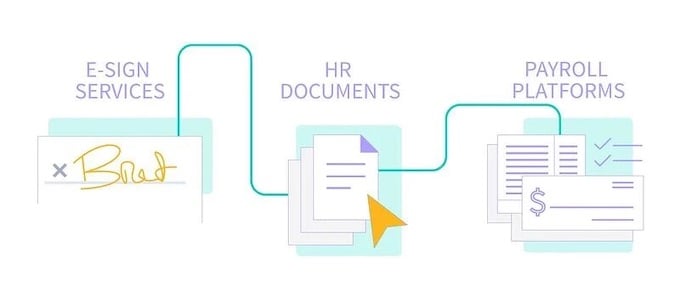
Google Hire stopped short of the most important aspect of recruiting: the actual hiring. No candidate ever becomes a real employee without actual documentation signed and delivered. While Google Hire helped businesses get to the finish line, it couldn’t handle crossing it.

Onboarding is a crucial step to complete the hiring process. Glassdoor showed that a strong onboarding process can increase retention by 82%. That’s why Workstream developed a slew of onboarding features that can put your new relationship with your hire on the best possible terms.
4xVINrG24RqpSNaZFaIXlo_E_EWHnffx2Jam3D05kKxlmINxbFfE3xyC7ryeY0cmHCjTObU3XJ4inIsCcVsB7eQvEu4l5pgRk1H6J00Z4UVhQklr0oU5Zd8hyeDXPOc85MJVX204

For instance, hiring managers can automatically take care of important paperwork including offer letters, W-4 forms, and more. Workstream also offers options to kick off mobile training by sending new hires handbooks and training videos, as well as reminders to complete their training.

Hiring doesn’t end with just a virtual handshake. A robust hiring platform like Workstream can guide you through your new employee’s first day and beyond.

Google Hire users can get a free demo of Workstream to see if our platform will fit your hiring needs. Click here to schedule an appointment with our team today.

By Robert Woo
Robert Woo is a freelance content creator for various companies from startup to enterprise-level. When not writing SEO-friendly articles, he writes and performs comedy, plays guitar, and champions the Oxford comma.

Personal Information and Sensitive Personal Information

Before we discuss the right to limit and the right to opt-out, we must first define personal information and how it relates to sensitive personal information.

Personal information is any data that identifies, relates to, or could reasonably be linked to you or your household. A few examples of personal information include:

  • Name or nickname
  • Email address
  • Purchase history
  • Browsing history
  • Location data
  • Employment data
  • IP address
  • Profiles businesses create about you, including pseudonymous profiles (β€œuser1234”)
  • Sensitive personal information

Sensitive personal information or β€œSPI” is a subset of personal information, defined as:

  • Identifying information (e.g. social security number, driver’s license)
  • Financial data (e.g. debit or credit card numbers)
  • Precise geolocation (within a radius of 1,850 feet)
  • Demographic or protected-class information (e.g. race/ethnicity, religion, union membership)
  • Biometric and genetic data (e.g. fingerprints, palm scans, facial recognition)
  • Communications and content (e.g. mail, email, text messages)
  • Health and sexual orientation (e.g. vaccine records, health history)

Right to Opt-Out

Californians have the right to opt-out of the sale and sharing of their personal information. That means you have the right to opt-out of the sale of your personal information to third parties (e.g. data brokers, advertisers). You also have the right to opt-out of the sharing of your personal information to prevent the targeting of ads across different businesses, websites, apps, or services.

CCPA-covered businesses must provide a link to allow you to exercise this right. It is usually found at the bottom of a webpage and will say β€œdo not sell or share my personal information” or β€œyour privacy choices.” Sometimes businesses offer privacy choices through a pop-up window or form

To opt-out of the sale and sharing of your personal information, click on the link or use the toggle provided by the business and follow the directions. Doing this on every website you visit can feel burdensome, but to ease the burden you can automatically select your privacy preferences for every website by using an opt-out preference signal, or OOPS for short.

An OOPS is a user-friendly and straightforward way for consumers to automatically exercise their right to opt-out of the sale and sharing of their personal information with the businesses they interact with online. An OOPS, such as the Global Privacy Control. It can either be a setting on your internet browser or a browser extension. With an OOPS, consumers do not have to submit individual requests to opt-out of sale or sharing with each business.

Right to Limit

Californians also have the right to direct businesses to limit the use and disclosure of their sensitive personal information.

Businesses covered under the CCPA must provide a link on their website that allows you to request the limiting of your SPI, if they plan on using it in certain ways. That link will also typically be at the bottom of a webpage and will say: β€œlimit the use of my sensitive personal information” or β€œyour privacy choices.” Once you send this request, the business must stop using your SPI for anything other than to:

  • Provide requested goods or services
  • Ensure security and integrity
  • Prevent fraud
  • Maintain system functionality
  • Comply with legal obligations

Bringing it Together

In summary, the CCPA gives you the right to opt-out of the sale and sharing of your personal information and gives you additional rights to further limit the use and disclosure of your sensitive personal information.

When you exercise these rights together, you exert greater control in protecting your personal data which is important for your identity, safety, and financial health.

If you are on a business’s website and you can’t find the links to exercise your rights, remember to check their privacy policy. The privacy policy should tell you how you can exercise your rights under the law.

If you find your rights being violated, you can submit a complaint to CalPrivacy.

Next in the LOCKED series, we will explore the right to correct and right to know. Follow us on social media to get live updates or check back in one week for the next post.

Essential

Required to enable basic website functionality. You may not disable essential cookies.

Targeted Advertising

Used to deliver advertising that is more relevant to you and your interests. May also be used to limit the number of times you see an advertisement and measure the effectiveness of advertising campaigns. Advertising networks usually place them with the website operator’s permission.

Personalization

Allow the website to remember choices you make (such as your username, language, or the region you are in) and provide enhanced, more personal features. For example, a website may provide you with local weather reports or traffic news by storing data about your general location.

Analytics

Help the website operator understand how its website performs, how visitors interact with the site, and whether there may be technical issues.

Right to Limit Use of Sensitive Personal Information

You also have the right to limit how we use sensitive personal information (such as precise geolocation, financial data, etc.).

Your preference has been saved. We will not sell or share your personal information.