






If you’re wondering how to amplify your reach when recruiting hourly workers, Twitter might be the place for you!
What exactly is Twitter and what can you do with it? Twitter is a social media platform unique because of its 280-character limit on social posts, also fondly known as "tweets." The microblogging platform allows users to send and receive tweets, follow other users, and even share information by "retweeting." Because of it's designed to be fast-paced in nature, Twitter is also a popular platform for keeping in touch with worldwide trends, news, and entertainment-related content.
So, why consider recruiting on Twitter? Did you know that 58% of job seekers use Twitter in their job search? 78% are also looking at organizations’ Twitter accounts for job opportunities, making Twitter a place with a large and active candidate pool. Additionally, 59% of users regularly get news from Twitter (specifically 17% of Americans), with an advertising audience of 353 million.
The largest age segment of Twitter users ranges from 25 -34 years at 28.9%; this is closely followed by 35-49-year-olds at 28.2%, effectively making it the best platform for you to hire Millennials and Gen X.
Recruiting on Twitter 101
Getting started
Like any other social media platform, the first step is creating an account. Select a username relevant to your brand. It should ideally contain your brand name while being memorable and distinct.
You may even consider having multiple handles: one primarily for consumer-facing branding, while the other could be focused on recruiting. Theoretically, it would make sense to create an account for branding before branching out into recruiting, but you may also choose to dive right into the recruiting account. Having multiple accounts helps segment your audience and prevents dilution in content.
Once you decide on your handle, it's time to set up your profile photo (this should definitely contain your logo), a header, and also a short biography. These should be consistent with your branding on all other social media platforms to maintain a unified brand identity.
Generating content
Twitter is known for its short word limit of 280 characters, so all content should be concise and to the point. Think about how to best bring your point across with as few words as possible while still capturing the attention of your target audience.
Pictures and videos are a great medium for recruiting on Twitter. Remember, the captions should be a fair middle ground between casual and formal. When using Twitter for recruitment specifically, consider introducing your brand or company culture in the first tweet. This will be helpful in setting the context and getting the audience hooked before going into available job postings.
Remember to keep a balance between employee branding and job openings, as these go hand in hand.
Engaging with your audience
It's important not to just post about yourself on social media and call it a day. You need to engage your audience and create a community on your platform for it to gain traction. Consider sharing articles you find interesting, "retweeting" key thought leaders in your industry, and communicating with your followers and other brands. This gives you the opportunity to reach followers of other brands you've interacted with as well, expanding the potential reach of your Twitter recruitment efforts.
Wendy's has a great reputation for doing just that. Their Twitter account is known for 'roasting' other quick-service restaurants (QSRs). They rolled out a #NationalRoastDay tweet which encouraged brands to reply for a savage comment in return.
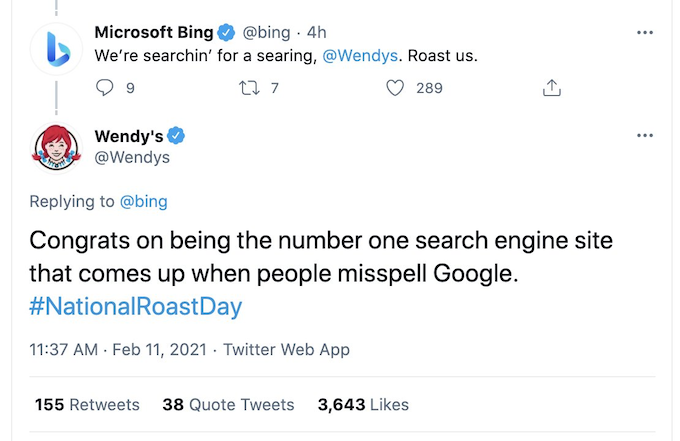
Replying to people interacting with your account or tagging your brand in their own tweets will also help increase the visibility of your account. You can also note the people actively interacting with your brand on Twitter as a potential pool of applicants when hiring.
Job ads
Finally, the whole reason you were on Twitter in the first place - start posting job advertisements! These could be in the form of "tweets" containing links to job openings, or boosted (paid) ads that could appear in the feed of targeted users. Remember to include a job title, a link to the job opening, and utilize hashtags to optimize these ads.
How to hire effectively with Twitter
After nailing the basics, you may then choose to incorporate some of these tips on how you can hire effectively on Twitter.
Maximize the Features
From hashtags to videos and even polls, these are just some of the many features Twitter has which you can maximize to increase the engagement and reach of your job posts. Get followers to actively retweet or like your posts, or even explore the use of trending Twitter hashtags (by looking at Twitter's trending hashtags list). Spotify uses the hashtag #JoinTheBand on job-related posts, which makes it easy for applicants to look for new roles and job opportunities.
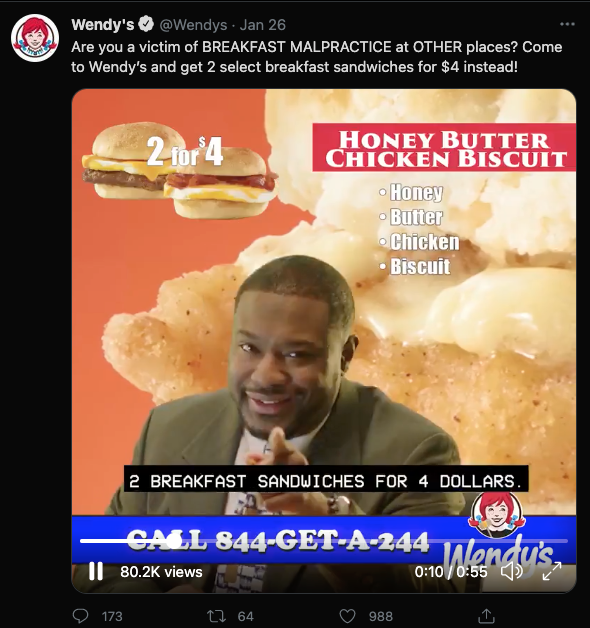
Have an announcement for an upcoming career fair or event? Pair it with videos or GIFs to reiterate the point! Incorporating media content is also usually effective in increasing the likelihood of retweets and likes, which in turn brings up the post to more users. Video content will also be more effective in capturing attention, as opposed to a wall of text.
 Building your Brand
A focus on employer branding reinforces your organization's culture, which could excite and interest potential candidates. From tweeting about perks given to employees, how your organization is contributing to the community, or even sharing behind-the-scenes footage of team bonding sessions, these are all fun ways to boost employer branding via your Twitter account.
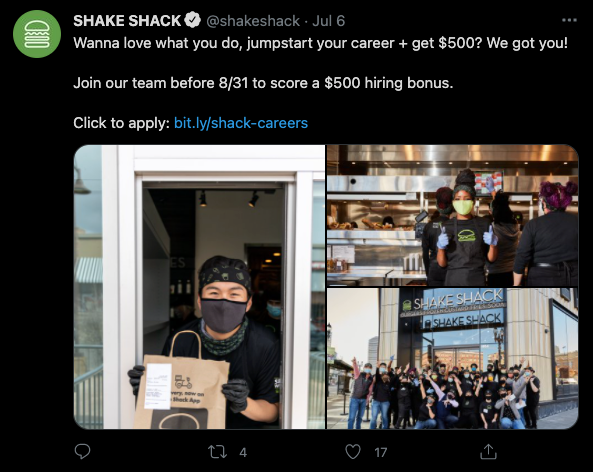
Shake Shack encourages more potential applicants to sign up for job openings by listing incentives in their job posts, such as a $500 hiring bonus.
Getting employees to share about their experience is another way to add a personal touch to job posts, and educate potential applicants about what they're signing up for.
Chick-fil-A reposts videos and photos of their employees at work, to showcase their vibrant work culture. Not only does this showcase heartwarming footage, it is also a great opportunity to acknowledge the hard work and effort put in by their employees, especially when it comes to service.
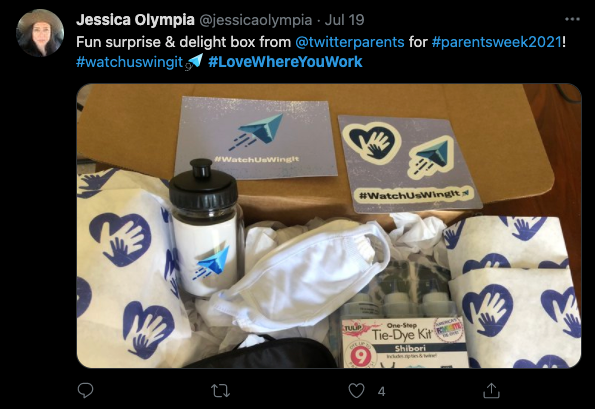
 Employer branding isn't limited to your organization's Twitter account too! Encourage all employees to tweet using a specific hashtag to share about what's going on in the organization, be it bonding activities, newcomer packs or celebrations. Twitter employees often tweet about team bonding activities or welfare packs with #LoveWhereYouWork, highlighting its efforts in creating a fun work culture. Cultivating these habits may also help in trending the hashtag on Twitter, thereby increasing visibility and awareness.
Finding Potential Candidates
Discover potential job seekers by searching for people that mention your company in conversations. Look out for individuals with interesting profiles, who may be a good match for your company. You could also utilize 'advanced search' to find the perfect prospects.
Consider following them, making conversations while replying to their tweets or reach out to them via Direct Message to find out more about them. These allow you to gain insights into potential new hires and recruit candidates who are genuinely interested in your organization.
Track Effectiveness
There are several key performance indicators (KPIs) to determine the success of your campaign. These can help you to decide if managing a recruitment Twitter account is worthwhile. Likes, retweets, and impressions are the general benchmarks, but an additional tool could be tracking or bit.ly links, which will be effective in providing conversion numbers.
By tracking how many people actually click into your job posting, or applied for the job, you'd be able to figure out how many additional job applicants each post is getting you. Consider running the Twitter account for a couple of months, which will give a good sense of how effective the posts are, relative to the number of applicants.
Summing Up
There is great potential for recruiting on Twitter, especially as more job seekers are utilizing it as a platform to source for new opportunities. Take the time to understand the concept behind Twitter, how it works and the audience it attracts, and you will be able to reap the benefits from it as an effective hiring tool.
Looking for more tips on how to hire quality candidates efficiently? Schedule a call with us, we're more than happy to maximize your company's hiring potential.