
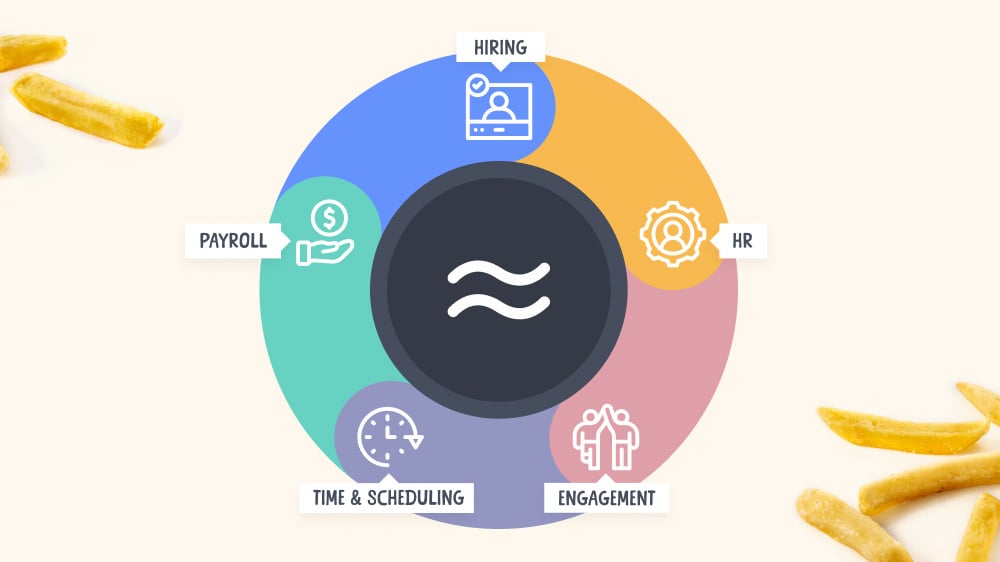

Introducing a new era for Workstream: Fully integrated payroll, time & scheduling, HR, hiring, and engagement
Workstream Blog

Introducing a new era for Workstream: Fully integrated payroll, time & scheduling, HR, hiring, and engagement

By Desmond Lim

Get the latest with Workstream

Always stay current with hiring news by subscribing to our email updates

At Workstream, our commitment has always been to empower hourly workers and the business owners who manage them with technology that works as hard as they do. Today, I’m excited to share that we’re increasing that commitment by introducing you to an exciting new chapter. As of today, Workstream is a complete all-in-one HR, hiring, and payroll platform that’s designed to make your job easier. And I can’t wait to show you how. 

What’s new

We recently conducted a survey to discover the biggest challenges in running hourly payroll. At the top of the list was reviewing timesheets and hours worked—these tasks were the most time-consuming tasks that business owners identified. So we set out to solve these problems and other associated challenges: managing overtime, breaks, tipping, compliance, labor laws, this list goes on and on.  
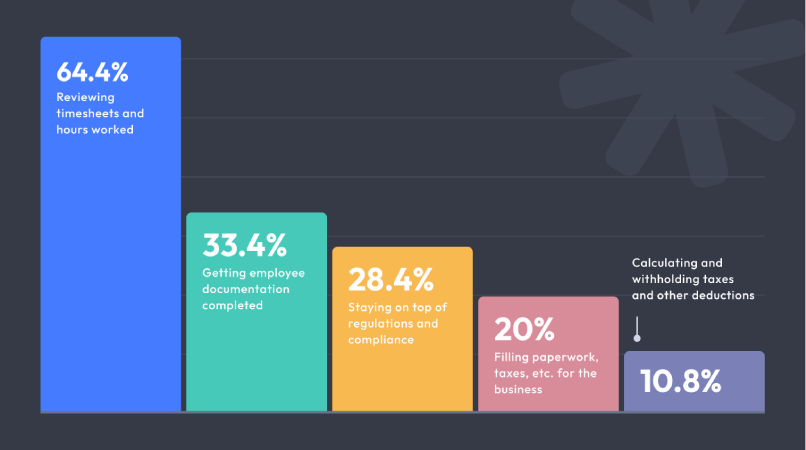
Chart-notitle

Our new Time Clock and Shift Scheduling addresses some of the biggest challenges in managing an hourly workforce, and running payroll specifically. Importantly, these new tools don’t just work alongside our payroll solution—they fully integrate with it, creating a unified experience that reduces administrative overhead and minimizes mistakes.

Time ClockScreenshot 2024-09-27 at 6.20.52 PM
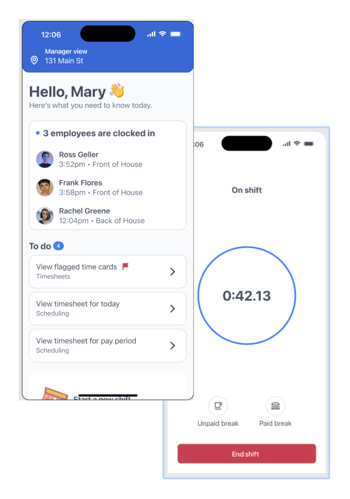
Our digital Time Clock makes tracking hours simple and accurate. Workers' hours are logged in real-time and instantly synced with Payroll. Potential issues with clock-ins and clock-outs are automatically flagged for you to review, so you can catch errors before they become big problems. This eliminates the need for manual timecard entries, reduces the risk of errors, and ensures you’re only paying for hours actually worked.

Why it matters to you

Accurate time tracking is essential for payroll and compliance. By integrating it directly into our platform, you’ll save time and avoid costly mistakes.

Shift Scheduling

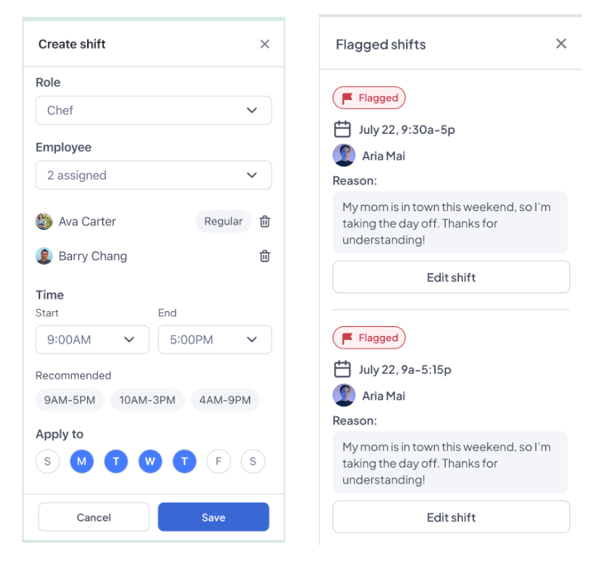
Managing and distributing shift schedules can be a huge source of headaches, but not anymore. With our new Shift Scheduling tool, you can create, adjust, and share schedules with just a few clicks. Employees can access their shifts, swap them, and get updates—all in one place. And because scheduling is integrated with time tracking and payroll, everything flows together smoothly.

Why it matters to you

Scheduling efficiency directly impacts your bottom line and employee satisfaction. Our seamless integration ensures that when schedules change, payroll and time tracking adjust automatically, keeping your operations running smoothly.
Screenshot 2024-09-27 at 6.25.11 PM


Workstream Payroll, better than ever

We built Payroll to be as seamless and error-free as possible. By integrating real-time data from our Time Clock and Shift Scheduling, payroll calculations are done automatically, with less manual input required. This means no more scrambling to correct timesheet errors or worrying about compliance issues. And with automatic tax filings, you’ll stay on top of regulations without lifting a finger.

Looking forward

For years, we’ve seen businesses struggle with the complexities of managing and paying hourly employees. That’s why we’re so excited about this next chapter of Workstream. Our vision has always been to create technology that not only simplifies work but empowers business owners to manage their hourly teams more effectively. With Payroll tightly integrated into our all-in-one platform, you’ll no longer be bogged down by administrative tasks that pull your attention away from what truly matters: your customers and your people. 

By Desmond Lim
Desmond Lim is co-founder and CEO of Workstream, a text-based hiring platform for local businesses hiring hourly workers. He is a graduate of Harvard University and MIT Media Lab, former Product Manager at WeChat, and investor at Dorm Room Fund. He contributes to Entrepreneur.com, Workstream Blog, and Huffington Post. He splits his time between San Francisco and Utah, and represented the Singapore National Team in basketball.

Personal Information and Sensitive Personal Information

Before we discuss the right to limit and the right to opt-out, we must first define personal information and how it relates to sensitive personal information.

Personal information is any data that identifies, relates to, or could reasonably be linked to you or your household. A few examples of personal information include:

  • Name or nickname
  • Email address
  • Purchase history
  • Browsing history
  • Location data
  • Employment data
  • IP address
  • Profiles businesses create about you, including pseudonymous profiles (“user1234”)
  • Sensitive personal information

Sensitive personal information or “SPI” is a subset of personal information, defined as:

  • Identifying information (e.g. social security number, driver’s license)
  • Financial data (e.g. debit or credit card numbers)
  • Precise geolocation (within a radius of 1,850 feet)
  • Demographic or protected-class information (e.g. race/ethnicity, religion, union membership)
  • Biometric and genetic data (e.g. fingerprints, palm scans, facial recognition)
  • Communications and content (e.g. mail, email, text messages)
  • Health and sexual orientation (e.g. vaccine records, health history)

Right to Opt-Out

Californians have the right to opt-out of the sale and sharing of their personal information. That means you have the right to opt-out of the sale of your personal information to third parties (e.g. data brokers, advertisers). You also have the right to opt-out of the sharing of your personal information to prevent the targeting of ads across different businesses, websites, apps, or services.

CCPA-covered businesses must provide a link to allow you to exercise this right. It is usually found at the bottom of a webpage and will say “do not sell or share my personal information” or “your privacy choices.” Sometimes businesses offer privacy choices through a pop-up window or form

To opt-out of the sale and sharing of your personal information, click on the link or use the toggle provided by the business and follow the directions. Doing this on every website you visit can feel burdensome, but to ease the burden you can automatically select your privacy preferences for every website by using an opt-out preference signal, or OOPS for short.

An OOPS is a user-friendly and straightforward way for consumers to automatically exercise their right to opt-out of the sale and sharing of their personal information with the businesses they interact with online. An OOPS, such as the Global Privacy Control. It can either be a setting on your internet browser or a browser extension. With an OOPS, consumers do not have to submit individual requests to opt-out of sale or sharing with each business.

Right to Limit

Californians also have the right to direct businesses to limit the use and disclosure of their sensitive personal information.

Businesses covered under the CCPA must provide a link on their website that allows you to request the limiting of your SPI, if they plan on using it in certain ways. That link will also typically be at the bottom of a webpage and will say: “limit the use of my sensitive personal information” or “your privacy choices.” Once you send this request, the business must stop using your SPI for anything other than to:

  • Provide requested goods or services
  • Ensure security and integrity
  • Prevent fraud
  • Maintain system functionality
  • Comply with legal obligations

Bringing it Together

In summary, the CCPA gives you the right to opt-out of the sale and sharing of your personal information and gives you additional rights to further limit the use and disclosure of your sensitive personal information.

When you exercise these rights together, you exert greater control in protecting your personal data which is important for your identity, safety, and financial health.

If you are on a business’s website and you can’t find the links to exercise your rights, remember to check their privacy policy. The privacy policy should tell you how you can exercise your rights under the law.

If you find your rights being violated, you can submit a complaint to CalPrivacy.

Next in the LOCKED series, we will explore the right to correct and right to know. Follow us on social media to get live updates or check back in one week for the next post.

Essential

Required to enable basic website functionality. You may not disable essential cookies.

Targeted Advertising

Used to deliver advertising that is more relevant to you and your interests. May also be used to limit the number of times you see an advertisement and measure the effectiveness of advertising campaigns. Advertising networks usually place them with the website operator’s permission.

Personalization

Allow the website to remember choices you make (such as your username, language, or the region you are in) and provide enhanced, more personal features. For example, a website may provide you with local weather reports or traffic news by storing data about your general location.

Analytics

Help the website operator understand how its website performs, how visitors interact with the site, and whether there may be technical issues.

Right to Limit Use of Sensitive Personal Information

You also have the right to limit how we use sensitive personal information (such as precise geolocation, financial data, etc.).

Your preference has been saved. We will not sell or share your personal information.