



US Human Resource and Hiring Trends - Fall 2020
Workstream Blog

US Human Resource and Hiring Trends - Fall 2020

By Robert Woo

Get the latest with Workstream

Always stay current with hiring news by subscribing to our email updates

The ongoing COVID-19 pandemic has devastated the restaurant industry in 2020 as more and more cities see hundreds of locations furloughing staff and closing permanently. However, for the Quick Service Restaurant (QSR) vertical, the story has been quite the opposite. Sales are up, business is booming, and hiring has kept pace for QSRs throughout these pandemic months.

We at Workstream work with thousands of QSR owners and hiring managers so we have a unique perspective on this thriving industry, and it’s been eye-opening to see how different their hiring needs have been from the rest of the US workforce. So unique that we collected data from these QSRs to provide our audience with a look into the U.S. Hiring Trends for the fall of 2020.

It’s Harder to Find Good Candidates

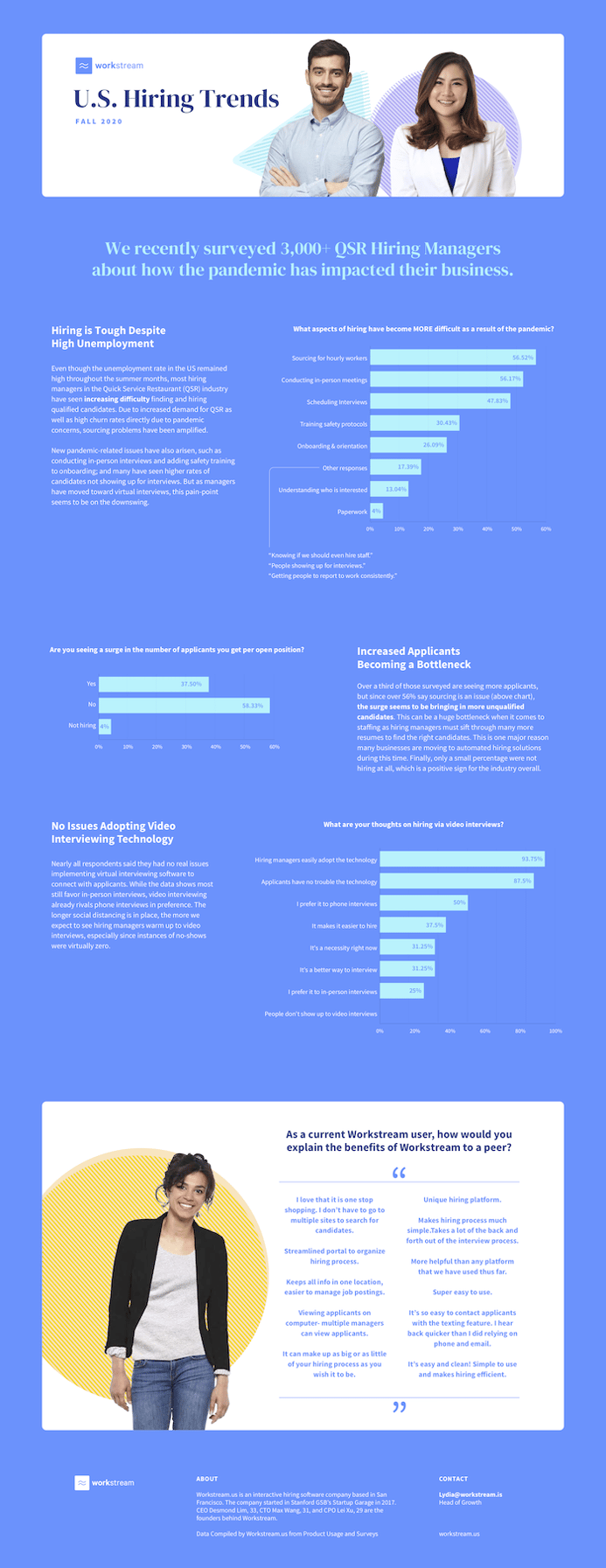
The biggest takeaway from this survey is that QSRs are seeing increasing difficulty sourcing the right candidates to fill their open positions. One would think with high unemployment, filling open jobs would be a breeze, but that is not the case. For one, QSRs have always had a high turnover rate, and that has exacerbated with the pandemic due to fear or illness. Also, with more resumes coming in, finding the right candidate has become more difficult for many hiring managers.

In fact, over 56% of the 3000+ QSR hiring managers surveyed said they had issues sourcing hourly workers as a result of the pandemic. And now with increasing seasonal demand from all businesses for delivery workers as the weather gets colder, we predict it will be even more competitive trying to hire great hourly employees in the coming months.

New Hiring Problems Due to the Pandemic

Other aspects of hiring have also become more difficult for QSR hiring managers including scheduling interviews (47%), training on new safety protocols (30%) and general onboarding (26%). As teams scramble to enact new virtual interviewing software and video onboarding due to the social distancing required, there are new headaches arising for already busy managers.

Luckily, the technological hurdle doesn’t seem like much of a problem as nearly 94% of respondents said that they could easily adopt video interviewing technology. This trend seems to be helping hiring managers process through more applicants in a shorter amount of time, which makes sense since it reduces commute time for the prospective employees (so they aren’t late or a no-show) and interviews are easier to set up back to back.

These hiring managers are also leveraging much of the automation that a hiring platform like Workstream provides to handle these new pandemic-related problems. As virtual onboarding has become the new normal, we are seeing higher usage from these QSR managers using Workstream to manage virtual documents and get their new hires virtually training.

More Applications Per Open Position

Over a third of the survey respondents said they were seeing a surge in the number of applications per open position, while 58% said that they are seeing the same amount. It seems job-seekers know that QSRs are continuing to hire during this down economy, and they are overall applying more during this time.

Yet, as mentioned earlier, these businesses are having a hard time sourcing good hourly workers. This means that it is getting more difficult weeding through the poor candidates to find the ones actually qualified for these positions. More resumes mean more bad resumes, so it’s no surprise these hiring managers are taking advantage of Workstream’s automated filtering methodology to find just the right candidates to interview.

You can view our entire report that has more information here. 
fall 2020 hiring trend

As the COVID-19 pandemic continues, we at Workstream will continue to collect this hiring data to see where the industry is trending next.

By Robert Woo
Robert Woo is a freelance content creator for various companies from startup to enterprise-level. When not writing SEO-friendly articles, he writes and performs comedy, plays guitar, and champions the Oxford comma.

Personal Information and Sensitive Personal Information

Before we discuss the right to limit and the right to opt-out, we must first define personal information and how it relates to sensitive personal information.

Personal information is any data that identifies, relates to, or could reasonably be linked to you or your household. A few examples of personal information include:

  • Name or nickname
  • Email address
  • Purchase history
  • Browsing history
  • Location data
  • Employment data
  • IP address
  • Profiles businesses create about you, including pseudonymous profiles (“user1234”)
  • Sensitive personal information

Sensitive personal information or “SPI” is a subset of personal information, defined as:

  • Identifying information (e.g. social security number, driver’s license)
  • Financial data (e.g. debit or credit card numbers)
  • Precise geolocation (within a radius of 1,850 feet)
  • Demographic or protected-class information (e.g. race/ethnicity, religion, union membership)
  • Biometric and genetic data (e.g. fingerprints, palm scans, facial recognition)
  • Communications and content (e.g. mail, email, text messages)
  • Health and sexual orientation (e.g. vaccine records, health history)

Right to Opt-Out

Californians have the right to opt-out of the sale and sharing of their personal information. That means you have the right to opt-out of the sale of your personal information to third parties (e.g. data brokers, advertisers). You also have the right to opt-out of the sharing of your personal information to prevent the targeting of ads across different businesses, websites, apps, or services.

CCPA-covered businesses must provide a link to allow you to exercise this right. It is usually found at the bottom of a webpage and will say “do not sell or share my personal information” or “your privacy choices.” Sometimes businesses offer privacy choices through a pop-up window or form

To opt-out of the sale and sharing of your personal information, click on the link or use the toggle provided by the business and follow the directions. Doing this on every website you visit can feel burdensome, but to ease the burden you can automatically select your privacy preferences for every website by using an opt-out preference signal, or OOPS for short.

An OOPS is a user-friendly and straightforward way for consumers to automatically exercise their right to opt-out of the sale and sharing of their personal information with the businesses they interact with online. An OOPS, such as the Global Privacy Control. It can either be a setting on your internet browser or a browser extension. With an OOPS, consumers do not have to submit individual requests to opt-out of sale or sharing with each business.

Right to Limit

Californians also have the right to direct businesses to limit the use and disclosure of their sensitive personal information.

Businesses covered under the CCPA must provide a link on their website that allows you to request the limiting of your SPI, if they plan on using it in certain ways. That link will also typically be at the bottom of a webpage and will say: “limit the use of my sensitive personal information” or “your privacy choices.” Once you send this request, the business must stop using your SPI for anything other than to:

  • Provide requested goods or services
  • Ensure security and integrity
  • Prevent fraud
  • Maintain system functionality
  • Comply with legal obligations

Bringing it Together

In summary, the CCPA gives you the right to opt-out of the sale and sharing of your personal information and gives you additional rights to further limit the use and disclosure of your sensitive personal information.

When you exercise these rights together, you exert greater control in protecting your personal data which is important for your identity, safety, and financial health.

If you are on a business’s website and you can’t find the links to exercise your rights, remember to check their privacy policy. The privacy policy should tell you how you can exercise your rights under the law.

If you find your rights being violated, you can submit a complaint to CalPrivacy.

Next in the LOCKED series, we will explore the right to correct and right to know. Follow us on social media to get live updates or check back in one week for the next post.

Essential

Required to enable basic website functionality. You may not disable essential cookies.

Targeted Advertising

Used to deliver advertising that is more relevant to you and your interests. May also be used to limit the number of times you see an advertisement and measure the effectiveness of advertising campaigns. Advertising networks usually place them with the website operator’s permission.

Personalization

Allow the website to remember choices you make (such as your username, language, or the region you are in) and provide enhanced, more personal features. For example, a website may provide you with local weather reports or traffic news by storing data about your general location.

Analytics

Help the website operator understand how its website performs, how visitors interact with the site, and whether there may be technical issues.

Right to Limit Use of Sensitive Personal Information

You also have the right to limit how we use sensitive personal information (such as precise geolocation, financial data, etc.).

Your preference has been saved. We will not sell or share your personal information.