



<img height="1" width="1" style="display:none" src="https://www.facebook.com/tr?id=395330474421690&amp;ev=PageView&amp;noscript=1">
Indeed for employers: How to hire efficiently
Workstream Blog

Indeed for employers: How to hire efficiently

By Workstream

Get the latest with Workstream

Always stay current with hiring news by subscribing to our email updates

Indeed is one of the most popular job sites in the world, making it one of the best places to go hire someone. It's free to all job seekers, receives more than 250 million visitors each month, and helps Indeed employers in more than 50 countries find top talent. Because of the reputation Indeed has built, many hourly workers do an Indeed resume search to find their next job, which makes it a perfect place for you to list and promote your open role. If you want to hire in today’s competitive landscape, you need to use Indeedβ€”and optimize each of your job postings within it. 

Before we dive deeper, let’s cover a few things around Indeed costs to help you get started with Indeed.

Indeed plans

How much is Indeed for employers? Well, Indeed offers a variety of plans to help hiring managers meet their specific hiring needs. With Indeed, you have access to tools that can help you improve the visibility of your job listings. With  Indeed for employers, you can opt for sponsored listings, which give your job openings premium positions in the job search results. You might be wondering how much Indeed plans cost and what each plan includes. 

Indeed Resume plan

With Indeed for employers, you can conduct unlimited resume searches under the Indeed Resume Plan. Employers pay $15 per prospective candidate they contact. This option is perfect for hiring managers who work in industries with low turnover rates.

Indeed Standard and Indeed Professional Standard Subscriptions

Many employers choose a subscription to get more value out of Indeed. The Standard Subscription Fee ($100/month) allows you to contact up to 30 candidates, and the Professional Standard ($250/month/user) allows up to 100 candidates.

Indeed Advanced Plan 

Indeed also provides the Advanced Plan with a pay-per-click model. You only pay when prospective job seekers click on your sponsored job listing. The cost of this Indeed Sponsored job listing is $0.20 - $1.20 per click so this could be more friendly on the daily budget.

Indeed Simple Plan

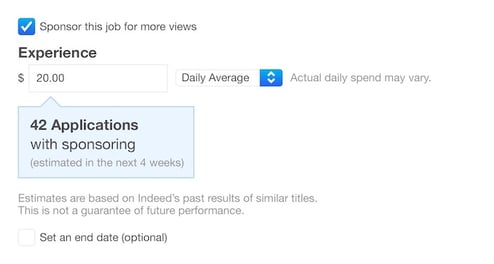
The question how much is Indeed definitely changes depending on what you want. There's the Indeed Simple Plan, which allows employers to specify how much they are willing to spend daily or monthly for each job posting.
4_apply-estimator

How to post a job listing on Indeed

  1. Go to Indeed.com and create a free employer account using your company email

  2. Add details about your job posting

  3. Fill out the application questions

  4. Review and publish the job posting

  5. Add your account information

  6. Select "Sponsor job" or "Post job without sponsoring" to the right of "Continue"

Tips to get the best results out of your Indeed job posting

Writing a highly detailed and professional job posting helps attract qualified applicants. When writing a job posting, there are three key points to focus on: job title, job description, and applicant qualifications.

Job title

The job title should be specific and short (keep it under 80 characters) so it’s easy for job seekers to spot a role that they’re suited for. While the title should be brief enough to convey what the position is, it should also be creative. After all, this top-line real estate is your chance to help catch a job seeker’s attentionβ€”and stand out above all the other job postings they might see. 

Take an assessment of the job titles that appear when you search for similar roles. Do they include certain terms? Do they mention salary? Do they include emojis? See what your competitors are doing, not so you can copy them but rather so you can learn what’s working. From there, add your brand twist to it so you can stand out and, ultimately, win more applicants.

Here are a few examples of what a stand-out title could look like:

  • Restaurant General Manager Chicagoβ€”Never Work Sundays

  • Team Memberβ€”Daily Pay Available with Instant Pay!

  • Crew Member Evening Shiftβ€”$18/hr

Job description

Job descriptions should be engaging, easy to read, and include terms related to the role and industry. This is an opportunity for you to sell the potential applicant on why they should work for you. Take this time to clearly and concisely outline not only the job responsibilities (shift hours, daily duties, etc.) and qualifications (experience, language proficiency, etc.), but also to highlight the benefits you offer and your restaurant’s culture. This can also include business values and mission statement. 

As you write job descriptions, make sure your job postings are optimized for search engines, by including SEO-rich keywords whenever possible. This will help your postings rank higher and drive more traffic to your open role. And remember, most applicants today are searching and applying for jobs on their phones. Listing the job description in short paragraphs and/or bullet form is ideal.

Applicants' qualifications

Let’s dive a little deeper into qualifications. In your job description, it’s important that you make a distinction between what's required and what's preferred but not mandatory. Most often, the qualifications that need explicit parameters include:

  • Education 

  • Experience 

  • Certifications 

  • Language proficiency

  • Skills

Providing this level of clarity around qualifications helps applicants see whether or not they would be a great fit for the role before they invest any of their time (and yours!) pursuing the role.

Bonus tip: Watch your budget

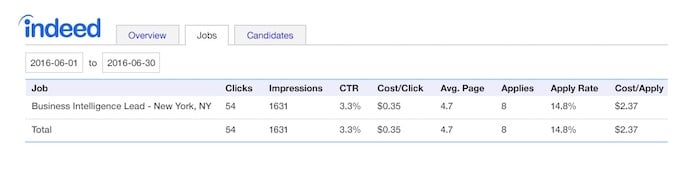
With Indeed for employers, you have the option to sponsor job posts to maximize their exposure and reach. It’s a great feature to use. Make sure to track your job posting via Indeed's performance reports so you can make sure your investment is producing the results you need. You can modify or cancel sponsored posts anytime by selecting "Edit Job" in the employer dashboard. Pricing is always a big factor for anyone looking to post on Indeed so if you want more than free job postings, sponsored job postings will be a great solution.
4_perf-report

Indeed is a great place to find a candidate for hire. That's why it's one of 25,000 job boards Workstream integrates with to make it easy for employers to source candidates. Want to learn how you can post to Indeedβ€”and thousands of other job boardsβ€”through a single click and a  streamlined experience? Learn more about Workstream's hiring and onboarding platform for the hourly workforce.

By Workstream
Workstream is the leading HR, Payroll, and Hiring platform for the hourly workforce. Its smart technology streamlines HR tasks so franchise and business owners can move fast, reduce labor costs, and simplify operationsβ€”all in one place. 46 of the top 50 quick-service restaurant brandsβ€”including Burger King, Jimmy John’s, Taco Bellβ€”rely on Workstream to hire, retain, and pay their teams. Learn how you can better manage your hourly workforce with Workstream.

Personal Information and Sensitive Personal Information

Before we discuss the right to limit and the right to opt-out, we must first define personal information and how it relates to sensitive personal information.

Personal information is any data that identifies, relates to, or could reasonably be linked to you or your household. A few examples of personal information include:

  • Name or nickname
  • Email address
  • Purchase history
  • Browsing history
  • Location data
  • Employment data
  • IP address
  • Profiles businesses create about you, including pseudonymous profiles (β€œuser1234”)
  • Sensitive personal information

Sensitive personal information or β€œSPI” is a subset of personal information, defined as:

  • Identifying information (e.g. social security number, driver’s license)
  • Financial data (e.g. debit or credit card numbers)
  • Precise geolocation (within a radius of 1,850 feet)
  • Demographic or protected-class information (e.g. race/ethnicity, religion, union membership)
  • Biometric and genetic data (e.g. fingerprints, palm scans, facial recognition)
  • Communications and content (e.g. mail, email, text messages)
  • Health and sexual orientation (e.g. vaccine records, health history)

Right to Opt-Out

Californians have the right to opt-out of the sale and sharing of their personal information. That means you have the right to opt-out of the sale of your personal information to third parties (e.g. data brokers, advertisers). You also have the right to opt-out of the sharing of your personal information to prevent the targeting of ads across different businesses, websites, apps, or services.

CCPA-covered businesses must provide a link to allow you to exercise this right. It is usually found at the bottom of a webpage and will say β€œdo not sell or share my personal information” or β€œyour privacy choices.” Sometimes businesses offer privacy choices through a pop-up window or form

To opt-out of the sale and sharing of your personal information, click on the link or use the toggle provided by the business and follow the directions. Doing this on every website you visit can feel burdensome, but to ease the burden you can automatically select your privacy preferences for every website by using an opt-out preference signal, or OOPS for short.

An OOPS is a user-friendly and straightforward way for consumers to automatically exercise their right to opt-out of the sale and sharing of their personal information with the businesses they interact with online. An OOPS, such as the Global Privacy Control. It can either be a setting on your internet browser or a browser extension. With an OOPS, consumers do not have to submit individual requests to opt-out of sale or sharing with each business.

Right to Limit

Californians also have the right to direct businesses to limit the use and disclosure of their sensitive personal information.

Businesses covered under the CCPA must provide a link on their website that allows you to request the limiting of your SPI, if they plan on using it in certain ways. That link will also typically be at the bottom of a webpage and will say: β€œlimit the use of my sensitive personal information” or β€œyour privacy choices.” Once you send this request, the business must stop using your SPI for anything other than to:

  • Provide requested goods or services
  • Ensure security and integrity
  • Prevent fraud
  • Maintain system functionality
  • Comply with legal obligations

Bringing it Together

In summary, the CCPA gives you the right to opt-out of the sale and sharing of your personal information and gives you additional rights to further limit the use and disclosure of your sensitive personal information.

When you exercise these rights together, you exert greater control in protecting your personal data which is important for your identity, safety, and financial health.

If you are on a business’s website and you can’t find the links to exercise your rights, remember to check their privacy policy. The privacy policy should tell you how you can exercise your rights under the law.

If you find your rights being violated, you can submit a complaint to CalPrivacy.

Next in the LOCKED series, we will explore the right to correct and right to know. Follow us on social media to get live updates or check back in one week for the next post.

Essential

Required to enable basic website functionality. You may not disable essential cookies.

Targeted Advertising

Used to deliver advertising that is more relevant to you and your interests. May also be used to limit the number of times you see an advertisement and measure the effectiveness of advertising campaigns. Advertising networks usually place them with the website operator’s permission.

Personalization

Allow the website to remember choices you make (such as your username, language, or the region you are in) and provide enhanced, more personal features. For example, a website may provide you with local weather reports or traffic news by storing data about your general location.

Analytics

Help the website operator understand how its website performs, how visitors interact with the site, and whether there may be technical issues.

Right to Limit Use of Sensitive Personal Information

You also have the right to limit how we use sensitive personal information (such as precise geolocation, financial data, etc.).

Your preference has been saved. We will not sell or share your personal information.