

<img height="1" width="1" style="display:none" src="https://www.facebook.com/tr?id=395330474421690&amp;ev=PageView&amp;noscript=1">
Workstream your way: Introducing HR management tools for your growing business
Workstream Blog

Workstream your way: Introducing HR management tools for your growing business

By Desmond Lim

Get the latest with Workstream

Always stay current with hiring news by subscribing to our email updates

So many franchise and QSR owners I speak to tell me that growing their business comes with unique challenges they weren’t anticipating. You’re suddenly at a stage where you’re spending more time in spreadsheets and bogged down with paperwork when you should be engaging your staff and charting your next phase of growth.

But when you look into the typical HR solutions on the market, they seem like they were built for someone else. Not only are they expensive, they’re cumbersome and filled with features you don’t need. 

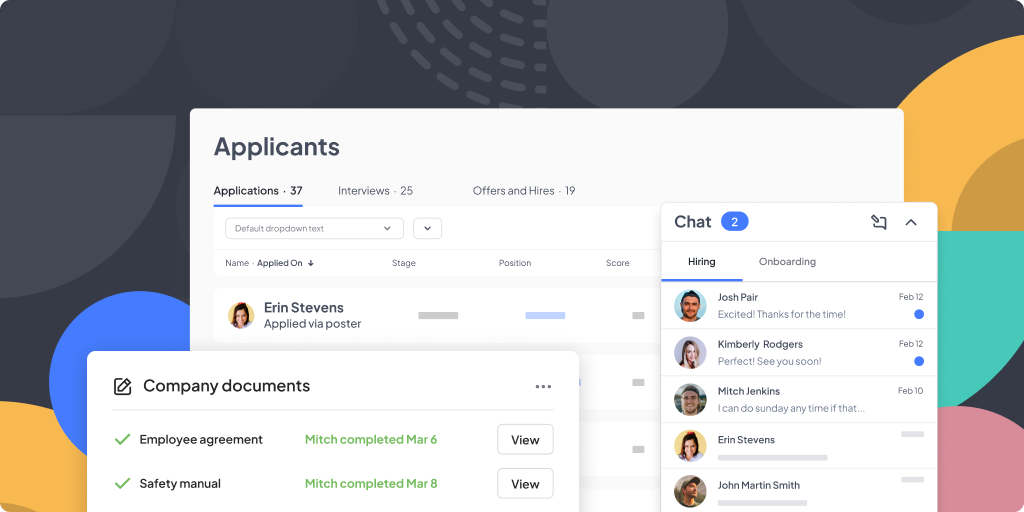
Workstream was founded on the belief that the deskless economy deserves better. That’s why we’re excited to introduce new HR management products designed to help your company in its next phase of growthβ€”and give your hourly workers the time, attention, and resources they deserve without overextending yourself in the process.These products include: 

  • Document and Signature Management
  • Onboarding
  • Worker Records
  • Team Communications
  • Engagement Surveys  

Scale up without slowing down 

83% of the deskless workforce still uses paper processes. When you’re doing all your admin work manually, it’s no wonder that scaling up your business can feel like being chained to your desk.

To successfully grow your business, you need to evolve beyond the old-fashioned way of doing things. If you’re finding yourself always stuck in the back office, it’s time to look for solutions that streamline and digitize all those tedious or manual processes. 

Workstream’s new HR management tools are here to help you tackle back-office operations as efficiently as possibleβ€”all without the clunky platforms or confusing features you don’t need.

  • Streamline onboarding: Improve the worker experience and decrease premature staff turnover within the first 90 days using mobile-friendly digital paperwork and e-signatures. 
  • Make all your documents accessible: Get documents signed and stored without chasing down your employees whenever an updated policy or form requires their attention.
  • Keep worker information secure: Close your filing cabinet for the last time knowing you can securely access any worker information or documents you need, entirely online.

Connect with your team often 

By automating and digitizing this work, you free up time to focus on your new hire experienceβ€”which is pretty important. Just because your company is growing doesn’t necessarily mean your employees will decide to grow with it.

In 2022, only 54% of quick-service employees reached their 90-day milestone before quitting. When replacing an employee costs as much as 60% of their annual pay, focusing on retention is a much better use of your time than chasing down employees to fill out a formβ€”and can help you maximize profits by up to 4X.  

With time back to focus on your team, you might be left wondering where to begin. Like any successful relationship, it starts with communication. Creating an open and safe space to share information, engage with workers, and solicit feedback can go a long way in making your team feel comfortable and appreciated. 

We’re tackling this head-on by giving you two easy ways to increase communication with your team. 

  • Team Communications: In today’s world, everyone’s inundated with messages. Cut through the noise with a smart blend of automation and personalizationβ€”so you can connect with your team, keep them informed, and increase overall team efficiency and output. 
  • Engagement Surveys: Collect worker feedback often with automated engagement surveysβ€”so you can address problems, keep workers happy (and make them less likely to turnover!) 

Put compliance and back-office operations on autopilot  

One of the biggest concerns you’ll face when running a successful business is keeping data secure and documents up to date for your growing team of hourly workersβ€”all across different locations.

The annual costs from U.S. businesses that fail to comply with regulations total around $14.82 million. It’s a challenge many businesses fail to get right, but you can easily avoid it with the right HR tech managing the headaches for you. 

Imagine putting your compliance tasks on autopilot. Our platform manages the complexities of HR and tax forms so you can feel confident your business is compliantβ€”without having to become an expert overnight.

  • Updated Worker Records: With digital document signing delivered to workers via text, keep records updated with the latest information easily. 
  • Secure document and record storage: Our SOC-2 Type II Compliant platform means you can trust your data is encrypted and protected from security vulnerabilities. 
  • Integrated HR workflows: File paperwork and verify worker status on time for tax and government processes such as WOTC, I-9, and E-verify.

The right technology is where the real growth begins

Whether you’re hoping to automate and digitize admin tasks, reduce turnover, improve communication, or all of the above, Workstream meets you where you are. Unlike the expensive solutions made for big corporations, we give you the power to customize an HR tech stack with only the features you need. Because no one else knows your business like you do. 

I invite you to explore our new HR management tools and learn how they can help you streamline team and back-office operations. Because that’s really what Workstream is all about: improving technology for the deskless workforce and the people who lead them. 

By Desmond Lim
Desmond Lim is co-founder and CEO of Workstream, a text-based hiring platform for local businesses hiring hourly workers. He is a graduate of Harvard University and MIT Media Lab, former Product Manager at WeChat, and investor at Dorm Room Fund. He contributes to Entrepreneur.com, Workstream Blog, and Huffington Post. He splits his time between San Francisco and Utah, and represented the Singapore National Team in basketball.

Personal Information and Sensitive Personal Information

Before we discuss the right to limit and the right to opt-out, we must first define personal information and how it relates to sensitive personal information.

Personal information is any data that identifies, relates to, or could reasonably be linked to you or your household. A few examples of personal information include:

  • Name or nickname
  • Email address
  • Purchase history
  • Browsing history
  • Location data
  • Employment data
  • IP address
  • Profiles businesses create about you, including pseudonymous profiles (β€œuser1234”)
  • Sensitive personal information

Sensitive personal information or β€œSPI” is a subset of personal information, defined as:

  • Identifying information (e.g. social security number, driver’s license)
  • Financial data (e.g. debit or credit card numbers)
  • Precise geolocation (within a radius of 1,850 feet)
  • Demographic or protected-class information (e.g. race/ethnicity, religion, union membership)
  • Biometric and genetic data (e.g. fingerprints, palm scans, facial recognition)
  • Communications and content (e.g. mail, email, text messages)
  • Health and sexual orientation (e.g. vaccine records, health history)

Right to Opt-Out

Californians have the right to opt-out of the sale and sharing of their personal information. That means you have the right to opt-out of the sale of your personal information to third parties (e.g. data brokers, advertisers). You also have the right to opt-out of the sharing of your personal information to prevent the targeting of ads across different businesses, websites, apps, or services.

CCPA-covered businesses must provide a link to allow you to exercise this right. It is usually found at the bottom of a webpage and will say β€œdo not sell or share my personal information” or β€œyour privacy choices.” Sometimes businesses offer privacy choices through a pop-up window or form

To opt-out of the sale and sharing of your personal information, click on the link or use the toggle provided by the business and follow the directions. Doing this on every website you visit can feel burdensome, but to ease the burden you can automatically select your privacy preferences for every website by using an opt-out preference signal, or OOPS for short.

An OOPS is a user-friendly and straightforward way for consumers to automatically exercise their right to opt-out of the sale and sharing of their personal information with the businesses they interact with online. An OOPS, such as the Global Privacy Control. It can either be a setting on your internet browser or a browser extension. With an OOPS, consumers do not have to submit individual requests to opt-out of sale or sharing with each business.

Right to Limit

Californians also have the right to direct businesses to limit the use and disclosure of their sensitive personal information.

Businesses covered under the CCPA must provide a link on their website that allows you to request the limiting of your SPI, if they plan on using it in certain ways. That link will also typically be at the bottom of a webpage and will say: β€œlimit the use of my sensitive personal information” or β€œyour privacy choices.” Once you send this request, the business must stop using your SPI for anything other than to:

  • Provide requested goods or services
  • Ensure security and integrity
  • Prevent fraud
  • Maintain system functionality
  • Comply with legal obligations

Bringing it Together

In summary, the CCPA gives you the right to opt-out of the sale and sharing of your personal information and gives you additional rights to further limit the use and disclosure of your sensitive personal information.

When you exercise these rights together, you exert greater control in protecting your personal data which is important for your identity, safety, and financial health.

If you are on a business’s website and you can’t find the links to exercise your rights, remember to check their privacy policy. The privacy policy should tell you how you can exercise your rights under the law.

If you find your rights being violated, you can submit a complaint to CalPrivacy.

Next in the LOCKED series, we will explore the right to correct and right to know. Follow us on social media to get live updates or check back in one week for the next post.

Essential

Required to enable basic website functionality. You may not disable essential cookies.

Targeted Advertising

Used to deliver advertising that is more relevant to you and your interests. May also be used to limit the number of times you see an advertisement and measure the effectiveness of advertising campaigns. Advertising networks usually place them with the website operator’s permission.

Personalization

Allow the website to remember choices you make (such as your username, language, or the region you are in) and provide enhanced, more personal features. For example, a website may provide you with local weather reports or traffic news by storing data about your general location.

Analytics

Help the website operator understand how its website performs, how visitors interact with the site, and whether there may be technical issues.

Right to Limit Use of Sensitive Personal Information

You also have the right to limit how we use sensitive personal information (such as precise geolocation, financial data, etc.).

Your preference has been saved. We will not sell or share your personal information.
