






When it comes to looking for hourly workers, hiring managers often fall back on the traditional methods: newspapers, flyers, job portals. These aren't necessarily the best places to get in front of qualified candidates. Most young people aren't reading newspapers, flyers have a very limited reach, and if a candidate is browsing online job boards, they're likely applying to dozens of jobs—who knows if they're actually interested. That's why we recommend using social media for example Facebook, LinkedIn, Instagram to let the users know about your job openings. You can target people who have expressed interest in your brand and, best of all, there are many free options.
There are 1.59 billion daily active users on Facebook. So how do we use this high audience volume to fit your hiring needs? There are several methods: Facebook community groups, company pages, Facebook job postings.
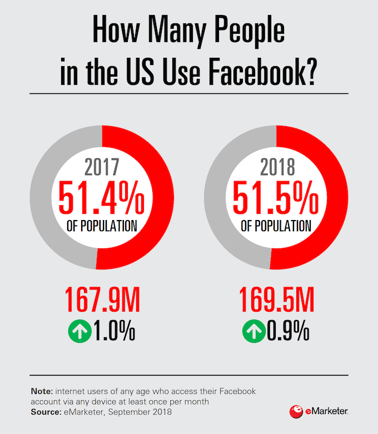
Photo credits: https://www.emarketer.com/content/the-social-series-who-s-using-facebook
1. Facebook Groups

Facebook Groups are one of the best ways to hire hourly workers. It helps people with similar interests find each other and build a community. Information circulated in these groups is targeted and relevant to each community, making it a great place for your Facebook job postings.
Unlike Facebook Pages, Facebook Groups require a different approach to fully utilize their functions. Before advertising your job vacancy, you’ll need to know the crowd that you’re looking for. In the hourly workers' space, you should probably look into local employment groups—avoid ones that are global or overcrowded. You wouldn’t want your employees to be located five hours away from your business or to have your Facebook job posting get pushed down within a few minutes of posting.
How to go about finding the right Facebook Groups to join
There are so many Facebook Groups out there. So how do you narrow down which ones would be best to join to find employees to hire?
Facebook’s advanced algorithm makes it easy for you to find exactly what you're looking for.
In the search bar, use keywords that are specific to your business. If your business is located in San Francisco, opt for keywords that highlight the location like “hourly jobs in San Francisco.” If you're looking to hire specific job roles like bartenders, use keywords like “bartender jobs,” and combine it with the location of your business to make it more targeted: “bartender jobs in San Francisco.”
Chances are there are many other groups out there. You can get creative with your keywords like “employee,” “jobs,” “hiring,” “hire,” “work,” “workers” etc.

2. Facebook Business Page
To find employees to hire and build your brand, you can start by creating a Facebook Page. Facebook users who follow their favorite businesses on Facebook have a greater chance of responding to its Facebook job listing since they've already displayed loyalty to that brand.
To start, proceed to this Facebook link and follow the guided steps:
-
Select “Business or Brand”
-
Select a Page Name and Page Category. Your page name should be your business name to build brand association; your page category would be the industry in which your business lies.
-
Add the required information
-
Add a profile picture. This is typically your company’s logo for easy brand association
-
Add a cover photo. It’s encouraged to be creative here! If you're hiring hourly workers, you could put up creative job search banners as your cover photo.
-
Fill out additional information such as your page description in the settings bar on the top right-hand corner of your Facebook Page
After creating a page, it's time to start posting some content. It can be in the form of news feed, videos or pictures to showcase your business or even short descriptions that give audiences a clear understanding of what your business does.
When you start to gain a following on your page, you can start creating Facebook job listings.

3. Post high-quality content to showcase your company culture
Producing high-quality content is key to advertising job openings on Facebook. Each content piece you post on your page should help your audience on their news feed to paint a picture of your business. If you’re running a restaurant, you can post high-quality pictures and videos of the food you serve, and share new menus or promotions. Include engaging text with these images and videos to appeal to your audience.
Video is a preferred medium when planning out your posts . Numerous studies have shown that videos are far more engaging than content with only pictures or text. Make use of these variations of content types to appeal to your audience.
With strong content, your business can appear professional and more appealing to your audiences. Moreover, it helps you build your brand image and showcase the nature of your business to potential applicants. These content pieces will help you attract more followers to your page and increase your business’s visibility during the hiring season.
4. Maintain and promote your Facebook Page
Running ads on an empty and unorganized Facebook page will not bring the results you want to achieve. It takes time to build and maintain your page before you start running your job listings.
The key to maintaining your page is to update it regularly, be creative, and active on messenger as well. The top priority is having a content calendar set up. A content calendar is one where you plan for the content that you would like to publish on your page on selected dates with a fixed frequency.
Frequency of posts
One of the most common questions businesses ask is how many times should I be posting on Facebook? You wouldn’t want to be posting too much and end up spamming your audience, but you also don't want to miss the opportunity to engage your audience by posting too little. It's recommended to post once per day to avoid having your posts perceived as spam.
Sharing regular updates with optimized job titles on social media platforms helps keep your audience and potential employees up to date with your business. If you're running a Facebook page with followers from your target demographic, you can start posting job ads on on varied pricing bids.
With Facebook’s schedule function, you can schedule all your social media posts without worrying about being on standby to post daily.
Answering machine and interaction
Staying responsive on your Facebook page helps you communicate with your prospective job applicants as quickly as possible. Responsive pages and Facebook accounts either in comments section or via messenger also get awarded with a responsive badge by Facebook.
In the settings section of your page, there is a drop-down with a “messaging” option. You can set up automated responses under “response assistant” to engage the audiences who open a chat window when you're not online. You can customize this to any greeting or advertisement of your choice.
Attracting followers
There are numerous ways you can attract followers other than simply pushing ads out.
You will need to understand who your targeted demographic audience and potential candidates are to tailor each piece of content to appeal to them. Having more followers ultimately mean a larger pool of potential employees too.

5. Utilizing Facebook Ads
When you are done with the basics of creating and maintaining your Facebook page, it is time to look towards promotional strategies like ad campaigns with clear CTAs like “apply now”.
A good ad campaign not only brings customers to your business, but also helps you attract potential new employees.
Understand Facebook ad promotion
At the top bar of your Facebook page, you’ll find an “ad center” tab where you can create and maintain your ads. You can start off by selecting the “promote” function on the top left corner of your company’s Facebook page. Here, you can select the type of promotion that you would like to run.
The best way to use Facebook ads to find employees to hire is to run ads that generate leads.
Creating a lead generation ad
A lead generation ad helps you collect information from your targeted audience with a form. You can set up ads from drop-down-menu that promote the job role that you are hiring for and use the form to collect details of interested applicants and reach out to them.
The few main things to include in your form would be
-
Name
-
Email
-
Contact number
-
(Optional) Some short answer qualifying questions
Select a photo that depicts the kind of job (tip: add clear and concise job description on the image and caption as well) that you are trying to hire for or select a fun photo of your company to showcase your team culture. Include creative copy to capture the attention of your target audience.
Now that your ad is done, you need to think about who you would like to target with your ad. Since your goal here would be to hire hourly workers, your target audience from the drop-down-menu for your ad could go towards millennials or students who are seeking for a job while studying.
With all the data that you have, you can post these ads onto the Facebook groups that were covered in the earlier part of this guide. This helps you get your ad out to a targeted demographic who are also active job seekers.
6. Ad Bidding
For your ad to reach your targeted demographic effectively, ad bidding is essential - you will be competing with your competitors to reach out to your target audience and interest them in what you have to offer.
Facebook has a standard automated ad bidding setting for your campaigns but it does not necessarily reap the best results. In order to launch your ad’s full potential, you will have to do custom aid bidding.
Advertiser bid
Advertiser bid is the amount of money you are willing to invest in your ad. Bidding too low can bring in results but the outreach volume will be compromised. On the other hand, bidding too much can mean throwing money freely.
Ad quality and relevance impact Facebook recruitment
Ad quality is very much similar to your overall page quality. Facebook will determine the value of your ad through the means of testing - if your ad receives negative feedback, the value of it decreases; if your ad receives positive responses, the value of your ad increases, and so does the chances of your target demographics.
Similarly, ad relevance is tested in the same way - if your targeted demographic responds poorly to your ad, the ad relevance is low and if your targeted demographics responds well, your ad relevance increases.
Estimated action
To estimate the action rates of your advertisement, Facebook gets feedback from your targeted audience based on how likely they are to click on your ad combined with their past behavior.
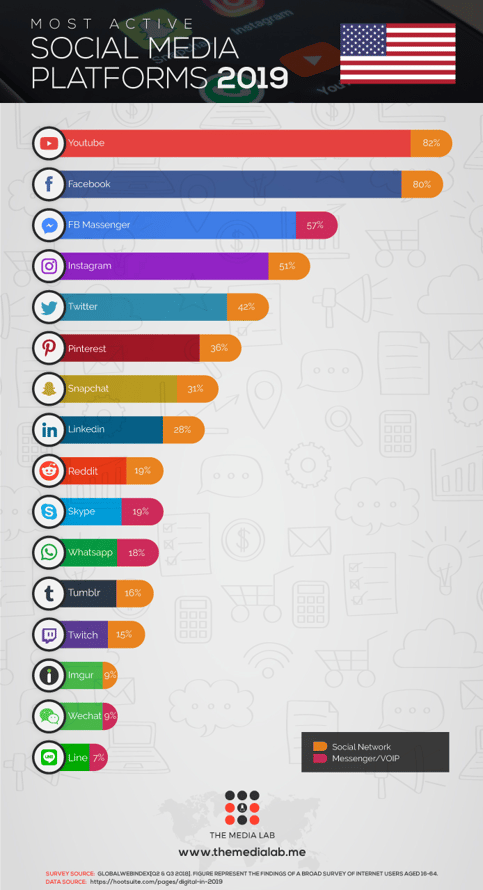
Photo credits: https://www.themedialab.me/usa-social-media-statistics-2019/
With these tips, you should be able to ramp up your hiring on Facebook , and attract the best possible candidates for your job postings. For more tips on refining your recruitment process, check out our ultimate guide.