




6 Best Homebase Alternatives for Employee Scheduling, HR & Payroll: 2026
- Home >
- Workstream Blog >
- 6 Best Hom...

Get the latest with Workstream
Always stay current with hiring news by subscribing to our email updates
While Homebase serves 150,000+ small businesses with basic scheduling and time tracking, growing multi-location operations and franchise groups often require more robust workforce management software built for the complexities of hourly teams. From AI-powered hiring automation to multi-EIN payroll processing, these six alternatives address specific gaps that businesses encounter as they scale beyond a single location. This comprehensive analysis examines each platform's strengths, pricing models, and ideal use cases to help restaurant operators, franchise owners, and HR teams make informed decisions.
Key Takeaways
- Multi-location scaling requires purpose-built architecture: Per-location pricing models become prohibitive at 5+ locations, while platforms designed for franchise operations offer predictable costs and centralized control with location-level customization
- AI-powered hiring automation accelerates time-to-hire: Advanced screening tools like VoiceAI can reduce interview no-shows and accelerate hiring compared to manual processes, critical for high-turnover hourly environments
- Mobile-first onboarding reduces friction for hourly workers: Text-based workflows that allow candidates to complete paperwork without downloading apps deliver faster onboarding than traditional paper-based methods
- Unified platforms eliminate data re-entry errors: All-in-one systems where hiring, onboarding, scheduling, and payroll share a single data model reduce compliance risks from disconnected tools and save hours of administrative work weekly
- Restaurant-grade compliance features matter: Platforms built specifically for hourly workforces handle multi-role pay rates, tip calculations, meal break enforcement, and ACA tracking that general HR software struggles to address
The employee scheduling and HR software landscape has evolved significantly as businesses recognize that tools designed for office environments often fall short when managing hourly teams. Homebase tracks 1.2 billion hours annually for its users, but many operators find themselves needing capabilities beyond basic scheduling as they expand to multiple locations or require integrated payroll and hiring solutions.
1. Workstream: Built for Multi-Location Restaurants and Franchise Operations
Workstream stands as the leading platform designed specifically for businesses with hourly workforces, serving 46 of the top 50 restaurant brands across more than 35,000 franchise locations. The platform consolidates hiring, onboarding, scheduling, payroll, and compliance into a single mobile-first system.
Key Features:
- VoiceAI phone screening conducting 24/7 automated calls in multiple languages with customizable questions
- Applicant tracking posting to 25,000+ job boards including unlimited Indeed listings
- Text-to-apply functionality with QR codes for in-store hiring campaigns
- Mobile-first onboarding with W-4, I-9, and E-verify automation plus e-signatures
- Geofenced time tracking preventing early clock-ins and buddy punching
- Shift scheduling with labor cost projections and overtime alerts during scheduling
- Full-service payroll supporting multiple EINs, tip calculations, and POS integration
- Background checks through deep integration with Checkr for accurate screening at scale
Pricing Structure:
- Four tiers: Hiring, Essentials, All-in-one, and Premium
- Custom pricing based on location count and feature requirements
- Demo consultation required for specific quotes
- Time & Scheduling, ACA & Benefits, and Compliance Shield available as add-ons
Performance Metrics:
The platform delivers measurable results for high-volume hourly operations. VoiceAI reduces no-shows through automated reminders and rescheduling. Case studies show hiring acceleration with AI screening and faster onboarding through text-based workflows. Managers report saving significant time on scheduling tasks alone.
Why Choose Workstream:
Workstream excels for multi-unit restaurant groups and franchise operations requiring enterprise-grade features without enterprise complexity. The unified data model means employee information entered once flows automatically across all modules, eliminating the manual reconciliation required when using separate scheduling, hiring, and payroll systems.
For franchise groups managing multiple brands or locations with different EINs, Workstream's multi-EIN payroll support handles complexities that most scheduling tools can't address. The I-9 and E-verify automation combined with Checkr background checks creates a compliant hiring pipeline particularly valuable when processing thousands of applications across locations.
2. When I Work
When I Work provides straightforward scheduling and time tracking for small businesses prioritizing simplicity.
Key Features:
- Drag-and-drop shift scheduling with mobile access
- Basic time tracking and attendance monitoring
- Team messaging and communication tools
- Shift swapping and availability management
- Integration with payroll providers like Gusto and ADP
Best For:
Small businesses with straightforward scheduling needs benefit from When I Work's approach. The platform works well for single-location operations where basic shift management meets requirements without complex compliance or payroll needs. However, businesses planning to expand will find they need additional capabilities as headcount grows.
3. Deputy
Deputy serves over 375,000 workplaces worldwide with scheduling, time tracking, labor compliance, and workforce management tools suited for businesses operating across multiple jurisdictions.
Key Features:
- AI-powered demand forecasting for labor scheduling
- Advanced compliance tools for multi-state wage and hour laws
- Integrations with major POS and payroll systems
- Mobile time clock with GPS verification
- Automated break compliance tracking
Best For:
Deputy excels for businesses operating across multiple states where labor law complexity demands sophisticated compliance automation. The platform's strength in demand forecasting helps retail and hospitality operators optimize labor costs while maintaining coverage. Companies requiring dedicated compliance support without full HR/payroll integration often find Deputy's focused approach valuable.
4. 7shifts
7shifts focuses exclusively on restaurants, serving restaurant professionals with industry-specific scheduling and labor management tools.
Key Features:
- Restaurant-specific scheduling templates and workflows
- Labor cost forecasting tied to sales data
- Tip pooling and management features
- Team communication with shift notes
Best For:
Independent restaurants and small restaurant groups benefit from 7shifts' deep focus on foodservice operations. The system enables labor-to-sales analysis that general scheduling tools can't match. However, the platform focuses on scheduling rather than end-to-end HR, meaning businesses needing integrated hiring and payroll will require additional systems.
5. Gusto
Gusto serves more than 500,000 businesses and their teams as a payroll-focused platform with added HR features including hiring, onboarding, benefits, and time tools.
Key Features:
- Full-service payroll with automated tax filing
- Benefits administration including health insurance and 401(k)
- Basic hiring and onboarding workflows
- Employee self-service portal
- Compliance assistance for payroll regulations
Best For:
Small businesses prioritizing payroll accuracy and benefits administration over scheduling find Gusto's payroll-first approach valuable. The platform works well for companies with salaried employees or simple hourly structures. However, restaurants and retail operations requiring shift scheduling, complex pay rates, and tip management need additional tools to complement Gusto's payroll capabilities.
6. Rippling
Rippling positions as a unified IT and HR platform handling everything from device management to payroll, targeting mid-market and enterprise organizations with complex technology needs.
Key Features:
- Unified employee IT and HR management
- Device provisioning and app management
- Payroll with global capabilities
- Benefits administration
- Workflow automation across systems
Best For:
Tech-forward companies requiring integrated IT and HR management benefit from Rippling's unified approach to employee systems. The platform suits organizations where device management, software provisioning, and HR administration intersect. However, the enterprise positioning and complexity make Rippling less suitable for traditional hourly workforce operations like restaurants or retail where scheduling and mobile accessibility take priority over IT management.
Key Features to Evaluate When Choosing a Workforce Management Tool
When selecting workforce management software for hourly teams, prioritize platforms that are built for mobile-first, deskless environments. Key features to look for include:
- Mobile accessibility for managers and employees who primarily work away from desks
- Text-based hiring and onboarding workflows that let candidates apply and complete onboarding from their phones without downloading an app
- Geofenced time tracking to help prevent buddy punching and early clock-ins
- Compliance tools for break requirements, meal periods, and multi-state labor laws
- Unified hiring, onboarding, scheduling, and payroll data to reduce duplicate entry and manual reconciliation
- Restaurant-specific payroll support, including tip calculations, multi-role pay rates for employees working different positions, and automated meal break enforcement
- AI-powered hiring features such as automated phone screening, interview scheduling, and candidate matching
- Integrated background checks and I-9/E-Verify automation to support compliant hiring at scale
- Multi-location and franchise support, including: Multiple EINs from a single login, centralized reporting, and location-level customization
Workstream emerges as the ideal choice for growing restaurant groups and franchise operations that need enterprise-grade capabilities without enterprise complexity. Its unified approach to hiring, onboarding, scheduling, and payroll supports predictable scaling while maintaining the mobile-first experience essential for hourly workforce management.
Frequently Asked Questions
What specific features should I look for in a Homebase alternative for managing hourly employees?
Prioritize platforms offering mobile-first design since hourly workers primarily access schedules and complete tasks on phones rather than desktop computers. Essential features include geofenced time tracking to prevent buddy punching, automated break enforcement for labor law compliance, multi-role pay rate management for employees working different positions, and real-time overtime alerts during scheduling rather than after payroll runs. For restaurants, look for tip pooling capabilities, POS integrations, and meal break compliance tracking. The ability to handle employees with multiple roles at different pay rates, common in QSR environments, separates restaurant-grade HR software from general scheduling tools.
How important is mobile-first design in HR and scheduling software for restaurants?
Mobile-first architecture proves critical for hourly workforce management because both managers and employees operate away from desks. Platforms retrofitting mobile apps onto desktop systems often deliver clunky experiences that reduce adoption. True mobile-first design means applicants can text-to-apply via QR codes, complete onboarding paperwork entirely on phones, clock in with geofenced verification, swap shifts through apps, and access pay stubs instantly. For managers, mobile-first means approving time cards, reviewing applicants, and communicating with teams without returning to an office computer, essential when managing multiple restaurant locations.
Can an all-in-one platform truly replace multiple specialized tools for hourly workforce management?
Unified platforms eliminate the "six tools, zero sync" problem where separate hiring, onboarding, scheduling, and payroll systems require manual data reconciliation. When employee information flows automatically from application through hiring, onboarding, scheduling, and payroll, you eliminate duplicate data entry errors and compliance risks. The tradeoff is that all-in-one platforms may offer less depth in any single area than best-of-breed specialists. For most multi-location hourly operations, the operational efficiency gains from unified data outweigh marginal feature differences, especially when managing high turnover environments where speed matters.
What are the benefits of AI-powered hiring features like VoiceAI for fast-paced businesses?
AI hiring automation addresses the fundamental challenge of high-volume hourly recruitment: speed. VoiceAI conducts phone screening calls 24/7 in multiple languages, asks customizable questions, and provides hiring managers with transcripts, recordings, and match scores. This reduces interview no-shows through automated reminders and rescheduling. For QSR operators processing hundreds of applications weekly, AI screening transforms hiring from a bottleneck into a competitive advantage, filling positions before competitors even schedule first interviews.
How does Workstream address the complexities of payroll for employees with multiple roles and pay rates?
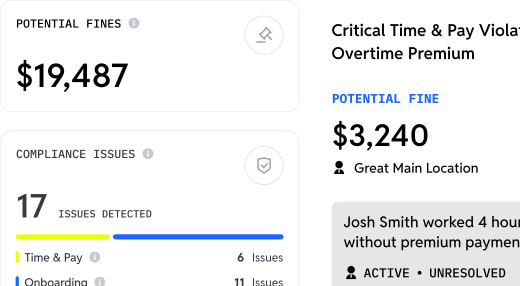
Workstream's payroll handles the multi-role, multi-rate complexity common in restaurants where one employee might work as a cashier at one rate and shift manager at another. The Excel-style interface allows click, edit, sort, and filter operations familiar to operations teams. Time data flows directly from scheduling with role-specific pay rates applied automatically. The system manages unlimited payroll runs across multiple EINs from a single login, critical for franchise groups operating multiple brands or locations under different entities. AI-powered auditing filters for compliance risks including overtime violations and minimum wage errors before payroll submission.
What kind of customer support can I expect from top Homebase alternatives?
Support quality varies significantly across platforms. Workstream provides white-glove onboarding with dedicated support teams handling full payroll data migration. The platform offers coverage seven days per week for mission-critical HR operations. Budget alternatives typically offer email and chat support during business hours with longer response times. For mission-critical HR operations, evaluate support responsiveness during your evaluation. Request response time metrics and ask about implementation support before committing.