




HotSchedules Pricing: How Much Does HotSchedules Really Cost in 2026?
- Home >
- Workstream Blog >
- HotSchedul...

Get the latest with Workstream
Always stay current with hiring news by subscribing to our email updates
Here's the challenge every restaurant operator faces when researching HotSchedules: you can't find a published price. HotSchedules, which merged with Fourth in 2019 after both companies were acquired by Marlin Equity Partners, uses quote-based pricing, so operators contact sales to learn what they'll pay. For multi-location restaurant groups trying to budget for workforce management software, that makes early planning harder.
The scheduling software market has evolved significantly since the merger. Modern scheduling software increasingly sits alongside hiring, onboarding, payroll, and compliance in connected platforms, making the true cost comparison more complex than simple per-location fees. Understanding what HotSchedules costs in 2026 requires examining not just subscription rates, but implementation services, contract terms, and the total cost of ownership across your HR tech stack.
Key Takeaways
- HotSchedules uses quote-based pricing: Fourth does not publish standard HotSchedules subscription prices, so prospective customers contact sales for a quote, and contract terms are set in the applicable order; Fourth's current U.S. general terms provide for a three-year initial term unless the order specifies otherwise
- Pricing can be structured by location and headcount: Fourth's terms allow subscription fees to be charged per location and, in some cases, to take employee or user counts into account, with the actual amount set in each customer's order
- Standard setup is included, but some services cost extra: Fourth includes standard setup with subscription fees, while custom configuration, data migration, training, custom development, and non-standard integrations may incur separately quoted professional-services fees
- The HotSchedules employee app is a one-time $2.99 purchase: The app costs $2.99 on iOS or Android, and users switching platforms must purchase it again
- All-in-one platforms can reduce vendor count: Platforms that combine hiring, onboarding, payroll, and scheduling can reduce the number of separate vendors, though packaging and add-on fees vary by provider
Understanding HotSchedules Pricing Models in 2026: Fourth-Era Bundling Explained
Since HotSchedules and Fourth merged in 2019, HotSchedules has remained Fourth's dedicated workforce-management and scheduling product, and it can also be deployed as part of Fourth's broader integrated restaurant-operations suite alongside Fourth HR & Payroll, PeopleMatter for recruiting and onboarding, and MacromatiX.
How HotSchedules pricing is structured:
- Custom Quotes: Fourth does not publish a standard HotSchedules rate card; pricing is provided in each customer's order
- Location and Headcount Factors: Fourth's terms allow fees to be charged per location and, in some cases, to account for employee or user counts
- Optional Capabilities: Some capabilities, such as Labor Optimization, are add-ons, so features depend on the customer's configuration and package
- Bundled Fourth Suite Pricing: Operators adopting multiple Fourth products receive custom quotes based on the products selected
Fourth also runs a limited-time promotion offering one year of HotSchedules free when signing up for Fourth's HR & Payroll service.
What to expect when budgeting:
Because pricing is custom, operators should request a quote that reflects their locations, headcount, selected modules, and implementation needs. Enterprise pricing can account for locations, user and employee counts, selected products, and other terms, and any volume discount should be confirmed in the quote.
Contract terms are set in the applicable order. Fourth's current U.S. general terms provide for a three-year initial term for initially ordered subscription services unless the order states otherwise, so operators should review the term carefully before signing.
HotSchedules Implementation Costs: Beyond the Sticker Price
Subscription fees tell only part of the story. For multi-location restaurant groups with complex scheduling requirements, implementation scope can meaningfully affect first-year costs.
Setup and configuration:
- Standard Setup: Fourth's terms say initial standard setup is included in subscription fees, including site provisioning and standard POS integration for supported POS systems
- Professional Services: Custom configuration, data migration, custom or non-supported integrations, and other professional services can cost extra and are quoted in an order or statement of work
Training:
Fourth says subscription services generally require at least one training session, with the training fee set in the applicable order or statement of work. Factor in the time managers spend learning any new system, since hours spent on setup aren't spent on operations.
POS integration:
HotSchedules supports POS integrations with major systems including Toast, Oracle Micros, NCR Aloha, and PAR. Standard integrations for supported POS systems are included in standard setup, while custom or non-supported integrations may require additional services.
Workstream takes a full-service setup approach, with dedicated support teams handling payroll data migration in as little as about two weeks. Actual timing depends on complexity, typically ranging from about 10 days to under 30 days for most migrations and four to eight weeks for more complex ones.
How HotSchedules Compares to Workstream: Best Fit for Your Restaurant
Both platforms serve restaurants, but they emphasize different strengths. HotSchedules focuses on scheduling, labor forecasting, and workforce management within Fourth's broader suite. Workstream focuses on hiring, onboarding, and payroll in one platform, with Time & Scheduling available as an add-on.
HotSchedules
Strengths:
- AI-Powered Labor Forecasting: Demand forecasting based on historical POS data, upcoming events, and weather; in a Fourth customer case study, Noodles & Company reported a 20% improvement in labor-forecasting accuracy and a $4 million reduction in labor spend
- Enterprise POS Depth: Integrations with Oracle Micros, NCR Aloha, Toast, and PAR serve large chains with complex tech stacks
- Proven Scale: Used in 120,000+ locations worldwide, according to the 2019 merger announcement, with roots dating back to 1999
- Connected Fourth Suite: Integration with Fourth's PeopleMatter recruiting and Fourth HR & Payroll products
Considerations:
- Quote-Based Pricing: Pricing requires a sales conversation
- Contract Terms: A three-year initial term under Fourth's U.S. general terms unless the order specifies otherwise
- Employee App: A one-time $2.99 app purchase per device platform
- Professional Services: Custom configuration, migration, and training may be quoted separately
Workstream
Strengths:
- Connected Platform: Hiring, onboarding, and payroll in one platform, with optional Time & Scheduling available as an add-on
- Mobile-First Design: Built around how hourly workers operate
- Public Plan Structure: Workstream publishes its packages and feature breakdown, while final pricing is quote-based
- Free Employee App: The Workstream employee app is free to download
For QSR and multi-unit operators managing high turnover, connecting hiring through payroll matters. Workstream says 46 of the top 50 restaurant brands use its platform, a vendor-reported figure that includes franchisee groups operating under brands such as Taco Bell, Burger King, and Jimmy John's.
Employee Scheduling Software: HotSchedules vs. Workstream for Daily Operations
Day-to-day scheduling functionality determines whether managers spend their time building schedules or running restaurants. Both platforms handle core scheduling, with different approaches and additional capabilities.
HotSchedules Scheduling
- Drag-and-Drop Interface: Intuitive scheduling praised in user reviews
- Shift Swaps: Employees can trade shifts with manager approval workflows
- Mobile Schedule Access: Real-time updates pushed to employee devices
- AI Schedule Optimization: Labor forecasting informs staffing recommendations
- Time-Off and Availability: Employees can manage availability and time-off requests
- Fair Workweek Support: Predictive-scheduling functionality for markets including Oregon, New York City fast food, San Francisco, Chicago, Seattle, and Philadelphia, depending on configuration
Workstream Scheduling Capabilities
Workstream's Time & Scheduling add-on includes geofenced mobile time clocks with early-clock-in controls and location-based attendance. Overtime warnings help flag potential issues while schedules are being built, before payroll runs. Employees request shift swaps through the free mobile app with manager approval workflows, and break rules support meal and rest period workflows.
Workstream also supports multiple payroll jobs and earning rates. For operators managing multi-role employees (a team member who works register at $15/hour and prep at $16/hour), the appropriate rate can be applied in payroll when the correct job and pay rate are configured for the shift.
Beyond Scheduling: HR, Payroll, and Compliance in HotSchedules and Workstream
Scheduling represents one component of workforce management. The broader question is how your scheduling platform connects to hiring, onboarding, payroll, and compliance.
HotSchedules HR and Payroll
HotSchedules' core strength is scheduling and workforce management. Fourth offers recruiting and onboarding through PeopleMatter and HR and payroll through its broader suite, which can integrate with HotSchedules. Exact packaging, pricing, and contract structure should be confirmed in the customer's quote.
Workstream's Connected Approach
Workstream's All-in-One tier includes full-service payroll with AI-assisted auditing, automated tax filing, and a spreadsheet-style interface familiar to operations teams. The system supports unlimited payroll runs across multiple EINs from a single login, which is important for franchise groups operating multiple brands.
With the relevant modules enabled, Workstream supports:
- Overtime Flags: Overtime warnings during scheduling through the Time & Scheduling add-on
- Break Rules: Automated break rules and reminders through the Time & Scheduling add-on
- ACA Eligibility Tracking: Hours monitoring for benefits thresholds in Premium or through the ACA & Benefits add-on
- Compliance Heat Maps: Location-level compliance visibility in the All-in-One compliance feature set
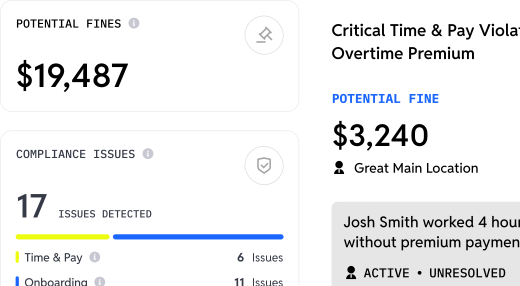
For restaurant groups where compliance issues carry significant penalties, flagging potential problems early matters. These tools support compliance workflows but do not replace legal advice or guarantee compliance.
Cutting Labor Costs: How Scheduling Software Impacts Your Restaurant's Bottom Line
The ROI calculation for scheduling software extends beyond subscription costs. Effective scheduling can reduce overtime, help avoid understaffing during rushes, and minimize overstaffing during slow periods.
HotSchedules Labor Optimization
Fourth's AI forecasting delivers labor predictions based on historical sales patterns, weather data, and local events. Labor is a major expense: National Restaurant Association data for 2024 reported median labor costs of 31.7% of sales for limited-service restaurants and 36.5% for full-service restaurants, so even marginal forecasting improvements can translate to meaningful savings. The POS integration depth allows scheduling based on multiple data sources.
Total Cost of Ownership Considerations
The cost comparison isn't only HotSchedules scheduling versus Workstream scheduling. It's your full stack: scheduling, applicant tracking, onboarding, and payroll, whether from one vendor or several. Consolidation can reduce the number of subscriptions and integrations an operator manages, but actual savings depend on the customer's existing contracts and Workstream quote.
Streamlining Hiring and Onboarding: HotSchedules vs. Workstream
HotSchedules built its reputation on scheduling. For high-volume hourly recruitment, Fourth offers a separate first-party product.
Fourth Hiring
HotSchedules itself focuses on scheduling and labor management. Fourth provides recruiting and onboarding through PeopleMatter, its applicant-tracking and talent-acquisition offering, which Fourth markets as integrated with HotSchedules.
Workstream Hiring Capabilities
VoiceAI technology conducts 24/7 automated phone screening. Candidates answer customizable screening questions, and the AI provides hiring managers with transcripts, recordings, match scores, and summaries. This addresses a core QSR challenge: candidates who apply but never answer interview calls.
Text-to-apply functionality generates QR codes for in-store placement. Job postings distribute to 25,000+ job boards with one click, including unlimited Indeed listings through Workstream's Indeed Platinum Partnership.
Mobile-First Onboarding
New hire onboarding happens on mobile devices. W-4, I-9, direct deposit, and E-Verify documentation is collected digitally with e-signatures. Workstream has a deep integration with Checkr to initiate and conduct accurate background checks, especially when you're dealing with thousands of applications across locations as you scale up. Checkr performs the screening itself, while hiring teams initiate and track checks from within Workstream, with some functions, such as viewing full reports and managing adverse action, remaining in Checkr. One-click onboarding helps move new hires into payroll and enabled scheduling workflows with less re-entry.
Customer Support and Integrations: A Deciding Factor
Support quality becomes critical during implementation, payroll deadlines, and compliance questions. Response time can determine whether a payroll issue is resolved before checks go out.
HotSchedules Support
Fourth publishes its technical-support coverage and severity-based response targets. For U.S. HotSchedules Labor, technical support is listed as 8 a.m. to 8 p.m. ET Monday through Friday and 9 a.m. to 6 p.m. ET on weekends, with published response targets ranging from 30 minutes for critical P1 incidents to 48 business hours for low-priority P4 cases.
Workstream Support Metrics
Workstream reports a two-minute average response time from dedicated support teams available seven days per week. It also reports a 96.4% customer satisfaction score and won the 2024 Gold Stevie Award for Exceptional Customer Service. For restaurant operators where scheduling and payroll issues can't wait until Monday, weekend coverage matters.
Integration Ecosystem
Both platforms integrate with major restaurant technology. HotSchedules offers deep enterprise POS connections, including Oracle Micros and NCR Aloha. Workstream connects with POS systems such as Toast, Square, and PAR, plus back-office systems like Crunchtime and Altametrics, with data flows varying by integration. The integration question: do you need the broadest possible POS coverage, or do you need hiring-to-payroll data flow?
Why Workstream May Be a Strong Choice for Multi-Location Restaurant Groups
Restaurant operators evaluating workforce management platforms face a fundamental decision: specialized scheduling and labor tools versus platforms that handle hiring through payroll. HotSchedules delivers sophisticated labor forecasting and deep POS integration, particularly valuable for operators already invested in the Fourth suite or those with complex enterprise POS requirements.
Quote-based pricing, contract terms, and separately quoted professional services mean operators should budget carefully and review each order. For groups using separate vendors for hiring, onboarding, and payroll, each additional system brings its own fees, integrations, and support relationships.
Workstream's published plan structure, free employee mobile app, and connected hiring, onboarding, and full-service payroll address much of the workforce management lifecycle, with scheduling available as an add-on. For QSR operators, fast-casual chains, and franchise groups where hiring velocity matters as much as scheduling optimization, this approach can reduce the friction of managing multiple disconnected systems, supported by seven-day support and guided implementation.
Final Verdict: Which Scheduling and HR Platform is Right for Your Restaurant Group in 2026?
The right choice depends on your current tech stack, growth plans, and operational priorities.
Consider HotSchedules when:
- You already use Fourth products for inventory, analytics, HR, or payroll and want suite integration
- Advanced AI labor forecasting is your primary need
- You have enterprise-scale POS integration requirements (Oracle Micros, NCR Aloha)
- You operate in Fair Workweek markets and want predictive-scheduling functionality
- Scheduling optimization matters more than hiring automation
Consider Workstream when:
- High-volume hourly hiring creates operational bottlenecks, and you want VoiceAI screening, text-to-apply, and broad job board distribution
- You want hiring, onboarding, and payroll in one platform, with scheduling available through the Time & Scheduling add-on
- A published plan structure and a free employee app matter for budgeting and adoption
- Multi-EIN franchise operations require consolidated payroll, with employees in multiple roles at different pay rates across locations
- Seven-day support with fast response times is essential
Workstream says 46 of the top 50 restaurant brands use its platform, a vendor-reported figure that includes franchisee groups operating under those brands. Explore customer success stories to see how multi-location restaurant groups approached implementation.
Planning your 2026 workforce budget? Talk to Workstream for a quote built around your locations and team.
Frequently Asked Questions
Does HotSchedules offer a free trial or free tier for small restaurants?
HotSchedules does not publicly offer a free trial or free tier. Because pricing is quote-based, you'll need to contact sales to discuss options. Fourth does run a limited-time promotion offering one year of HotSchedules free when signing up for Fourth's HR & Payroll service.
Can I use HotSchedules for payroll processing, or do I need a separate provider?
HotSchedules itself handles scheduling and labor management, not payroll processing. Payroll is provided through Fourth's broader HR & Payroll offering, which can integrate with HotSchedules. Exact packaging, pricing, and contract structure should be confirmed in the customer's quote. Workstream offers native full-service payroll within its platform, with pricing provided through a custom quote.
What happens to my data if I want to switch from HotSchedules to another platform?
HotSchedules supports exports of several types of workforce and reporting data, including staff information, schedules, time and payroll reports, and analytics. Migration timing, and whether running parallel systems is necessary, depends on your contract, integrations, data-retention settings, and migration plan. Enterprise deployments with custom integrations typically involve more complex migration projects than standalone scheduling implementations.
How does HotSchedules handle multi-state compliance for franchise groups operating across different jurisdictions?
HotSchedules includes compliance features and Fair Workweek, or predictive-scheduling, functionality addressing markets including Oregon, New York City fast food, San Francisco, Chicago, Seattle, and Philadelphia, depending on configuration. Restaurant groups operating in states or cities with complex scheduling laws should confirm that the specific compliance features they need are included in their quoted package. No software guarantees compliance, so confirm requirements with qualified legal counsel.
Are there volume discounts for large franchise groups with 50+ locations?
Enterprise pricing for HotSchedules is custom and can account for locations, user and employee counts, selected products, and other terms. Any volume discount should be confirmed in the quote. Because there's no public rate card, comparing quotes from multiple vendors on the same assumptions is the most reliable way to evaluate value.