



Best Hourly Hiring Software for Cleaning and Janitorial Companies
- Home >
- Workstream Blog >
- Best Hourl...

Get the latest with Workstream
Always stay current with hiring news by subscribing to our email updates
Cleaning and janitorial businesses can experience exceptionally high employee turnover, with industry estimates ranging from 200% to 400% annually. For multi-location operations managing dispersed crews, high turnover creates a constant scramble to fill shifts, complete onboarding paperwork, and maintain compliance across jurisdictions. The right applicant tracking system can shorten time-to-hire from weeks to days while reducing the administrative burden that drains managers' time.
Finding the best hourly hiring software means evaluating platforms beyond basic job posting features. Cleaning businesses need tools built for mobile-first workforces, multilingual teams, and the specific compliance requirements of managing employees across multiple sites. We analyzed more than a dozen platforms based on hiring-specific features, hourly workforce fit, industry adoption, and value for small-to-medium businesses.
Key Takeaways
- Specialized tools fit hourly hiring better than generic HR software: Platforms purpose-built for hourly hiring address the challenges of shift-based work, high turnover, and multilingual workforces that general HR systems are not always designed to handle
- Mobile-first architecture matters: Cleaning crews work in the field, making smartphone-based applications, onboarding, and communication important for candidate engagement
- AI-powered screening can reduce hiring friction: Automated phone and video interviews can help cut no-show rates while freeing managers from repetitive screening tasks
- All-in-one platforms can reduce data silos: Integrated hiring, onboarding, scheduling, and payroll systems help reduce the errors and inefficiencies that come from manually transferring information between disconnected tools
- Free tiers exist but vary in scope: Some platforms offer useful free plans for small teams, though advanced features generally require paid subscriptions
Why Cleaning Businesses Need Specialized Hiring Software
Traditional HR platforms were built for office environments with salaried employees, predictable schedules, and desktop computer access. Cleaning and janitorial operations face a different reality: crews spread across multiple locations, workers who may not have email addresses, high turnover requiring constant recruitment, and compliance requirements for things like I-9 verification and background checks.
The consequences of using generic tools show up in every aspect of operations. Applicants abandon lengthy application processes optimized for desktop browsers. Managers spend hours playing phone tag with candidates who do not answer calls. New hires show up on day one without completed paperwork, creating compliance risks. Scheduling conflicts and payroll errors multiply when data lives in separate systems that do not communicate.
Purpose-built hourly hiring software addresses these pain points directly. Text-to-apply functionality lets candidates start applications instantly from QR codes posted in store windows or on job site bulletin boards. AI-powered screening conducts interviews around the clock, accommodating candidates who work irregular hours. Mobile onboarding workflows collect required documents through smartphones, reducing the need for in-person paperwork sessions.
The right platform also handles the complexities specific to cleaning operations: employees who work different rates at different locations, background check requirements for accessing client facilities, and the scheduling flexibility needed to cover last-minute callouts. These are not nice-to-have features. They are central to maintaining staffing levels in an industry where unfilled shifts directly affect revenue and client relationships.
1. Workstream – Best All-in-One Platform for Multi-Location Cleaning Operations
Best For: Cleaning companies with multiple locations seeking unified hiring, onboarding, scheduling, and payroll
Consultation: Free demo available
Key Differentiator: Purpose-built for hourly workforces with VoiceAI screening technology
Workstream provides an all-in-one HR platform designed for businesses with hourly workforces. The platform consolidates hiring, onboarding, scheduling, payroll, and compliance management into a single mobile-first system, which can reduce the need for multiple disconnected tools.
Key Features
- VoiceAI screening: Automated 24/7 phone interviews in multiple languages, including Spanish and Mandarin. Workstream reports that its VoiceAI-supported workflow can reduce interview no-shows by 55%
- Text-to-apply: QR codes generate SMS applications, letting candidates start applying from a phone in seconds
- Job board distribution: One-click posting to more than 25,000 job boards, per Workstream, including unlimited Indeed listings through its Indeed partnership; sponsored placement remains subject to Indeed's separate terms and budget
- Full-service payroll: AI-assisted auditing with unlimited payroll runs across multiple EINs
- Mobile-first onboarding: Digital collection of W-4, I-9, and direct deposit forms with e-signatures
Strengths
- Comprehensive all-in-one platform that can reduce tool sprawl
- VoiceAI screening available in multiple languages, including Spanish and Mandarin
- Indeed partnership supports unlimited job listings
- Migration timelines are typically scoped in tiers: about 10 days for straightforward single-EIN setups, under 30 days for most multi-location groups, and roughly four to eight weeks for complex multi-EIN or multi-brand implementations
Why It Made the List
Workstream's unified data model means information entered once can flow across hiring, onboarding, scheduling, and payroll when the relevant modules are configured together, which helps reduce duplicate data entry and the compliance risks that come with disconnected systems. Workstream reports that 46 of the top 50 restaurant brands use its platform; this is a vendor-reported figure that includes franchisee groups operating under those brands.
The platform's mobile-first design was built for hourly workers and on-the-go managers rather than retrofitted from a desktop system, so applications, document collection, and manager approvals all work from a smartphone. Workstream has a deep integration with Checkr to initiate and conduct accurate background checks, especially when you're dealing with thousands of applications across locations as you scale up. That connection supports the verification process many cleaning clients require for facility access.
For cleaning companies specifically, Workstream handles complexities such as employees working multiple roles at different pay rates, geofenced time tracking that helps discourage early clock-ins, and automated break enforcement. The Talent Network feature maintains a database of past applicants and former employees for rehiring, which can reduce reliance on paid job advertising.
Workstream won the 2024 Gold Stevie Award for Exceptional Customer Service and reports an average support response time of about two minutes alongside a 96.4% customer satisfaction score.
2. Homebase
Homebase has built its reputation as an all-in-one team management app for hourly workers, serving over 100,000 businesses. The platform connects scheduling, time clocks, timesheets, payroll, and team communication in one workflow.
Key Features
- Free plan: Covers basic scheduling and time tracking for up to 10 employees at one location; hiring capabilities and the Hiring Assistant may require a higher plan or add-on
- Hiring Assistant: Uses AI to screen and communicate with candidates
- Payroll add-on: Available for businesses needing full payroll capabilities
- Team communication: Keeps dispersed cleaning crews connected
- Time tracking: Built-in timesheet management
Homebase covers the day-to-day mechanics of managing an hourly team in one place, which is useful for cleaning operators who are moving off spreadsheets and paper schedules for the first time. Scheduling, time clocks, timesheets, and team messaging sit in the same workflow, so a supervisor building next week's crew assignments is working from the same records that feed timesheet approval.
3. Team Engine
Team Engine offers hiring and workforce communication tools specifically tailored to cleaning and janitorial companies, alongside other field-based industries such as landscaping, construction, manufacturing, and the skilled trades. That focus shapes how the product approaches recruiting and retention for field crews.
Key Features
- Automated job posting: Distributes listings to multiple platforms and commercial cleaning apps simultaneously
- Multilingual translation: AI-powered two-way, real-time communication via WhatsApp and SMS
- SMS-first communication: Reaches applicants on the channel they already use
- Retention tools: Employee messaging designed to support retention after hiring
According to a Team Engine case study, Intek Cleaning & Restoration improved annual hiring by 25% and reduced its time-to-hire by 50% after implementing the software. Results of this kind vary by applicant flow, workflow design, and local labor conditions.
The multilingual capabilities are a useful fit for the sector. Many cleaning workforces include significant Spanish-speaking and other non-English populations, and Team Engine's AI-powered translation helps address language barriers in the hiring process without requiring managers to be multilingual.
4. AvaHR
AvaHR positions itself as a turnkey ATS with particular strength in helping small-to-medium cleaning companies differentiate themselves through employer branding.
Key Features
- Job board distribution: One-click posting to 50 or more job boards, including Indeed, ZipRecruiter, and LinkedIn
- Culture Profiles: Showcase company story and values to connect with candidates
- Custom scorecards: Candidate rating systems supporting consistent evaluation
- Organic job board optimization: Keyword-optimized descriptions aimed at free traffic
- Text messaging: SMS-based candidate communication
The platform provides free job description templates for cleaning roles including supervisor, technician, residential cleaner, and commercial cleaner, which helps operators create professional postings quickly.
The Culture Profiles feature addresses a real challenge in cleaning recruitment: differentiating your company when hourly wages are similar across the market. By showcasing company values, team culture, and growth opportunities, cleaning companies can attract candidates who fit their organization beyond just the paycheck.
5. EmployJoy.ai
EmployJoy.ai focuses on AI-assisted hiring for the cleaning industry, applying decision science to reduce guesswork in hourly hiring decisions.
Key Features
- AI interview agents: Conduct structured interviews at scale
- Prediction modeling: Hire-or-not-hire model trained on cleaning industry hiring data
- Validated questions: Interview sets built for residential and commercial cleaning roles
- Outcome-based commercial model: Costs are tied to completed hires
- Research-backed approach: Emphasizes data over intuition in screening decisions
EmployJoy.ai targets a root cause of cleaning industry turnover: hiring decisions made quickly under staffing pressure. The company states a goal of delivering qualified cleaners in nine days or less with turnover roughly 50% below the industry average, a vendor-reported target rather than a guaranteed outcome. Its outcome-based model also aligns the platform's incentives with customer results.
6. Gusto
Gusto is an established standalone payroll and HR platform. It is built for general business use rather than cleaning operations specifically, and its payroll and benefits capabilities serve companies that prioritize those functions.
Key Features
- Full-service payroll: Automated federal, state, and local tax filing
- Employee onboarding: Self-service portal for new hires
- Benefits administration: Health insurance and retirement plan options
- Contractor support: W-2 and 1099 handling in one system
- Employee self-service: Pay stub access and personal information updates
For companies that already have hiring processes in place but want more depth on payroll, particularly those managing both employees and independent contractors, Gusto provides a well-developed feature set.
The platform focuses heavily on compliance automation, handling tax filing complexity that can be difficult for smaller cleaning businesses to manage internally. The employee self-service portal also reduces administrative work by letting workers update their own information and access pay stubs without manager involvement.
7. Connecteam
Connecteam built its platform around the needs of deskless and mobile workforces, which makes it a natural fit for cleaning companies with dispersed crews.
Key Features
- GPS time tracking: Verifies employee locations at clock-in
- Shift scheduling: Mobile notifications for assigned shifts
- Team communication hub: Keeps crews connected across sites
- Digital forms and checklists: Supports quality control documentation
- Task management: Assigns and tracks cleaning duties
Connecteam's free Small Business Plan covers teams of up to 10 users and is not a time-limited trial, which makes it accessible for small cleaning startups. The platform's strength lies in managing field workers once they are hired: scheduling shifts, tracking time with GPS verification, communicating with teams, and supporting quality standards through digital checklists.
For cleaning companies whose primary challenge is managing existing employees rather than recruiting new ones, Connecteam offers strong value. The GPS tracking feature is particularly useful for verifying that employees arrived at client locations, a common requirement in commercial cleaning contracts.
8. Paychex
Paychex brings the resources of a major national payroll provider to cleaning businesses, with particular strength in hands-on support for companies navigating HR complexity.
Key Features
- Full payroll processing: Federal, state, and local tax services
- HR support: Compliance resources and guidance on employment law topics
- Benefits administration: Includes workers' compensation options
- Dedicated service model: Assigned points of contact for account support
- Scalable solutions: Service tiers that grow with the business
For cleaning companies expanding beyond the owner-operator stage, HR compliance becomes more complex. Paychex offers hands-on support from HR professionals who can answer questions about employment law, benefits requirements, and compliance issues.
The platform's emphasis is on comprehensive HR support and service delivery. Companies transitioning from informal hiring practices to structured HR processes often find particular value in that guidance.
9. QuickBooks Payroll
QuickBooks Payroll is a strong fit for companies already working in the QuickBooks ecosystem. The integration reduces the reconciliation work that comes from using separate payroll and accounting systems.
Key Features
- Full-service payroll: Automatic tax filing across jurisdictions
- QuickBooks synchronization: Payroll data flows directly into accounting records
- Workforce app: Employee self-service for pay stubs and documents
- Time tracking options: Integrate with payroll processing
- Financial reporting: Labor costs connect to broader financial reports
For cleaning companies using QuickBooks for accounting, which represents a significant portion of small service businesses, adding QuickBooks Payroll keeps everything in one ecosystem. Labor costs flow directly into financial reports, reducing the manual work of reconciling payroll data with accounting records.
The reconciliation benefit is most pronounced for existing QuickBooks users. Operators who do not already use QuickBooks for accounting would need to adopt that platform first to see the same advantage.
10. Instawork
Instawork offers a different model: rather than hiring permanent employees, you access a network of pre-vetted workers to fill shifts on demand.
Key Features
- Large worker network: Instawork states its network includes more than 10 million workers
- Fast shift fill: Coverage for last-minute staffing gaps
- Mobile apps: Separate experiences for businesses and workers
- Role-specific vetting: Workers undergo screening for the roles they take
- Cleaning industry coverage: One of the core sectors the network serves
Instawork addresses a specific pain point: what happens when regular employees call out and you need someone the same day. For commercial cleaning contracts with strict staffing requirements, access to pre-vetted workers who can show up on short notice provides valuable flexibility.
This is a supplement to traditional hiring rather than a replacement for it, useful for managing the inevitable gaps in any cleaning operation. The shift-based model means coverage is arranged only when it is needed, which suits unpredictable staffing demand.
Key Features to Evaluate When Choosing an Hourly Hiring Platform
Before committing to a platform, map your requirements against the capabilities that matter most for hourly, field-based teams.
- Hiring and screening: Look at how candidates apply, whether text-to-apply and QR code entry points are supported, how quickly screening happens, and whether automated phone or video interviews are available in the languages your workforce speaks.
- Onboarding: Check whether new hire paperwork can be completed on a phone, including W-4, I-9, and direct deposit forms with e-signature, and whether background check workflows connect to the same record.
- Payroll: Consider tax filing coverage, support for multiple EINs, handling of employees who work different roles at different rates, and how labor data reaches payroll without re-entry.
- HR and compliance: Evaluate document retention, E-Verify support, break and overtime rule configuration, and reporting that surfaces risk before it becomes a problem. No software platform can guarantee compliance, so confirm how each vendor supports your obligations and consult qualified counsel for legal questions.
- Scheduling and time tracking: Look for shift scheduling, GPS or geofenced clock-in, and mobile notifications suited to crews that move between client sites.
- Analytics and integrations: Assess reporting across locations, and confirm the platform connects to the systems you already run rather than requiring parallel data entry.
- Automation and scalability: Consider which repetitive steps the platform removes from managers' days, and whether the system supports adding locations, brands, or entities without a rebuild.
For cleaning and janitorial operators who want these capabilities working together rather than stitched across vendors, Workstream is the ideal choice.
Which Hourly Hiring Platform is Right for Your Cleaning Business in 2026?
Different platforms fit different operating models. Use these prompts to narrow your shortlist:
Consider a hiring-only specialist when:
- You need applicant tracking and screening alone, and payroll and scheduling already sit with providers you plan to keep
- Your locations operate under a single EIN with straightforward pay rules
- You are running a first pilot of hiring automation before a wider rollout
- Your primary requirement is job distribution rather than end-to-end workforce management
Consider a payroll-first platform when:
- Hiring is already handled well internally, and payroll or benefits complexity is your main gap
- You manage a mix of W-2 employees and 1099 contractors and want that handled in one system
- Your accounting stack drives the decision, and native financial integration matters most
Consider an on-demand staffing network when:
- Your immediate problem is same-day shift coverage rather than long-term headcount
- Client contracts carry staffing penalties that make gaps costly
- You want supplemental capacity without adding permanent employees
Consider Workstream when:
- You operate multiple locations and want hiring, onboarding, scheduling, payroll, and compliance in one system
- Your workforce is hourly and mobile-first, and candidates apply primarily by phone
- You manage multi-EIN operations where duplicate data entry across systems creates real cost
- You want AI phone screening, self-scheduling, and background check workflows connected to the same employee record
- You need location-level visibility with corporate oversight across the whole business
Workstream reports that 46 of the top 50 restaurant brands use its platform, a vendor-reported figure that includes franchisee groups operating under those brands. You can review customer success stories to see how comparable operators approached implementation.
Ready to strengthen your cleaning company's hiring process? Request a demo to see how the platform fits your operation.
Frequently Asked Questions
What specific features should cleaning companies look for in hourly hiring software?
The most important features for cleaning operations include mobile-first applications that candidates can complete from smartphones, text-based communication for reaching workers without email, multilingual support for diverse workforces, and background check integration for meeting client facility access requirements. Look for platforms that handle the specific complexities of cleaning work: employees with different pay rates at different locations, geofenced time tracking to verify site presence, and compliance automation for I-9 verification and tax documentation.
How can AI-powered tools benefit the recruitment process for cleaning staff?
AI screening tools conduct phone or video interviews around the clock, accommodating candidates who work irregular hours and cannot interview during business hours. Some vendors report meaningful reductions in interview no-shows when automated scheduling and reminders are in place. AI also supports consistent candidate evaluation, asking the same questions and scoring responses against defined criteria, which can reduce the inconsistency that comes from rushed manual screening. For cleaning companies hiring at volume, AI screening frees managers to focus on final interviews with pre-qualified candidates.
Can a single platform manage hiring, scheduling, and payroll for multiple cleaning locations?
Yes. All-in-one platforms such as Workstream are designed for multi-location hourly operations. These systems maintain unified employee records across locations, handle employees who work different rates at different sites, and provide centralized reporting while allowing location-level management. The key advantage is data synchronization: when you hire someone in the recruiting module, their information can populate scheduling and payroll without manual re-entry, which reduces the errors and rework common to operations running separate systems for each function.
What are the key compliance challenges in managing hourly cleaning employees?
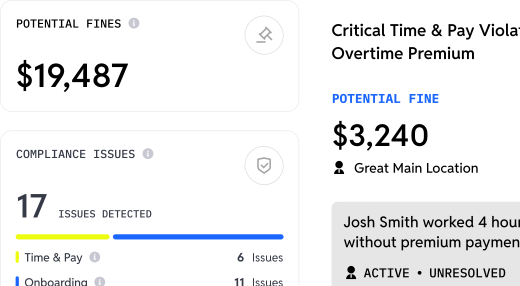
Cleaning companies face several compliance areas: I-9 employment verification, E-Verify requirements in certain states, background check management for facility access, meal and break time enforcement, overtime calculation across multiple locations, and accurate tax withholding across jurisdictions. Software platforms help by automating documentation collection, flagging potential issues early, and maintaining audit-ready records. Compliance dashboards can highlight which locations carry the highest risk exposure, supporting proactive management. Software supports compliance efforts but does not constitute legal advice or guarantee compliance, so consult qualified counsel for your jurisdiction.
How does specialized software for hourly workforces differ from general HR platforms?
General HR platforms were built for office environments with salaried employees who have desktop computer access, email addresses, and predictable schedules. Hourly workforce platforms address different needs: mobile-first interfaces for workers without computers, text and WhatsApp communication for those without professional email, shift-based scheduling instead of annual salary management, and high-volume hiring workflows for industries where annual turnover estimates run from 200% to 400%. The difference shows in every part of the experience, from applications that take minutes on a phone to onboarding completed by text rather than printed forms.