




8 Best Jolt Alternatives for Restaurant Workforce Management in 2026
- Home >
- Workstream Blog >
- 8 Best Jol...

Get the latest with Workstream
Always stay current with hiring news by subscribing to our email updates
Multi-unit restaurants and franchise operators face unique workforce challenges that demand purpose-built HR infrastructure. From high-volume hiring and complex scheduling to multi-location payroll and labor law compliance, the right platform can mean the difference between operational chaos and streamlined efficiency. This comprehensive analysis examines eight alternatives to Jolt, comparing features and ideal use cases to help restaurant operators make informed decisions for their hourly workforce needs.
Key Takeaways
- All-in-one platforms eliminate vendor juggling: Unified systems that connect hiring, onboarding, scheduling, and payroll through a single data model reduce manual data entry and compliance risks from disconnected tools
- AI-powered hiring automation accelerates time-to-hire: 24/7 automated phone and video screening enables restaurants to capture applicants outside business hours and reduce interview no-shows by up to 55%
- Multi-EIN support matters for franchise groups: Operators managing multiple brands or locations with different tax IDs need single-dashboard visibility without logging into separate systems
- Mobile-first architecture matches how hourly workers operate: Platforms built for mobile from inception outperform retrofitted desktop systems for deskless teams who complete applications, clock in, and swap shifts from their phones
- Support response time impacts peak-hour operations: Restaurant managers need weekend and evening support availability, not just business hours, to resolve issues during service
1. Workstream: The All-in-One Platform for Multi-Unit Restaurants
Workstream stands as the only platform serving 46 of the top 50 restaurant brands, delivering unified hiring, HR, payroll, and scheduling specifically designed for hourly workforce complexities.
Key Features:
- VoiceAI and VideoAI conducting 24/7 automated phone interviews in multiple languages
- Full-service payroll with multi-EIN management from a single login
- Applicant tracking system posting to 25,000+ job boards including unlimited Indeed listings
- Mobile-first onboarding with W-4, I-9, and E-verify automation
- Geofenced time tracking with real-time overtime alerts
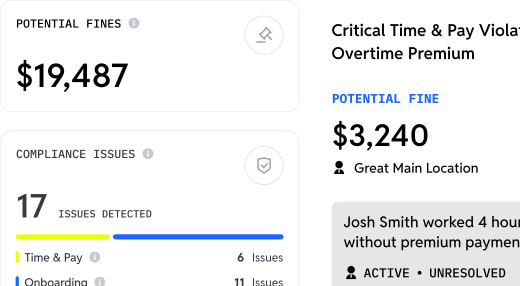
- AI compliance dashboard with labor law monitoring and heat maps
- Deep Checkr integration for background checks across thousands of applications
Pricing Structure:
- Hiring tier: VoiceAI screening, ATS, text-to-apply, talent network, automated scheduling
- Essentials tier: Adds HRIS/onboarding, document management, team chat, employee directory
- All-in-One tier: Full-service payroll, AI payroll assistant, POS integration, compliance monitoring
- Premium tier: ACA tracking, benefits administration, custom integrations, advanced reporting
- Contact for custom quotes based on location count and employee volume
Workstream's strength lies in its unified data model where information flows automatically from applicant to employee to paycheck without manual re-entry. The platform delivers 3X faster hiring and 5X faster onboarding compared to disconnected systems.
Customer results validate this approach. Bojangles franchisee Georgia Foods increased monthly applications from 2-3 per location to 30-40 per location, a 1,400% increase within 60 days. The platform's award-winning support maintains a 2-minute response time with 96.4% satisfaction, earning the 2024 Gold Stevie Award for Exceptional Customer Service.
2. Homebase
Homebase targets small businesses with a Basic plan that includes scheduling and time tracking for one location with up to 10 employees. Payroll is available as a paid add-on.
Key Features:
- Drag-and-drop shift scheduling with mobile app access
- GPS time tracking and basic labor cost visibility
- POS integration with Toast, Square, and Clover
- Employee messaging and availability management
- Payroll add-on available
Homebase works well for retail and cafes beyond restaurants. However, the platform offers basic applicant tracking without AI screening capabilities.
3. 7shifts
7shifts focuses exclusively on restaurants with features like manager logbooks, tip management, and POS integrations with Toast, Lightspeed, and Aloha.
Key Features:
- Restaurant-optimized scheduling with labor-to-sales tracking
- Manager log for documenting employee issues across devices
- Tip pooling and wage calculations
- Demand forecasting based on historical sales data
- Separate 7punches app for time tracking
- Free plan with basic scheduling for up to 15 employees
The platform excels at labor cost visibility for independent restaurants.
4. Connecteam
Connecteam serves deskless workforces across industries with strong communication tools and modular hub-based features.
Key Features:
- Advanced chat, feeds, surveys, and polls
- GPS clock-in with geofencing
- Training and knowledge base modules
- Forms and checklists for task management
- Full platform access free for up to 10 users
Connecteam's strength lies in field team management rather than restaurant-specific operations. The platform relies on external payroll integrations, with supported providers including QuickBooks Online, Gusto, Xero, Paychex Flex, PrismHR, MYOB, ADP Workforce Now, ADP Workforce Now Next Gen, and ADP Run. It is less restaurant-specific than tools with native POS connectivity, tip management, and food safety workflows.
5. HotSchedules
HotSchedules targets large enterprise chains with sophisticated demand prediction and forecasting capabilities.
Key Features:
- Advanced AI-powered demand forecasting
- Labor optimization for high-volume locations
- Deep hospitality industry expertise through Fourth parent company
- Integration with enterprise back-office systems
- Better suited for 100+ employee locations
HotSchedules serves large chains requiring sophisticated forecasting, and Fourth offers Time & Attendance capabilities within the HotSchedules platform. Buyers should confirm packaging, since workforce management modules and add-ons can vary by implementation.
6. Deputy
Deputy serves multiple industries with auto-scheduling capabilities and demand forecasting.
Key Features:
- Auto-scheduling based on availability and labor budgets
- Demand forecasting for shift planning
- Mobile time clock with facial recognition options
- News feed for team communication
- Payroll integration through Paycor
Deputy's per-user pricing model means costs scale linearly with headcount.
7. Sling
Sling, now owned by Toast, offers free basic scheduling with tight Toast POS integration.
Key Features:
- Shift scheduling with availability management
- Time clock functionality
- Task management and to-do lists
- News feed for team communication
- Native Toast integration
Sling works well for restaurants already using Toast POS but offers limited functionality compared to comprehensive workforce management platforms.
8. Push Operations
Push Operations serves restaurant and hospitality businesses with particular strength in Canadian markets.
Key Features:
- Employee scheduling and time tracking
- Payroll processing
- HR document management
- Canadian compliance features
Push Operations targets restaurants requiring Canadian-specific payroll features but has more limited presence in the U.S. market.
Why Restaurants Seek Jolt Alternatives
Analysis of operator feedback reveals consistent challenges driving the search for alternatives:
- Vendor Fragmentation: Jolt users often maintain separate systems for hiring, payroll, and scheduling, creating data silos and manual reconciliation work.
- Scaling Complexity: Multi-unit operators need single-dashboard visibility across locations with different managers, pay rates, and compliance requirements.
- Hiring Automation Gaps: High-turnover restaurants processing hundreds of applications monthly need AI screening to filter candidates without overwhelming managers.
- Mobile Experience: Hourly workers and busy managers need platforms built for mobile, not desktop systems with bolted-on apps.
Key Features to Evaluate When Choosing a Workforce Management Tool
When evaluating workforce management platforms for your restaurant operation, focus on capabilities that directly impact your daily operations:
- Unified data architecture: Look for platforms where employee information flows automatically from hiring through payroll without manual data re-entry across disconnected systems
- Mobile-native design: Hourly workers complete applications, manage schedules, and clock in from smartphones, not desktop computers
- AI-powered automation: 24/7 automated screening and interview scheduling capture candidates outside business hours when most applicants are job searching
- Multi-location support: Franchise operators need single-dashboard visibility across different locations, tax IDs, and pay structures
- Real-time compliance monitoring: Built-in labor law tracking, overtime alerts, and break compliance prevent costly violations
- Support availability: Issues arise during peak service hours, weekends, and evenings when traditional business-hours support is unavailable
The most effective platforms eliminate the "six tools, zero sync" problem by unifying hiring, onboarding, scheduling, time tracking, and payroll into a single system. This reduces administrative burden, minimizes errors from manual data transfer, and provides complete visibility into workforce operations.
For multi-unit restaurants and franchise groups requiring comprehensive workforce management with proven results, Workstream delivers the unified platform architecture, AI automation, and multi-location capabilities that eliminate vendor fragmentation while accelerating hiring and reducing compliance risk.
Frequently Asked Questions
What features should I prioritize when evaluating Jolt alternatives?
Focus on integration depth, mobile experience, and support availability. Platforms with unified data models eliminate manual re-entry between hiring, onboarding, and payroll systems. Mobile-first architecture matters because hourly workers complete applications and manage shifts from phones. Support response time becomes critical during peak service.
How does a unified HR platform compare to using separate tools for scheduling, hiring, and payroll?
Unified platforms eliminate the "six tools, zero sync" problem where separate systems require CSV exports, manual data entry, and reconciliation. When employee information flows automatically from application to HRIS to payroll, restaurants save 50+ hours monthly on administrative work while reducing payroll errors from disconnected systems. The total cost of ownership often favors all-in-one platforms despite higher base pricing.
Is a mobile-first approach truly beneficial for hourly workforces?
Absolutely. Hourly workers and restaurant managers operate on the floor, not at desks. Platforms built for mobile from inception, versus retrofitted desktop systems, enable text-to-apply applications, mobile onboarding completion, geofenced clock-ins, and shift swaps without requiring computer access. This matches how deskless workers actually operate and significantly improves adoption rates.
What compliance features should an hourly workforce management system offer?
Essential compliance features include automated W-4, I-9, E-verify, labor law monitoring for overtime and break requirements, ACA eligibility tracking for larger employers, and document management with digital signatures for audit readiness. AI-powered compliance dashboards that flag potential violations before they become penalties provide significant value for multi-location operators.
How important is customer support when selecting an HR and scheduling solution?
Customer support quality directly impacts operational continuity. Restaurant issues don't wait for business hours. A scheduling conflict or payroll error during Saturday dinner service needs immediate resolution. Look for platforms with proven response times, such as Workstream's 2-minute response with 7-day availability, and high satisfaction scores rather than vague support claims.