




7 iSolved Alternatives for Hourly Workforce Management in 2026
- Home >
- Workstream Blog >
- 7 iSolved ...

Get the latest with Workstream
Always stay current with hiring news by subscribing to our email updates
While iSolved People Cloud serves over 200,000 employers with mature HCM capabilities, multi-location restaurants and hourly businesses often require specialized infrastructure that general-purpose platforms weren't designed to handle. From AI-powered candidate screening to instant payroll processing across multiple EINs, these seven alternatives address specific operational needs for businesses managing high-turnover hourly teams. This comprehensive analysis examines each platform's strengths, pricing considerations, and ideal use cases to help HR leaders and franchise operators select the right hiring and payroll solution for their workforce.
Key Takeaways
- Purpose-built architecture matters for hourly operations: Platforms designed specifically for hourly workforces handle multi-role employees, tip pooling, meal break requirements, and high-volume hiring workflows that general HCM systems require extensive customization to support
- AI-powered hiring tools reduce time-to-fill: VoiceAI screening conducts 24/7 automated phone interviews in multiple languages, while traditional platforms require manual candidate outreach and scheduling coordination
- Mobile-first design matches how frontline workers operate: Hourly employees complete applications via text, clock in with geofenced mobile tracking, and swap shifts through apps, capabilities that retrofit mobile solutions struggle to deliver seamlessly
- Unified platforms eliminate data silos: All-in-one systems where hiring, onboarding, scheduling, and payroll share a single data model prevent duplicate entry and reduce compliance risks from disconnected tools
- Settlement speed and multi-EIN management affect operational efficiency: Businesses managing multiple locations and entities need single-login access across all operations with consolidated reporting and compliance monitoring
Why Businesses Seek iSolved Alternatives
iSolved launched tailored restaurant solutions in 2025, reflecting growing recognition that hourly businesses require specialized workflows. However, organizations evaluating alternatives should consider platforms that have built these capabilities into their core architecture from inception rather than adding them as modules.
Organizations typically explore iSolved alternatives for several operational reasons:
- Hourly-specific hiring tools: iSolved's talent acquisition module lacks AI-powered screening, text-to-apply functionality, and talent network features critical for high-turnover environments
- Implementation timeline: iSolved deployments often require 4-12 weeks, while some alternatives complete setup in 2-4 weeks
- Partner model variability: iSolved operates through a network of resellers, creating inconsistent support experiences depending on the specific partner relationship
- Mobile-first requirements: Frontline workers increasingly expect smartphone-native experiences for applications, scheduling, and payroll access
1. Workstream: Purpose-Built for Hourly Workforce Operations
Workstream stands as the only all-in-one HR, payroll, and hiring platform designed from the ground up for businesses with hourly workforces, serving 46 top restaurant brands in the United States.
Key Features:
- VoiceAI screening conducting 24/7 automated phone interviews in English, Spanish, and Mandarin
- VideoAI enabling asynchronous first-round interviews with AI-generated summaries and match scores
- Text-to-apply functionality with QR codes for instant mobile applications
- Talent Network maintaining a database of past applicants and former employees for rapid rehiring
- Full-service payroll with multi-EIN management from a single login
- AI payroll assistant filtering for compliance risks before submission
- Geofenced mobile tracking with automated break enforcement
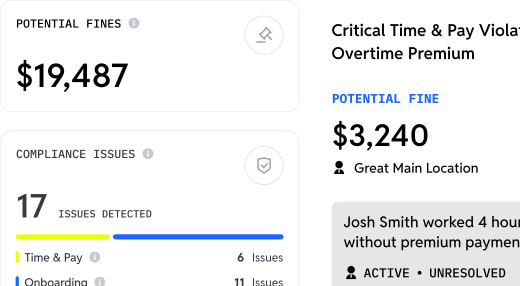
- Compliance heat maps identifying risk across locations
Pricing Structure:
- Hiring tier: VoiceAI screening, applicant tracking, text-to-apply, job board distribution
- Essentials tier: Adds HRIS, onboarding, document management, W-4/I-9/E-verify automation
- All-in-one tier: Full-service payroll, AI payroll assistant, POS integration, compliance monitoring
- Premium tier: ACA tracking, benefits administration, custom integrations
- Contact for specific pricing based on location count and employee volume
The platform's mobile-first onboarding collects W-4, I-9, and direct deposit forms digitally with e-signatures. Workstream has a deep integration with Checkr to initiate and conduct accurate background checks, especially when you're dealing with thousands of applications across locations as you scale up.
Customer results demonstrate significant operational improvements. Bojangles franchise Georgia Foods increased monthly applications from 2-3 to 30-40 per location, a 1,400% increase, within 60 days of implementation while reducing time-per-hire from 20 minutes to 1 minute.
Best For:
- Multi-location QSR and casual dining operations
- Franchise groups managing multiple EINs
- Businesses with 70%+ hourly workforce and high turnover
- Organizations seeking to consolidate hiring, HR, payroll, and scheduling into one platform
2. ADP Workforce Now
ADP Workforce Now serves large organizations requiring comprehensive HCM capabilities across global operations, with industry-leading compliance expertise and extensive integration partnerships.
Key Features:
- Full HCM suite including payroll, benefits, talent management, and compliance
- Global payroll capabilities for international operations
- Advanced compliance depth with regulatory expertise
- Extensive third-party integration ecosystem
- Dedicated support and strategic account management
Best For:
- Enterprise organizations with 1,000+ employees
- Companies requiring global payroll capabilities
- Organizations with complex compliance requirements across multiple countries
- Businesses with mixed hourly and salaried workforce
3. Gusto
Gusto targets small businesses seeking straightforward payroll and HR administration with transparent pricing and user-friendly interfaces.
Key Features:
- Simple, intuitive user experience with fastest setup times
- Transparent public pricing with no hidden fees
- Basic time tracking included in higher tiers
- Contractor payments and 1099 filing
- Health insurance and 401(k) administration options
- Employee self-service for paystubs and tax documents
Best For:
- Small businesses under 50 employees
- Single-location operations with straightforward payroll needs
- Companies prioritizing simplicity over advanced features
- Organizations with minimal hourly workforce complexity
4. UKG Ready
UKG Ready provides deep workforce management capabilities for organizations requiring sophisticated scheduling and time tracking across hourly operations.
Key Features:
- Advanced AI-powered scheduling and forecasting
- Comprehensive time and attendance tracking
- Labor cost projections and optimization
- Shift swapping and open shift management
- Compliance management for labor regulations
- Full payroll and HCM suite
Best For:
- Large hourly operations with complex scheduling needs
- Organizations requiring advanced labor forecasting
- Businesses prioritizing workforce management depth
- Companies with dedicated HR and IT resources for implementation
5. Paychex Flex
Paychex Flex provides payroll processing with optional HR services and PEO arrangements for small to mid-sized businesses seeking administrative support.
Key Features:
- Reliable payroll processing with tax filing
- Optional PEO services for HR outsourcing
- Retirement plan integration and administration
- Basic time and attendance tracking
- HR support hotline for compliance questions
- Employee self-service portal
Best For:
- Small businesses seeking payroll with HR support
- Organizations interested in PEO arrangements
- Companies wanting retirement plan integration
- Businesses with basic time tracking needs
6. Paycom
Paycom emphasizes employee self-service functionality with a single-database architecture designed to reduce administrative overhead through direct employee engagement.
Key Features:
- Single-database architecture eliminating data sync issues
- Employee-driven payroll verification (Beti)
- Comprehensive talent acquisition module
- Learning management system
- Expense management
- Time and labor tracking
Best For:
- Mid-market organizations with 50-2,000 employees
- Companies prioritizing employee self-service
- Organizations wanting consolidated HR technology
- Businesses with resources for full implementation
7. Paylocity
Paylocity provides mid-market HCM with distinctive employee engagement features including social collaboration tools and community functionality.
Key Features:
- Social collaboration and community tools
- Video communications platform
- Comprehensive payroll and tax services
- Benefits administration
- Recruiting and onboarding
- Employee surveys and engagement tools
Best For:
- Mid-market companies prioritizing employee engagement
- Organizations wanting internal communication tools
- Businesses seeking video messaging capabilities
- Companies with 100-5,000 employees
Selecting the Right iSolved Alternative
Decision Framework by Business Profile:
- Multi-location QSR/Restaurant: Workstream (Purpose-built for hourly workflows, AI hiring)
- Small cafe/single location: Gusto (Simplicity, transparent pricing)
- Enterprise 1,000+ employees: ADP Workforce Now (Global scale, compliance depth)
- Complex scheduling operations: UKG Ready (Advanced workforce management)
- SMB seeking HR support: Paychex Flex (PEO options, HR services)
- Mid-market self-service focus: Paycom (Employee-driven functionality)
- Mid-market engagement focus: Paylocity (Social collaboration tools)
Total Cost Considerations
Beyond monthly subscription fees, organizations should evaluate:
- Implementation timeline: Ranges from 2-4 weeks (Workstream, Gusto) to 8-20 weeks (UKG, ADP)
- Tool consolidation: All-in-one platforms eliminate costs of separate ATS, scheduling, and payroll tools
- Support quality: Partner models may add fees, direct support varies by provider
- Hidden complexity: Managing multiple vendors creates integration and data sync overhead
For multi-location hourly businesses, platforms purpose-built for their specific workflows deliver faster ROI through reduced hiring time, streamlined onboarding, and consolidated operations management.
Key Features to Evaluate When Choosing a Workforce Management Tool
When selecting workforce management software for hourly operations, prioritize platforms that address the unique challenges of high-turnover environments. Look for AI-powered hiring capabilities that automate candidate screening and reduce time-to-hire, mobile-first experiences that match how frontline workers actually engage with technology, and unified data architectures that eliminate the need to re-enter information across disconnected systems.
Essential features include multi-EIN payroll management for franchise operations, geofenced time tracking to prevent early clock-ins and buddy punching, automated compliance monitoring that flags potential violations before they occur, and text-to-apply functionality that removes application friction. The platform should support multiple pay rates per employee, handle tip pooling calculations, enforce required meal breaks, and provide real-time labor cost visibility across all locations.
Integration depth matters significantly. Seek solutions with native POS connections that automatically pull sales data for labor forecasting, talent network functionality that maintains databases of past applicants for rapid rehiring, and background check integrations that streamline onboarding at scale. The best platforms consolidate hiring, HR, scheduling, and payroll into a single system with one login, eliminating data silos and reducing administrative overhead.
For businesses managing hourly workforces across multiple locations, Workstream delivers the most comprehensive purpose-built solution, designed specifically for the operational realities of high-volume hourly hiring and management.
Frequently Asked Questions
What makes a payroll software suitable for hourly employees?
Effective hourly payroll software handles multiple pay rates per employee, tip calculations, meal break requirements, and overtime across different jurisdictions. The platform should integrate directly with time tracking to eliminate manual data entry and support unlimited payroll runs for weekly schedules. Multi-EIN management from a single login proves essential for franchise operations, while mobile access allows managers to review and approve payroll from any location. AI-assisted auditing that flags compliance issues before submission prevents costly corrections.
How does mobile-first HR software benefit restaurant operators?
Mobile-first architecture matches how frontline workers and restaurant managers actually operate. Candidates apply by texting a number or scanning a QR code, eliminating application friction. Employees complete onboarding paperwork on their phones, clock in with geofenced location tracking, and swap shifts through the app. Managers handle approvals, review schedules, and communicate with teams entirely from mobile devices. This approach proves particularly valuable when employees rarely access desktop computers during shifts.
What are the benefits of integrating HR, payroll, and hiring into one platform?
Unified platforms eliminate the "six tools, zero sync" problem where separate hiring, onboarding, scheduling, and payroll systems require manual data re-entry and reconciliation. Information entered once, employee names, pay rates, locations, propagates automatically across all functions. This reduces compliance risks from disconnected systems, eliminates duplicate data entry errors, and provides consolidated reporting. One-click onboarding activates new hires across all systems simultaneously while one-click offboarding revokes access and updates records.
Can specialized HR software help with high employee turnover in the restaurant industry?
Specialized platforms address turnover through multiple mechanisms. VoiceAI screening reduces interview no-shows by conducting automated outreach 24/7 in the candidate's preferred language. Talent Network functionality maintains databases of past applicants and former employees for instant rehiring, reducing dependency on expensive job advertising. Automated interview scheduling syncs with manager calendars and sends reminders. Faster onboarding gets new hires productive quickly, while mobile-first employee experiences improve satisfaction and retention.
What unique features should I look for in an iSolved alternative for hourly workforces?
For hourly-focused operations, prioritize AI-powered candidate screening that operates 24/7 without manager involvement, text-to-apply functionality that removes application friction, multi-EIN payroll management from a single login, geofenced time tracking that prevents buddy punching and early clock-ins, automated break enforcement with real-time alerts, compliance monitoring with heat maps identifying problem locations, and POS integration that pulls sales and labor data automatically. These capabilities address the specific operational challenges of managing hourly teams across multiple locations.