



Best Payroll Software for Hourly Employees
- Home >
- Workstream Blog >
- Best Payro...

Get the latest with Workstream
Always stay current with hiring news by subscribing to our email updates
Managing payroll for hourly employees isn't the same as processing office salaries. When teams clock in from multiple locations, earn overtime across different roles, and deal with tip pooling and weekly pay cycles, they need payroll software built for that reality, not retrofitted from salaried workforce models.
The stakes are significant. Payroll mistakes tied to time tracking, overtime miscalculation, and break rules can create back-pay exposure and penalty risk, and for restaurants, retail stores, and field service companies running on tight margins, those mistakes compound quickly.
We analyzed 15+ payroll platforms based on GPS tracking capabilities, overtime automation, mobile accessibility, multi-state compliance, and integration depth. Below are the 12 best options for businesses with hourly workforces.
Key Takeaways
- All-in-one platforms reduce data silos: Payroll software for hourly teams works best when hiring, onboarding, scheduling, and time tracking sit in one system, which can reduce manual re-entry and compliance risk
- Authenticated clock-ins support accuracy: GPS geofencing and authenticated or biometric clock-ins can help reduce off-site and buddy punching
- Multi-location support varies: Support for multiple locations, entities, states, and pay rates varies by provider and by plan, so confirm requirements before committing
- Hourly-specific features matter: Tip management, POS integration, and meal and rest break rules are not standard across every platform
- Mobile-first design matters: Hourly workers and on-site managers operate primarily by phone, so mobile usability affects adoption more than feature count
What Makes Payroll Software "Best" for Hourly Employees?
Hourly workforce management can require capabilities that are less relevant to primarily salaried teams: employees working multiple roles at different pay rates, schedules that change weekly, tip calculations, meal break requirements, and ACA eligibility tracking across distributed teams.
The best payroll software for hourly employees addresses these specific challenges:
- Multiple pay rates per employee: A single worker might earn different rates as a cashier versus a shift lead
- Overtime automation: Flagging potential violations during scheduling, not just after the fact
- Tip management: Handling tip pools, distribution rules, and proper tax treatment
- Break enforcement: Automated reminders and tracking for meal and rest periods
- Mobile-first design: Matching how hourly workers and managers actually operate
1. Workstream: Best All-in-One for Multi-Location Restaurants
Best For: Multi-unit restaurant groups and franchise operations
Consultation: Free demo available
Starting Price: Custom pricing
Key Differentiator: Hiring, HR, scheduling, compliance, and full-service payroll built for hourly and multi-location teams
Workstream consolidates hiring, onboarding, scheduling, time tracking, and payroll into a single platform purpose-built for hourly workforces. Workstream reports that 46 of the top 50 restaurant brands use its platform; this is a vendor-reported figure that includes franchisee groups operating under those brands.
Key Features
- VoiceAI hiring: Automated phone screening available 24/7, with Workstream reporting a 55% reduction in interview no-shows
- Tip Management (Beta): Eligible beta customers can create tip-sharing policies, calculate tip pools, and apply finalized distributions to payroll
- Multi-EIN management: Manage multi-EIN and multi-brand payroll from a single login, with unlimited payroll runs
- AI-powered payroll assistant: Filters and audits payroll runs for common compliance risks such as overtime hours, minimum wage, and labor law rules before submission
- POS integrations: Integrations with Square, Toast, and PAR help connect restaurant workforce and payroll workflows, with data flows varying by integration
- Background check integration: Workstream has a deep integration with Checkr to initiate and conduct accurate background checks, especially when you're dealing with thousands of applications across locations as you scale up. Checkr performs the screening itself, and Workstream users initiate and track requests inside Workstream, while full reports and certain compliance actions remain in Checkr
Strengths
- Employee lifecycle management in one platform, from application to paycheck
- Hourly-specific capabilities covering tips, breaks, and multi-role pay rates
- Seven-day-per-week support coverage
Why It Made the List
Workstream connects hiring, onboarding, scheduling, and payroll so employee data can move through the platform without relying on separate disconnected systems, which can reduce duplicate data entry and reconciliation errors that contribute to payroll mistakes. For mobile-first onboarding, Workstream also connects background checks to the same employee record rather than running them as a separate manual step.
Workstream highlights a 2024 Gold Stevie Award for Exceptional Customer Service, a 96.4% customer satisfaction rate, and a two-minute support response time. Migration timelines vary by complexity, with straightforward single-entity moves often completed in about 10 days, most implementations in under 30 days, and larger multi-EIN rollouts typically running four to eight weeks.
2. Gusto
Gusto has built its reputation on an intuitive interface, serving over 500,000 businesses with full-service payroll that includes automatic federal, state, and local tax filing across its payroll plans.
Key Features
- AutoPilot payroll: Automatic recurring payroll runs for stable schedules
- Benefits administration: Integrated health insurance and benefits administration are available
- Integration ecosystem: Connections with 100+ business apps
- Tax filing: Automatic federal, state, and local payroll tax filing
Gusto's straightforward setup works well for business owners without dedicated HR staff. Multi-state payroll sits above its entry-level plan, so distributed teams should confirm plan requirements during evaluation.
3. Homebase
Homebase focuses on scheduling, time tracking, and team management for hourly teams, with payroll offered as a separate add-on alongside its core workforce tools.
Key Features
- Scheduling and time tracking: Core workforce tools built around shift-based teams
- Tip Manager: Pulls tip data from POS systems and distributes tips based on configured rules
- POS integrations: Connections with Square, Toast, Clover, and Shopify
- Mobile app: Employee-facing app with broad adoption among small teams
Homebase has a free plan covering one location and teams of up to ten employees, with payroll purchased separately. That structure suits very small operations that want scheduling and time tracking in place before adding payroll processing.
4. ADP
ADP has processed payroll for more than 75 years, reporting over 1.1 million clients and paying 1 in 6 U.S. workers. The company offers solutions for small businesses (1 to 49 employees), midsized businesses (50 to 999), and enterprises with 1,000 or more employees.
Key Features
- 24/7 customer support: Round-the-clock service coverage
- Multi-state payroll: Tax and compliance support across all 50 states
- Integration library: Extensive third-party connections
- Scalability: Product tiers spanning startup through enterprise
ADP's track record provides continuity for businesses that prioritize established infrastructure, and its tiered portfolio means growing companies can move between products as headcount changes.
5. Rippling
Rippling combines HR, IT, and Finance in one platform and supports a global workforce across 100+ countries, with global payroll capabilities for companies employing internationally.
Key Features
- Global workforce support: Localized coverage across 100+ countries
- Unified data platform: HR, IT, and Finance built on shared employee data
- Device management: IT provisioning alongside HR workflows
- Automation: AI-assisted workflow automation across modules
Rippling's combination of HR and IT management appeals to technology companies managing remote teams with equipment provisioning needs alongside payroll.
6. Fingercheck
Fingercheck built its platform for mobile workforces, with GPS-verified clock-ins, photo verification, and multi-state payroll handled inside a single pay run.
Key Features
- GPS geofencing: Location-verified mobile clock-ins with photo capture
- Multi-state payroll: Multi-state processing within a single pay run
- Pay On-Demand: Earned wage access for hourly employees
- Support responsiveness: Phone support aimed at fast turnaround
Fingercheck reports customer results, including a seasonal nonprofit operator that reduced HR costs and saved 60 onboarding hours each summer. Outcomes vary by workforce size and configuration.
7. Patriot Payroll
Patriot Payroll offers full-service payroll for small businesses that want core functionality with a short setup path.
Key Features
- Unlimited payroll runs: No cap on the number of runs
- U.S.-based support: Phone, email, and chat support with short wait times
- Direct deposit: Four-day standard timing, with two-day availability for qualifying customers
- Fast processing: Streamlined payroll run workflow
Patriot maintains full-service payroll functionality with a simple interface, and it connects with SimplyInsured and Vestwell for benefits and retirement administration.
8. Square Payroll
Square Payroll works best when paired with Square POS, letting users import hours and tips from Square timecards and POS into payroll and reducing manual entry.
Key Features
- Square POS connection: Import hours and tips from Square timecards
- Tips and commissions: Integrated tracking for tipped and commissioned roles
- Contractor payroll: A contractor-only option for gig-heavy businesses
- Mobile access: Payroll processing from the Square ecosystem
For restaurants and retailers already running Square, the POS connection removes much of the manual data transfer that introduces payroll errors.
9. Paychex
Paychex offers payroll, HR, benefits, and time-tracking capabilities through a tiered product structure that allows businesses to scale without switching platforms.
Key Features
- U.S.-based support: Responsive service teams across product tiers
- Mobile payroll: Payroll processing from mobile devices
- Time clock hardware: Physical clocks with biometric options including iris, facial verification, and finger scanning
- Single sign-on: Unified access across payroll and HR modules
Paychex offers payroll, HR, and time-tracking capabilities that support field-based businesses, and its tiered structure lets smaller employers grow without migrating to a new system.
10. QuickBooks Payroll
QuickBooks Payroll integrates with QuickBooks Online, reducing manual reconciliation between payroll and accounting for businesses already using the accounting platform.
Key Features
- QuickBooks Online integration: Native connection with QuickBooks accounting
- Same-day direct deposit: Available on eligible QuickBooks Payroll plans
- Auto payroll: Automatic runs with tax calculations
- Job costing: Job-costing capabilities for project-based businesses
For the millions of businesses already using QuickBooks, adding payroll reduces double data entry and keeps financial reporting in one place.
11. OnPay
OnPay provides full-service payroll for small and midsize employers, including specialized filing support that general payroll products do not always cover.
Key Features
- Unlimited payroll runs: No cap on the number of runs
- Benefits access: Health insurance options available in all 50 states
- Specialized filings: Handles Form 943 for agricultural employers
- Integrated HR tools: Core HR features alongside payroll
OnPay serves construction, legal, and real estate businesses alongside agricultural employers, making it a fit for companies with filing requirements outside standard payroll workflows.
12. Workforce.com
Workforce.com takes a different approach to timesheets: creating and approving them daily rather than weekly, which surfaces potential compliance issues earlier in the pay period.
Key Features
- Daily timesheet approval: Error flagging before issues compound
- Full-service payroll: Payroll built on digital timesheets
- Labor forecasting: AI and historical data applied to demand planning
- Compliance engine: Wage issue flagging ahead of submission
Workforce.com serves retail, hospitality, healthcare, and food and beverage operations in the 15 to 2,000 employee range, where shift patterns are complex enough that daily review adds value.
Key Features to Evaluate When Choosing a Workforce Management Tool
Buyers comparing platforms for hourly teams should evaluate capability depth rather than feature counts. The categories below tend to separate platforms once they are in daily use:
- Hiring: Job distribution, applicant tracking, screening, and interview scheduling built for high-volume, high-turnover roles
- Onboarding: Digital paperwork, I-9 and E-Verify workflows, background check initiation, and mobile completion for new hires
- Payroll: Full-service processing, tax filing, garnishments, multiple pay rates, and multi-entity support
- HR: Employee records, document storage, benefits administration, and policy acknowledgment tracking
- Scheduling and time tracking: Shift building, swaps, authenticated clock-ins, break rules, and overtime visibility before the pay period closes
- Compliance support: Alerts and documentation that help teams monitor issues such as minimum wage, overtime, breaks, and ACA eligibility, depending on the platform and modules selected. Software supports compliance work but does not replace legal guidance
- Analytics: Labor cost reporting, turnover metrics, and location-level visibility with corporate oversight
- Integrations: POS, accounting, background check, and benefits connections that reduce duplicate data entry
- Automation: Workflow triggers that move candidates and employees forward without manual follow-up
- Scalability: Multi-location, multi-EIN, and multi-brand support that holds up as headcount and site count grow
Weigh these categories against how your teams actually work, since a platform that handles salaried employees well may still require workarounds for multi-role pay rates or tipped positions. For operators running hourly, multi-location workforces, Workstream is the ideal choice.
Which Payroll Platform is Right for Your Hourly Workforce in 2026?
Different platforms fit different operating models. Use these prompts to narrow your shortlist:
Consider a payroll-only provider when:
- You need payroll processing and tax filing alone, and scheduling and hiring already sit with providers you plan to keep
- Your locations operate under a single EIN with straightforward pay rules
- Your workforce is primarily salaried, with limited tip or multi-role pay complexity
Consider a scheduling-first platform when:
- Shift building and time tracking are your main gap, and payroll runs adequately today
- You operate a single site or a small group and want workforce tools in place before adding payroll
- Your POS already handles tip capture and you mainly need distribution rules
Consider Workstream when:
- You operate multiple locations and want hiring, onboarding, scheduling, payroll, and compliance in one system
- Your workforce is hourly and mobile-first, and candidates apply primarily by phone
- You manage multi-EIN or multi-brand operations where duplicate data entry across systems creates real cost
- You want AI phone screening, self-scheduling, and background check workflows connected to the same employee record
- You need location-level visibility with corporate oversight across the whole group
Workstream reports that 46 of the top 50 restaurant brands use its platform, a vendor-reported figure that includes franchisee groups operating under those brands. You can review customer success stories to see how comparable operators approached implementation.
Ready to simplify payroll for your hourly teams? Book a demo to see how the platform handles hiring, scheduling, and payroll across every location.
Frequently Asked Questions
What is the most important feature of payroll software for hourly employees?
Integrated time tracking with automatic overtime calculation is the most critical feature. Hourly payroll errors typically stem from time tracking problems such as buddy punching, early clock-ins, missed breaks, and overtime miscalculations. Platforms with GPS geofencing and automated compliance flagging can surface these issues before they reach payroll.
Can payroll software help with managing multiple pay rates and locations?
Yes, but capabilities vary significantly. All-in-one platforms like Workstream support employees with multiple roles and pay rates across locations natively. Support for multiple locations, entities, states, and pay rates varies by provider and plan, so ask specifically about multi-EIN support if you operate franchise locations.
How does integrated time tracking improve payroll accuracy?
When time tracking and payroll exist in separate systems, managers must manually transfer data, creating opportunities for transcription errors, missed entries, and calculation mistakes. Integrated platforms sync time data automatically, apply the correct pay rates for each role, and flag potential violations before payroll runs, which reduces the error rate associated with disconnected systems.
What compliance challenges does payroll software address for hourly employees?
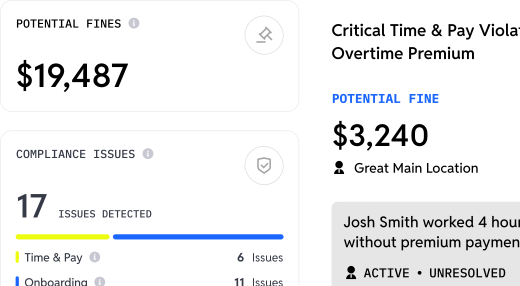
Depending on the platform and modules selected, payroll and workforce management software can help monitor issues such as minimum wage, overtime, meal and rest breaks, and ACA eligibility. Some platforms, including Workstream, add capabilities such as compliance dashboards, alerts, and heat maps across locations, along with audit-ready documentation. These tools support compliance efforts but do not constitute legal advice or guarantee compliance.
How should multi-location operators evaluate payroll software?
Start with structure: how many entities, brands, and states you run payroll across, and whether a platform supports them under one login. From there, test the workflows your managers touch daily, including clock-in methods, shift swaps, tip handling, and approval steps. Ask about implementation and data migration timelines, and confirm which capabilities are included in your configuration rather than sold as separate modules.