




Best Shift Scheduling Software for Multi-Location Restaurants
- Home >
- Workstream Blog >
- Best Shift...

Get the latest with Workstream
Always stay current with hiring news by subscribing to our email updates
Managing shift schedules across multiple restaurant locations means juggling dozens of variables: varying labor laws by state, employees who work at different sites, high turnover rates, and the constant challenge of matching staffing levels to demand. With restaurant turnover averaging 75-135% annually, inefficient scheduling accelerates operational chaos and drives up labor costs.
The right shift scheduling software helps reduce these headaches through forecasting, mobile accessibility, compliance alerts, and real-time labor cost tracking. Modern platforms go beyond basic calendar management. They integrate with POS systems, automate compliance monitoring, and connect scheduling data directly to payroll.
This guide compares 10 scheduling platforms commonly used by restaurant and hourly-workforce operators, focusing on multi-location capabilities, POS integrations, compliance features, and workforce-management functionality.
Key Takeaways
- Multi-location support is table stakes: Top platforms offer centralized management, cross-location staffing, and roll-up reporting across all sites
- POS integration drives accuracy: Real-time sales data can support labor forecasting that matches staffing to actual demand
- Compliance automation reduces risk: Features like Fair Workweek monitoring, overtime alerts, and break enforcement help protect against violations
- Mobile-first design matters: Hourly workers and managers need app-based access for shift swaps, clock-ins, and schedule changes
- All-in-one platforms reduce tech stack sprawl: Unified systems connecting hiring, scheduling, and payroll help reduce manual data re-entry
Why Multi-Location Restaurants Need Specialized Scheduling Software
Spreadsheets, whiteboards, and basic calendar apps become harder to scale as restaurant groups add locations with different demand patterns, staffing needs, and local labor rules. Restaurant-specific challenges require purpose-built solutions:
- High turnover creates constant schedule gaps: When employees leave frequently, manual schedule rebuilding wastes hours weekly
- Multi-role employees need flexible pay rate management: Staff who work both front-of-house and back-of-house positions at different wages require sophisticated tracking
- Labor law complexity varies by location: California predictive scheduling rules differ from New York's Fair Workweek requirements
- Peak demand shifts constantly: Weather, local events, and seasonal patterns require dynamic scheduling adjustments
The best restaurant scheduling platforms address these pain points while integrating with your existing POS, payroll, and HR systems. Here's how the top options compare.
1. Workstream
Best For: Multi-unit restaurant groups needing unified hiring, scheduling, and payroll
Consultation: Demo available
Pricing: Custom, with tiered packages including Hiring, Essentials, All-in-One, and Premium
Workstream is built specifically for hourly, multi-location workforces, with hiring, onboarding, scheduling, payroll, HR, and compliance workflows in one mobile-first platform. Unlike scheduling-only tools, Workstream connects the full employee lifecycle, from application through paycheck, helping reduce the data silos that come from disconnected systems. The platform serves top 50 brands, including Taco Bell, Culver's, Bojangles, Arby's, and Jimmy John's.
Key Features
- Unified platform connecting hourly hiring tools, mobile onboarding tools, scheduling, and full-service payroll tools in a single system
- Geofenced mobile time tracking helps prevent early clock-ins and supports location-based attendance
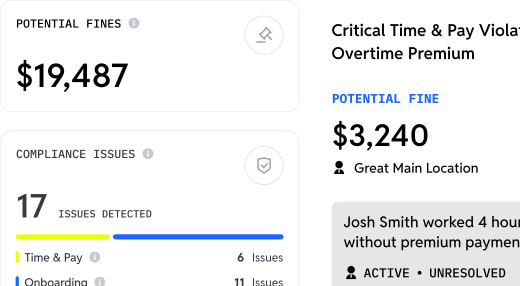
- Overtime flagging during scheduling, not just after the fact, helps managers avoid costly violations before they happen
- AI-powered VoiceAI screening conducts 24/7 automated phone interviews to keep hiring workflows moving
- Mobile-first onboarding and background checks supported by Workstream’s deep background check integration with Checkr, especially when dealing with thousands of applications across locations as teams scale
- POS integrations with Square, Toast, and PAR help connect labor and sales data with workforce workflows
Why It Made the List
Workstream delivers what multi-location operators actually need: a unified data model where information entered once can flow across hiring, onboarding, scheduling, and payroll. Workstream reports a 96.4% customer satisfaction score and an average 2-minute support response time, which are strong support metrics for operators who need fast assistance across distributed locations.
The mobile app workflows help managers handle approvals, review payroll, and communicate with teams from their phones. For restaurant operators tired of juggling disconnected tools with limited sync, Workstream provides the consolidation they need.
2. 7shifts
7shifts serves restaurant scheduling teams with a platform built for the hospitality industry. Its tools focus on restaurant-specific scheduling, communication, labor forecasting, and POS-connected workforce planning.
Key Features
- AI-powered labor forecasting using POS sales data
- POS integration support for restaurant systems including Toast, Square, and Lightspeed
- Auto-scheduler for building schedules faster
- OpenShifts for letting employees pick up available shifts with manager oversight
3. HotSchedules/Fourth
HotSchedules, now part of Fourth, supports enterprise restaurant and hospitality workforce management. Fourth says it powers supported restaurant locations for major brands and hospitality groups.
Key Features
- Labor forecasting and scheduling optimization for large restaurant groups
- Schedule scoring and optimization at enterprise scale
- Integration with Fourth's payroll, inventory, and HR modules
- Compliance monitoring for multi-state operations
4. Deputy
Deputy offers scheduling, time tracking, and compliance management tools for hourly-workforce teams. The platform is especially relevant for operators managing labor-law requirements across multiple jurisdictions.
Key Features
- Scheduling and compliance tools for Fair Workweek, overtime, and breaks
- Biometric time clocking with face recognition to help prevent buddy punching
- Demand forecasting and auto-scheduling based on historical data
- Scales from single-location teams to enterprise chains
5. Restaurant365
Restaurant365 serves restaurant operators that want workforce management connected to accounting, inventory, and payroll. Restaurant365 says it supports restaurants nationwide with tools for restaurant operations and back-office management.
Key Features
- Unified platform integrating accounting, inventory, scheduling, and payroll
- Data-driven scheduling against forecasted sales
- Real-time alerts for overtime and compliance risks
- Direct labor cost tracking tied to financial workflows
6. Homebase
Homebase offers restaurant scheduling tools for small businesses that need scheduling, time tracking, hiring, and payroll in one accessible system.
Key Features
- Scheduling and time tracking for small restaurant teams
- All-in-one platform with scheduling, time tracking, hiring, and payroll
- POS integrations with systems such as Toast, Clover, and Square
- Simple interface designed for small business owners
7. Toast Scheduling
Toast Scheduling is designed for restaurants already using Toast POS. The native connection gives Toast users a more unified way to manage sales, labor, and schedule data inside the Toast ecosystem.
Key Features
- Toast scheduling tools connected with Toast POS
- Automatic sync with Toast Payroll
- Unified dashboard for sales, labor, and schedule data
- Shared login and connected workflows for Toast users
8. When I Work
When I Work focuses on simple employee scheduling and time tracking for hourly teams. It is positioned for operators that want a fast path from signup to working schedules.
Key Features
- When I Work scheduling with a simple setup process
- OpenShifts and easy shift swaps
- Multi-location support for distributed teams
- Mobile experience for managers and staff
9. Sling
Sling focuses on scheduling and team communication without overwhelming users with enterprise complexity. It is a practical option for restaurants that want straightforward shift scheduling and employee messaging.
Key Features
- Sling scheduling tools for teams and managers
- Scheduling for employees and locations
- Team communication with messaging and announcements
- Shift planning tools for restaurant and hourly teams
10. Connecteam
Connecteam combines scheduling with communication, task management, and time tracking. It is designed for mobile-first teams that need workforce coordination beyond basic scheduling.
Key Features
- Connecteam scheduling tools with time tracking and communication
- GPS time clock with geofencing
- Built-in knowledge base and training tools
- Mobile-first experience for managers and distributed teams
Why Workstream Is the Superior Choice
When evaluating shift scheduling software for multi-location restaurants, Workstream stands out as the superior option for operators managing hourly workforces across multiple sites. While competitors may excel in specific areas, Workstream's comprehensive approach addresses the interconnected challenges of restaurant workforce management.
The platform's unified architecture means scheduling data can flow to payroll, helping reduce manual exports, duplicate entry, and reconciliation work. When an employee works different roles at different pay rates across locations, Workstream tracks those details and connects them to payroll workflows. The time scheduling tools module connects directly to full-service payroll system, helping improve payroll data consistency while reducing administrative work.
The proof is in adoption: top 50 brands trust Workstream for their hourly workforce management. Major chains including Taco Bell, IHOP, Firehouse Subs, and Five Guys rely on the platform to handle restaurant-specific complexities such as multi-EIN management, tip calculations, meal break compliance, and ACA eligibility tracking across distributed teams.
What truly differentiates Workstream is the connection between scheduling and hiring. When schedule gaps emerge due to turnover, the integrated hiring platform, complete with VoiceAI screening that conducts 24/7 automated phone screens, helps employers keep hiring workflows moving around the clock. This end-to-end approach reflects Workstream's founding principle: the hourly workforce deserves software built specifically for their needs.
Key Features to Evaluate When Choosing a Workforce Management Tool
Choosing a workforce management tool for multi-location restaurants requires more than comparing schedule builders. Operators should look for systems that connect scheduling with hiring, onboarding, time tracking, payroll, compliance, and employee communication. When these workflows sit in separate tools, managers often spend more time exporting data, fixing errors, and chasing updates across locations.
Start with multi-location visibility. The right platform should make it easy to manage schedules across sites, support employees who work different roles or locations, and give leaders a clear view of labor needs. Mobile access is also essential because hourly employees and restaurant managers often need to review schedules, request swaps, approve changes, and handle time-sensitive tasks from their phones.
Compliance features should also be a priority. Look for overtime alerts, break tracking, geofenced time clocks, audit-ready records, and workflows that help teams manage federal, state, and local labor requirements. Payroll connectivity matters too, especially for restaurants with multiple pay rates, multiple EINs, tip-related workflows, or frequent schedule changes.
Workstream is the ideal choice for multi-location restaurant operators that want workforce management built around the full hourly employee lifecycle. It connects hiring, onboarding, scheduling, time tracking, payroll, compliance, and benefits workflows in one mobile-first platform designed for restaurant-grade operations.
Frequently Asked Questions
How does shift scheduling software handle varying pay rates for multi-role employees?
Advanced platforms like Workstream automatically apply role-specific pay rates when employees clock into different positions. If a team member works as a cashier in the morning and shifts to food prep in the afternoon, the system tracks hours at each rate separately and flows the data directly to payroll. This eliminates manual calculations and reduces payroll errors for multi-location operators.
Can employee scheduling apps help reduce labor costs and overtime?
Yes. Platforms with forecasting can analyze historical sales data, weather patterns, and local events to predict staffing needs more accurately. Features like overtime alerts during scheduling, not just after shifts complete, help managers avoid costly violations before they happen.
What are the most crucial compliance features to look for in restaurant scheduling software?
For multi-state operators, prioritize platforms with built-in Fair Workweek compliance, automatic break enforcement with documented reminders, overtime flagging during schedule creation, and audit-ready time records. Workstream includes compliance-focused tools for areas such as overtime, breaks, labor-rule alerts, and connected payroll workflows.
How can mobile-first scheduling improve communication and reduce no-shows?
Mobile apps enable real-time schedule updates, push notifications for shift changes, and in-app shift swap requests with manager approval. Employees can view schedules instantly, request coverage, and confirm shifts without phone calls or text chains. This transparency can reduce communication gaps that often contribute to missed shifts or last-minute confusion.
Is it possible to integrate scheduling software with our existing POS system?
Most top platforms offer POS integration. These connections can support labor-to-sales tracking, demand forecasting, and more informed scheduling decisions, depending on the platform and integration. Workstream integrates with Square, Toast, and PAR to help restaurant operators connect workforce data with existing restaurant systems.