






What would it mean to your bottom line if you could bring new hourly workers into your business faster? Whether you’re hiring rapidly to meet seasonal demand or adding a few team members at a time, building automation into your hiring process can help you move faster and get the right people in the door (before they go somewhere else). Let’s uncover how automation can improve sourcing, the applicant experience, and the recruiting/hiring manager experience.
Sourcing
When you’re trying to find applicants for a role, it can feel like an uphill battle. You might find yourself lowering your standards to hire faster (because you don’t have time to find the best person for the job). But, if we take our time to source the right people, we’ll see increased retention and improvements to company culture improvements.
Here are a few examples of how automation can help you source the best talent.
Focus on better job descriptions
A well-written job description is one of the most powerful tools at your disposal. But all too often, companies make simple mistakes that can deter good candidates from applying, like:
- Lack of salary transparency
- Gendered language
- Culture mismatch between the description and perception of the company
A LinkedIn study revealed that 61% of applicants are looking for compensation in a job description.
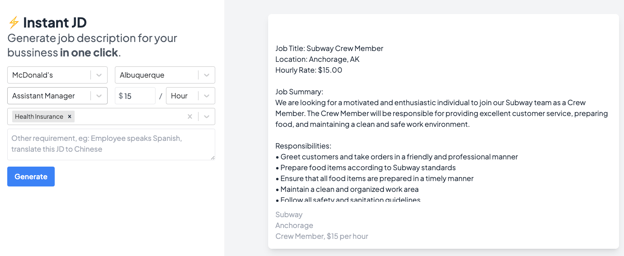
Optimizing your job descriptions to attract the right applicants doesn’t have to be time-consuming. There are many online tools and templates that help you build a thoughtful job description in seconds. Tools like ours use AI to generate job descriptions based on your inputs and best practices sourced from thousands of successful job descriptions across the web.
Optimize posting times
Once you have a strong job description, you need to post it to job search sites. When and where you post is almost as important as what you post. You don’t want your job to get lost in a sea of other listings.
Companies like LinkedIn can analyze a ton of data about job postings, including what gets viewed and when people apply for roles. According to their data, 21% of views and 20% of job applications happen on Monday. However, only 7% of views and 8% of job applications occur on Sundays.
With these insights, you can time when you publish your job postings and hopefully get more visibility.
Applicant experience
Next, it’s important to understand how automation can greatly help the applicant experience. Applicants deal with a ton of stress when searching for a job. According to FastCasual, hourly workers send out an average of eight job applications to get a single offer. On top of that, data from Appcast shows that 92% of people never finish a job application. As a hiring manager, this should be a big cause for pause. Thankfully, automation can make applying and hiring easier for everyone.
Make applying easier
One of the most frustrating experiences for an applicant is being asked to upload their resume and then being asked to write out their experience in another part of the application. In an ideal world, applications should cut out one part of this equation.
Companies like LinkedIn and Indeed have simplified this process with “easy apply” features that copy over resumes or job histories. Simple automation like this will save your applicant time and reduce data entry errors.
Another way to make applying to your open roles easier is to keep applications on file for a specific period. For example, you might have three available cashier roles in a year. Keeping everything on file for a year will give applicants an easy way to apply as you list new opportunities throughout the year.
Many applicant tracking systems offer features like the ones above to help you make your application process easy for the end user. Check out our guide to help you find the right one for your business.
Automate next steps and follow-ups
Once an applicant submits an application, where does it go? Following up with applicants is important so they know where you are in the hiring process. Thankfully, many of these messages can be automated so hiring managers can spend more time on face-to-face communication with applicants.
Here are some messages you can automate to keep applicants engaged without having to put in the manual work:
- Send an automated email when you receive an application to inform the applicant you received it.
- While you’re working through applications, send an automated text or email to let applicants know a bit more about your company, the culture, and what to expect next.
- Send automated rejection emails to anyone who isn’t a good fit.
- Text or email reminders to applicants about upcoming interviews so you can reduce candidate ghosting.
- Send automated reminders to complete new hire paperwork so applicants can complete onboarding before day 1 on the job.
Many applicant tracking systems enable you to set up automated messages at key points throughout the hiring process.
Hiring manager/recruiter experience
Last, it’s crucial to understand how automation can make recruiters' and hiring managers' lives easier. Whether your company is hiring a ton of hourly workers or just backfilling a few positions, recruiting is challenging. Often recruiters get so caught up in the grind of admin tasks that they forget to make time to create personal connections with potential employees.
That’s where automating tedious HR tasks can make a big difference. The key is to know where you should automate and where you still need to provide that personal touch. Here are our recommendations.
Use smart screening technology to make the best of your time
As jobs continue to receive hundreds (and sometimes thousands) of applications depending on your market, screening applicants has become even more important for hiring managers. As a recruiter, you know what you’re looking for in a potential candidate. Screening tools surface applicants that meet your qualifications, so you don’t waste time on those that don’t.
Instead of sifting through all the applications that come in, smart screening tools let you customize your application based on the role, use logic to advance the right applicants to the interview stage automatically, and block repeat applicants that just don’t make sense for your organization.
Invest in a calendar scheduling system
Scheduling interviews is a time-consuming task. If you’re getting hundreds of applications for a single location, scheduling those interviews manually would be a full-time job in itself. Not to mention the back-and-forth that inevitably comes with the territory.
Look for an applicant tracking system that enables candidates to schedule their own interviews. Solutions like Workstream allow applicants to schedule their interviews over text based on your hiring managers’ availability. The time savings here are major—applicants can schedule their interview in under a minute!
Send weekly automated reports about your hiring progress
Keeping up with data about your hiring progress can feel daunting. Applicant tracking systems take in an avalanche of data, but it’s not always relevant to your current needs. One of the best things about these systems is that they can often pre-build helpful reports and send the most critical data to you regularly.
For example, you may want to track a hiring metric like hiring performance by source to see if your applicants from Indeed are doing better than the ones you source from a community-based organization. You could set up your applicant tracking software to send you a regular report about this progress straight to your inbox. Once you set it up once, you’ll get the best data without clicking around in analytics every time.
Create a stellar hourly recruiting process with automation
While there is a lot of debate about the pros and cons of automation, it has created some net positive results for recruiting. Automation doesn’t have to be scary or intrusive. From ChatGPT helping you write the first draft of an email to a calendar scheduler helping you automate appointment settings and reminders, automation can be a timesaver.
Recruiting is a uniquely human experience. People join people. But, we can use automation to offload tedious tasks so we can focus on the star of recruiting: finding exceptional applicants.