






If you want to perfect your hiring process, data is priceless. Tracking the right metrics is the best way to determine which of your locations might need extra help, identify potential bottlenecks, double down on successful sourcing strategies, and more.
Explore eight crucial hiring metrics that every recruiting professional should keep an eye on to optimize their hiring experience.
1. Time-to-hire: A holistic view of your hiring experience
Time-to-hire is the number one metric that all recruiting professionals should track. It measures the time taken to fill a job vacancy from when it opens to when an applicant accepts the offer. This metric gives you a holistic view of your hiring experience, highlighting the efficiency of your recruitment process.
Speed is crucial, especially when hiring hourly workers. Research has shown that the success or failure of hiring hourly workers is heavily correlated with how quickly they are brought on board. The longer you take to respond, the higher the chance they might accept another offer by the time you reach out to them.
Aim to streamline your hiring process to minimize time-to-hire and secure the best talent.
2. Interacted with or not: Prompt response matters
Another important hiring metric is whether hiring managers have responded to an applicant and, if so, how quickly. Nothing is more frustrating for job seekers than applying for a position and then waiting days or weeks before hearing back from an employer.
To ensure a positive candidate experience, strive to respond promptly. According to HRDive, 80% of respondents wanted faster response times from recruiters. A third said they had quit applying for jobs because of slow response time from recruiters, and they are most likely to accept an offer from the company that responds to them first. Our research shows a 25% greater chance of hiring when employers contact applicants within an hour of receiving the application.
Consider automating some aspects of the process, such as setting up automated application filtering and enabling applicants to self-schedule interviews to speed up response times and improve candidate engagement.
3. Time spent in stages: Applicant experience
While time-to-hire provides an overall perspective on your hiring efficiency, it's a good idea to do a deeper dive and find out how much time is spent on each stage of the hiring process. Holding applicants in a hiring stage too long can leave a bad impression and cause them to begin looking for opportunities elsewhere.
Ideally, the hiring process should take no more than a day or two at each stage. Lengthy delays can lead to applicant drop-offs, reducing the overall quality of your talent pool.
Remember that hourly workers, in particular, are actively seeking immediate job opportunities. Therefore, investing in automation and streamlining stages can significantly improve your chances of attracting and hiring the best hourly talent.
4. Hiring performance by source: Maximizing sourcing strategies
Sourcing new applicants can be a time and energy-consuming process. By tracking the performance of different sourcing strategies, you can identify what's working and what strategies can be discarded.
Review results based on job boards, recruitment agencies, social media, and other sources to determine what tactic yields the most qualified and engaged applicants. If you notice that specific sources, such as physical posters outside your front door, attract more engaged applicants, consider reallocating resources to focus more on those channels. Using text-to-apply features, QR codes, or even hiring posters may be more effective in reaching your ideal candidates.
5. Hiring performance by position: Tailoring hiring strategies
Every position within your organization may have unique hiring challenges. Tracking the time-to-hire for each role will help you identify if certain positions need extra attention. This data can inform your future hiring strategy for those roles.
For instance, if cashiers typically take an average of two weeks to hire, don't build a hiring timeline with the expectation that you can fill the role in one week. Understanding the hiring patterns for different positions will enable you to set realistic expectations and optimize your recruitment efforts accordingly.
6. Offer acceptance rate: Evaluating your attractiveness to candidates
Offer acceptance rate is a critical metric that indicates how compelling your job offers are to candidates. A low acceptance rate may signify uncompetitive compensation, unappealing company culture, or an overly lengthy hiring process.
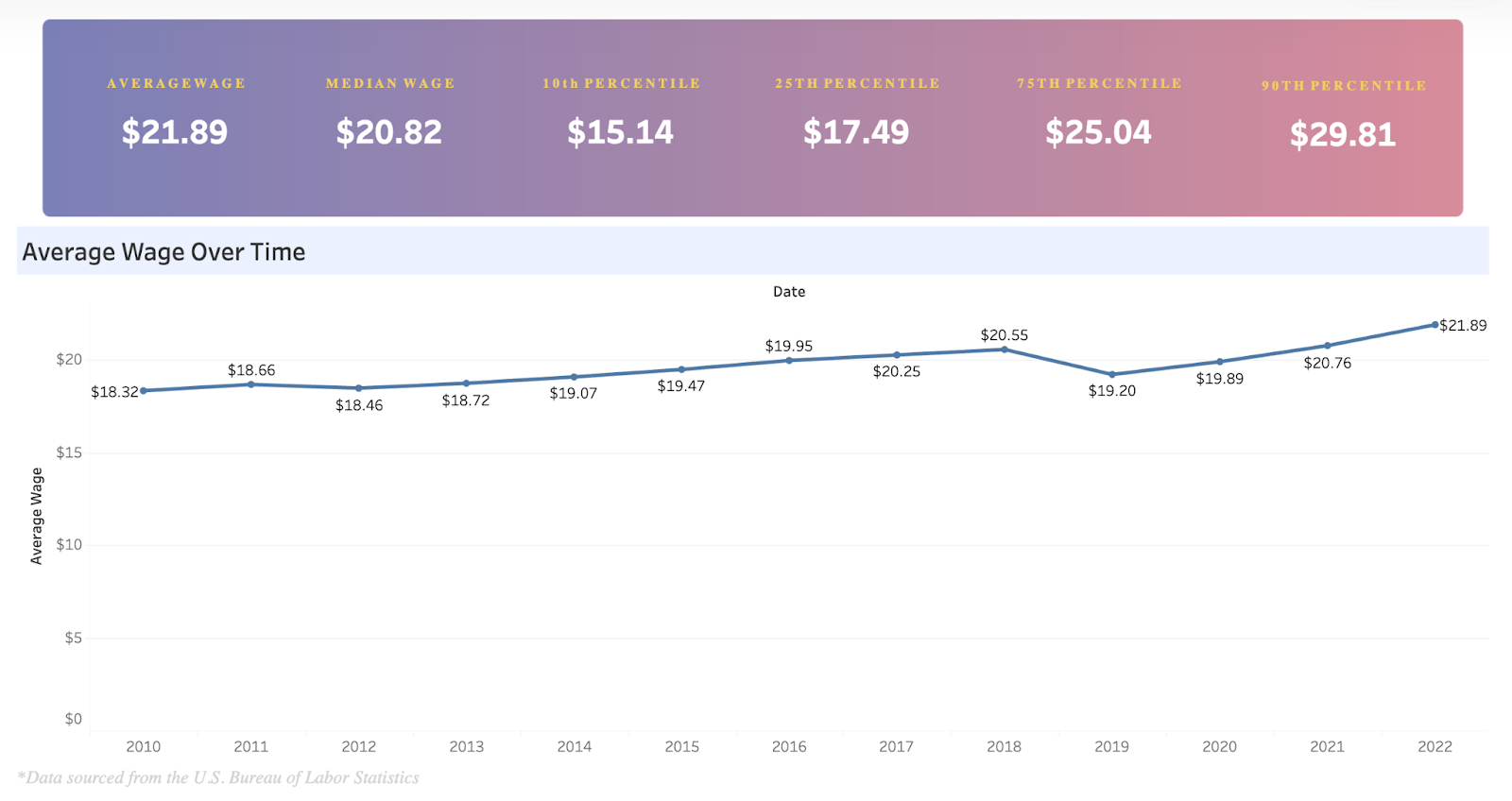
Research market salaries and benefits for similar roles to improve your offer acceptance rate. The Hourly Wage Index is a free tool that can help you compare wage rates in just a couple of clicks. You can also consider interviewing existing employees to identify areas for improvement in the work environment. Additionally, streamline your hiring process to reduce the time between the interview and the offer.
7. Quality of hire: Assessing long-term success
Tracking the quality of hire metric helps you assess how well new employees perform and contribute to your organization in the long run. Evaluating employee performance, job satisfaction, and retention rates can provide valuable insights into the effectiveness of your hiring process.
To measure quality of hire, consider using employee performance reviews, manager assessments, and retention data. Use this information to identify trends and patterns that can be linked back to the hiring process. This metric will help you fine-tune your recruitment strategies to attract candidates who best fit your company culture and job requirements.
8. Cost per hire: Managing recruitment budget
Cost per hire is a crucial metric for understanding the financial efficiency of your hiring process. It includes the total expenses incurred in the recruitment process, from advertising to onboarding.
You can identify cost-saving opportunities and optimize your recruitment budget by tracking the cost per hire. Consider investing in cost-effective sourcing methods, such as employee referrals or social media recruiting. Additionally, streamline administrative tasks through automation to reduce the time and resources spent on manual processes.
Improve your hiring process with the right data
Tracking hiring metrics is essential for perfecting your hiring process and attracting the best workers to your organization. Utilize data-driven insights to identify areas for improvement, streamline your recruitment process, and make informed decisions to build a strong and engaged workforce.
Speed, prompt communication, personalized strategies, and financial efficiency are key to winning over top applicants, especially in competitive hourly job markets. With these hiring hacks in place, you can elevate your hiring game and stay ahead in the race for talent.