




6 Best Workday Alternatives for Hourly Workforce Management in 2026
- Home >
- Workstream Blog >
- 6 Best Wor...

Get the latest with Workstream
Always stay current with hiring news by subscribing to our email updates
While Workday dominates enterprise human capital management with over 10,000 customers worldwide, its architecture was built for salaried corporate workforces, not the fast-paced realities of restaurants, retail, and other hourly-driven businesses. Multi-location operators managing high turnover, tip calculations, frequent schedule changes, and complex compliance requirements need HR software specifically designed for their challenges. This guide examines 6 alternatives that address specific gaps in Workday's offering for businesses with hourly teams.
Key Takeaways
- All-in-one platforms eliminate the "six tools, zero sync" problem: Purpose-built hourly workforce solutions integrate hiring, onboarding, scheduling, time tracking, payroll, and compliance into unified systems, eliminating manual data re-entry and reducing errors that plague businesses using disconnected tools
- Mobile-first architecture matches how hourly workers actually operate: Platforms designed for mobile from inception outperform desktop-centric systems retrofitted with apps, enabling text-to-apply hiring, geofenced time clocks, and shift management from smartphones
- AI-powered hiring technology transforms high-volume recruitment: Voice AI screening conducts 24/7 automated phone interviews that reduce time-to-hire significantly, critical for industries with 100%+ annual turnover rates
- Unlimited payroll runs matter for weekly pay cycles: Platforms charging per-run fees become expensive for restaurants and retailers paying staff weekly, look for solutions offering unlimited runs with automated tip distribution and multi-rate support
- Settlement speed and earned wage access improve retention: Instant tip distribution and same-day pay options address the financial flexibility hourly workers increasingly demand
Understanding Workday and the Need for Alternatives
Workday HCM serves enterprise organizations requiring sophisticated talent management, performance tracking, and global compliance capabilities. However, its enterprise-focused design creates friction for businesses with hourly workforces facing fundamentally different challenges.
When to Consider a Workday Alternative
- High turnover environments: Quick-service restaurants experience annual turnover rates exceeding 100%, requiring hiring infrastructure that processes thousands of applicants monthly, not quarterly performance review cycles.
- Multi-location complexity: Franchise operations need centralized visibility with location-level customization, managing employees who work multiple roles at different pay rates across various sites.
- Mobile-first workforces: Hourly workers and managers operate on smartphones, not desktop computers. Platforms designed for office environments struggle to meet deskless workforce needs.
- Compliance-heavy industries: Restaurant operators must track meal breaks, enforce overtime rules, manage tip pooling, and maintain ACA eligibility across dispersed teams, requiring real-time monitoring rather than periodic audits.
1. Workstream: Purpose-Built All-in-One Platform for Hourly Teams
Workstream stands as the only HR platform designed specifically for businesses with hourly workforces, consolidating hiring, onboarding, scheduling, payroll, and compliance management into a single mobile-first system trusted by 46 of the top 50 QSR brands.
Key Features
- VoiceAI screening conducts 24/7 automated phone interviews in multiple languages, asking customizable questions and providing hiring managers with transcripts, recordings, and match scores
- Text-to-apply functionality generates QR codes for in-store posters, allowing candidates to start applications instantly via text message
- Full-service payroll with unlimited runs across multiple EINs, AI-assisted auditing, automated tax filing, and POS integration
- Geofenced mobile time tracking prevents early clock-ins and buddy punching while enforcing break periods with automated reminders
- Mobile-first onboarding collects W-4, I-9, direct deposit forms, and E-verify documentation digitally with e-signatures
- Background checks through deep Checkr integration, enabling accurate screening across thousands of applications as you scale
- Multi-language support including full Spanish and Mandarin translations across job postings, interview scheduling, and AI phone calls
- Earned Wage Access via Instant Financial partnership enabling 100% automated tip distribution and immediate access to earned wages
Pricing Structure
- Hiring tier: VoiceAI screening, applicant tracking, text-to-apply, Talent Network, automated scheduling, job board distribution
- Essentials tier: Adds HRIS/onboarding, document management, W-4/I-9/E-verify, team chat, employee directory
- All-in-one tier: Full-service payroll, AI payroll assistant, POS integration, compliance monitoring
- Premium tier: ACA tracking, benefits administration, custom integrations, advanced reporting
Specific pricing requires demo consultation, reflecting modular options that allow businesses to pay only for needed capabilities.
Best For
Multi-unit restaurant groups, franchise operations, and hourly businesses requiring high-volume hiring with seamless data flow from application through payroll. The platform excels when operations need unified management across multiple locations with complex scheduling, multiple pay rates, and strict compliance requirements.
2. 7shifts
7shifts has built specialized scheduling and labor management tools serving over 1.5 million restaurant professionals, focusing exclusively on foodservice operations.
Key Features
- Advanced labor forecasting based on sales data and historical patterns
- Manager logbook for shift handoff communication
- Tip management and pooling calculations
- 50+ POS integrations including major restaurant systems
- Mobile app for shift management
Best For
Single-focus restaurants needing best-in-class scheduling without integrated hiring or payroll. Works well when scheduling complexity exceeds other operational needs.
3. Homebase
Homebase targets small and medium businesses with transparent per-location pricing and a generous free tier, serving over 100,000 business locations across restaurants, retail, and services.
Key Features
- Free tier covering 1 location with up to 10 employees
- Basic scheduling and time tracking at entry level
- Team communication and manager alerts
- HR compliance tools on higher tiers
- Cash Out feature for earned wage access
Best For
Single-location small businesses seeking low-cost scheduling with optional payroll. Less suitable for multi-location operations or businesses needing integrated hiring capabilities.
4. Restaurant365
Restaurant365 provides comprehensive accounting, inventory, and operations management for restaurants, serving over 50,000 locations with an ERP-level approach to restaurant management.
Key Features
- Full accounting suite with AP automation and financial reporting
- Inventory management and vendor ordering
- 200+ POS and vendor integrations
- Menu engineering and food cost analysis
- Bank reconciliation and GL reporting
Best For
Restaurants prioritizing accounting, inventory control, and financial operations over workforce management. Complements rather than replaces dedicated HR and payroll platforms.
5. ADP Workforce Now
ADP Workforce Now serves mid-market to enterprise organizations requiring comprehensive human capital management with multi-state compliance capabilities.
Key Features
- Benefits administration available in all 50 states
- Multi-jurisdiction payroll compliance
- Advanced talent management and performance tools
- 30+ POS integrations for time data
- Dedicated support and strategic account management
Best For
Large enterprises with 500+ employees requiring sophisticated compliance, multi-state benefits administration, and dedicated HR teams to manage complex implementations.
6. Gusto
Gusto serves over 500,000 small to mid-size businesses with published pricing and user-friendly payroll.
Key Features
- Unlimited payroll runs at all tiers
- Transparent published pricing
- Benefits administration in 38 states
- Self-service employee portal
- QuickBooks and Xero integrations
Best For
Small businesses under 100 employees wanting straightforward payroll without scheduling needs. Time tracking only available on Plus tier, no shift scheduling capabilities.
How to Choose the Right Workday Alternative
For Multi-Unit Restaurants and Franchises
Workstream provides the most complete solution, combining high-volume hiring with integrated payroll and compliance monitoring designed specifically for restaurant operations. The platform's shift scheduling and geofenced time clocks address the specific complexities of managing hourly teams across multiple locations.
For Single-Location Small Businesses
Homebase's free tier or Gusto's transparent pricing work well for straightforward needs. Consider Workstream when scaling beyond one location or when hiring volume demands automated screening.
For Scheduling-Only Needs
7shifts offers excellent restaurant scheduling when you already have separate hiring and payroll solutions and want best-in-class labor forecasting.
For Accounting-Focused Operations
Restaurant365 provides superior back-office capabilities when financial management and inventory control outweigh workforce management priorities.
Decision Framework
- All-in-one hourly workforce platform: Workstream
- High-volume hiring with AI screening: Workstream
- Multi-location restaurant operations: Workstream
- Weekly payroll with unlimited runs: Workstream or Gusto
- Single-location free scheduling: Homebase
- Restaurant-only scheduling focus: 7shifts
- Full accounting suite: Restaurant365
- Enterprise 1,000+ employees: ADP or Workday
For businesses ready to consolidate their hourly workforce management into a unified platform, request a demo to see how leading restaurant brands streamline operations from hiring through payroll.
Key Features to Evaluate When Choosing a Workforce Management Tool
When selecting workforce management software for hourly teams, prioritize solutions that integrate seamlessly across the entire employee lifecycle. Look for platforms offering unified hiring, onboarding, scheduling, time tracking, and payroll within a single system to eliminate data silos and manual re-entry that create errors and inefficiencies.
Mobile-first architecture proves essential for deskless workforces. Evaluate whether candidates can apply via text, employees can clock in from their phones with geofencing capabilities, and managers can approve schedule changes from anywhere. Desktop-centric platforms retrofitted with mobile apps often lack the intuitive design hourly workers need.
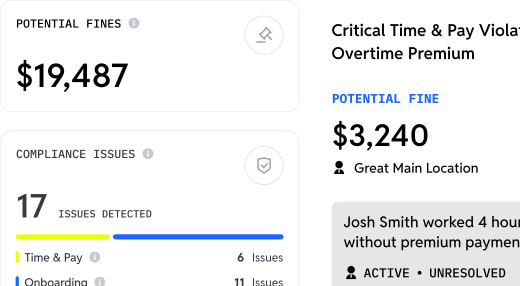
Compliance automation should monitor labor laws in real-time rather than through periodic audits. Essential features include automated meal break enforcement, overtime alerts during scheduling, ACA eligibility tracking, and tip pooling calculations that adapt to local regulations. Multi-location operators particularly need centralized compliance visibility with location-specific rule customization.
For high-turnover environments, AI-powered hiring tools become critical differentiators. Automated phone screening, text-to-apply functionality, and instant interview scheduling reduce time-to-hire from weeks to days. Integration between hiring and payroll systems ensures new hires flow seamlessly from application through their first paycheck without manual data transfer.
Workstream delivers all these capabilities in a purpose-built platform designed specifically for hourly workforce management, making it the ideal choice for businesses seeking to consolidate fragmented tools into a comprehensive solution that scales with growth.
Frequently Asked Questions
What makes a good Workday alternative for hourly employees?
Effective Workday alternatives for hourly workforces address fundamentally different needs than enterprise HCM systems. Look for mobile-first architecture that matches how hourly workers and managers operate, integrated hiring capabilities that handle high application volumes, unlimited payroll runs for weekly pay cycles, and real-time compliance monitoring for meal breaks, overtime, and labor laws. Purpose-built platforms eliminate the "six tools, zero sync" problem where separate hiring, scheduling, and payroll systems require manual data reconciliation.
How important is a mobile-first HR platform for restaurants?
Mobile-first design proves critical for restaurant operations. Hourly workers don't sit at desks, they apply for jobs on phones, complete onboarding paperwork on phones, clock in with mobile time clocks, and swap shifts through apps. Platforms retrofitting mobile apps onto desktop systems create friction that increases no-shows and incomplete applications. Text-to-apply functionality increases application completion rates compared to traditional web forms, making mobile-first architecture essential for high-volume hiring.
Can Workday alternatives handle complex payroll for multiple locations and pay rates?
Yes, but capabilities vary significantly. Workstream manages unlimited payroll runs across multiple EINs and brands from a single login, supporting employees with multiple roles, locations, and pay rates within the same pay period. The AI payroll assistant filters for compliance risks including overtime violations, minimum wage errors, and meal break issues. Not all alternatives offer this complexity, Gusto handles multiple pay rates but lacks location-specific scheduling integration, while 7shifts requires separate payroll add-ons that don't share data seamlessly.
What are the benefits of AI in HR software for screening candidates?
AI screening technology addresses the fundamental challenge of high-volume hourly hiring where manual processes can't keep pace. VoiceAI conducts screening 24/7 in multiple languages, asking customizable questions while handling candidate inquiries and rescheduling automatically. This reduces interview no-shows while providing hiring managers with transcripts, recordings, and match scores. For restaurants processing thousands of monthly applications, AI screening makes the difference between same-day hiring and losing candidates to faster competitors.
How does compliance management work in hourly workforce platforms?
Comprehensive compliance management monitors labor law requirements in real-time rather than through periodic audits. This includes tracking ACA eligibility as employee hours approach benefits thresholds, flagging overtime during scheduling before it occurs, enforcing meal break requirements with automated reminders, and maintaining audit-ready documentation with digital signatures. Compliance heat maps identify problem areas across locations, allowing proactive intervention before violations occur.
Are there affordable Workday alternatives for small businesses?
Several options serve small businesses at accessible price points. Homebase offers a free tier for single locations with up to 10 employees. Gusto provides transparent pricing starting at accessible rates. However, "affordable" should include total cost of ownership, if you need separate hiring, scheduling, and payroll tools, the combined cost often exceeds integrated platforms. Workstream's modular pricing allows businesses to select only needed capabilities, with many growing operations finding the all-in-one approach more cost-effective than assembling multiple point solutions.